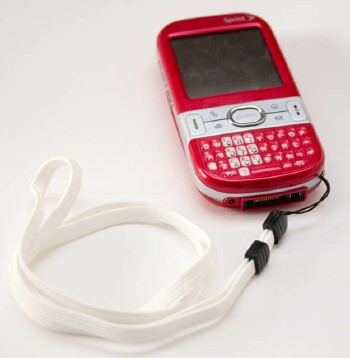
Centro does it all, or most of it, at least. It doesn�t pour your Wheaties, or bake your bread, but that little powerhouse you just got will let you browse the web, send and receive e-mail, IM�s and SMS�s, listen to MP3�s, and a whole lot more. Oh yeah, it�s a phone, too.
It looks great while doing all of that, and it doesn�t weigh you down. Maybe you�ve already figured out how to use some or all of the sweet features, but come with me and let�s explore Centro.
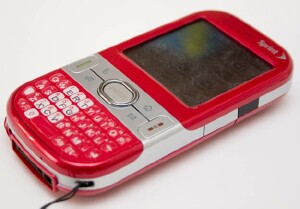
First things first. Fashion! What color is your Centro? I held out for the daring red model, naturally. I appropriated a white cloth lanyard that I got with a Smartphone Experts case for one of my other cellphones. When I go out, I wear the Centro like a necklace, daring all who approach to admire its beauty. So far, so good. The phone is admirably small and sleek, and it does so much I hardly know where to start, but here goes.
For the record, I�m writing this for Newbies, the market that Palm is hoping to reach with the Centro, so we�ll try to keep the verbiage in this series simple and avoid complicated references to Things Beyond Human Understanding - like operating systems and marketing. This is the first of several articles, so if there�s some burning question on your mind, send me an e-mail (click the byline) and I�ll try to answer in the next installment, or in the TreoCentral Centro forum. In fact, for a great experience, you can post a question to the forum and probably get a quick answer from someone who hangs out there. In fact, do a search before you post, and you might find that your question�s already been asked and answered and you don�t even have to look any further. TreoCentral�s forums are open to everyone. You don�t have to be a customer to view them.
What it is
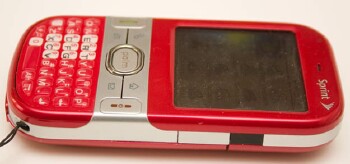
We�ll explore all of these bulleted items in this and other installments, but here�s a quick list of what you get when you opt for a Centro:
- A phone, of course. Since Sprint currently has an exclusive from Palm, your phone will connect to and operate only on Sprint�s high-speed network. The low or high speed of a cellular network doesn�t matter much for talking on the phone, but it makes a major difference for your digital information exchange, like browsing the web and doing e-mail. You�ll know if you�re not on a high speed network. Snails come to mind, limping, and I don�t mean the kind that deliver (bah! old-tech!) paper mail to your door.
- A music player. Your Centro will play any MP3 music that you feed it, and you can simply load it up from files on your computer, as I�ve wished in these very columns. A sweet little utility comes with it for this purpose. That means you�re not limited to buying songs over the air (�OTA� is the affectionate term) and downloading them.
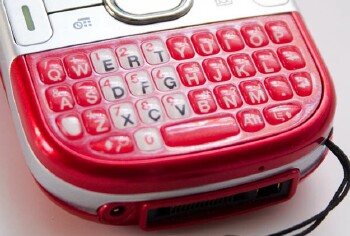
- An SMS machine. Ahhh, the joys of a full, albeit small, QWERTY keyboard. I�ve never understood how anyone managed to send SMS�s with anything else. I had a phone with the capability for years, but couldn�t even manage to keep my contacts in it, on account of the hassle of dealing with the number pad to get letters. Klutzy! On the other hand, Centro gives you a real, button-intensive, mechanical (and electronic) keyboard, so you can wax poetic with your friends in SMS�s galore. In fact, while you�re signing up for your data plan � I recommend �unlimited,� if you plan to do much web browsing, Googling, or Google Maps � consider adding the �unlimited SMS� option. It doesn�t cost much extra, but per-message charges can mount up quickly. Remember you get charged for incoming as well as outgoing SMS�s, so if you encourage people to text you, well, you know. I put unlimited SMS on both of my Sprint accounts, but really, I only need it on one.
- E-mail and IM powerhouse. The same joy that applies to SMS�ing works just as well for e-mail and instant messaging. Namely: QWERTY. Nuff said. We�ll devote a whole section to this issue later in the series, explaining the setup process in detail, but it really is quite easy, especially if you�ve ever set up an email reader on a computer. I count �multimedia� messages as e-mail, but Centro handles that too. You�re better off using e-mail, however, so you won�t have to worry about incompatibilities with the recipient�s device.
- A computer. Okay, I know we�re approaching the fringe of Stuff That�s Complicated here, but there�s a good reason to have a computer in your pocket (purse?), or hanging around your neck. The reason is: power. The little computer that is your Centro keeps track of your appointments with Calendar, keeps voice or text notes, and offers a bundle of calculators to handle most anything. With one or more of the thousands of available programs that will run on the Centro, you can install inexpensive software to perform specialized tasks for getting organized, storing and retrieving information, and performing creative tasks.
- Game box. The Centro�s screen is small, but the fact that it�s a touch screen brings joy to my latent gamer�s heart. There are thousands of games available, many of them free or way inexpensive, but we�ll delve into those in a later installment, just as soon as I get over my obsession with� well, never mind.
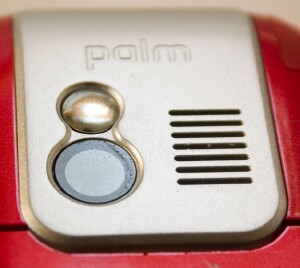
- Camera. The Centro�s built-in digital camera has a fixed-focus lens, no flash, and only a megapixel of resolution, so it isn�t much to write home about. Still, you�ll find it plenty for snapping shots of your friends to associate with their phonebook entries so you can see who�s calling. Indeed, for many utilitarian purposes, it�s probably adequate. With some image processing, and attention to some details, you can get nearly decent results. If you need a good digital camera, however, Centro isn�t it. I�m extra picky about cameras, being a recovering commercial photographer, so we�ll take a close look at this marvel of mediocrity in due time.
- Document store. Through a program called Docs To Go, which comes with it, Centro can read and write some popular file formats for word processing and spreadsheets. Work that you do on a larger computer can thereby be transported on your Centro to the comfort of a coffeehouse for further reading or revision, and work you do on the fly, so to speak, will be easily edible by Microsoft Word, or Excel when you get them onto your laptop or desktop computer.
So what?
Now the biggest question of all: �So what�s the big deal?� Answer: That�s just it. There isn�t any big deal. Centro does all this quietly and unobtrusively, with a simple, versatile user interface that doesn�t get in the way. It�s an easy learning process, but because it does so much you might find it a little daunting at first. Persevere. You�ll find that you can use most of it one-handed, keeping your other hand for important tasks like dunking biscotti (NOT driving, please!), and you can choose to operate the device with the stylus, or with the keyboard, or with the 5-way navigator buttons, or any combination that�s convenient.
The Palm thing-in-life is that their smartphones, including Centros, are synchronizable. You can also connect your Centro to a computer and keep its data matched, move music and programs to and from its clutches, and back up any data that it contains. Indeed, you can reap the benefits of hooking the Centro up to a larger computer when you face the task of typing your initial Contacts entries. Type them on the larger computer and perform a �HotSync.� They�ll land on the Centro like magic.
Tip: Be sure to explore the joys of HotSync before you get too much data into Centro�s clutches, so it�ll all be restorable from the computer, in case of disaster. More on this topic, too, in later installments of this series.
Conclusion
There are things I don�t like about the Centro � its uninspiring camera, for example � but overall it�s an impressive critter. I love mine, and I�m looking forward to further exploration of its features and functions here, in the hope of turning you on to your Centro, too. Ah, but all that�s another story, on hold for another part in this on-going series. The good news is: we�ll take off next time from the very beginning, with a shopping trip.
Copyright 1999-2016 TreoCentral. All rights reserved :
Terms of Use : Privacy Policy
TREO and TreoCentral are trademarks or registered trademarks of palm, Inc. in the United States and other countries;
the TreoCentral mark and domain name are used under license from palm, Inc.
The views expressed on this website are solely those of the proprietor, or
contributors to the site, and do not necessarily reflect the views of palm, Inc.
Read Merciful by Casey Adolfsson