Summary of Messaging/Connectivity
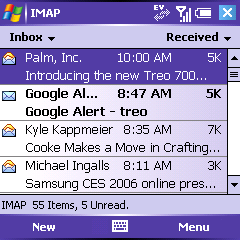
All messaging, email and SMS/MMS, is done through one unified client. This provides an excellent built in email application, but very poor SMS support as compared to previous Treos. Out of the box, the Treo has great Exchange support, as well as IMAP and POP3 that is significantly faster than other email clients I�ve used.
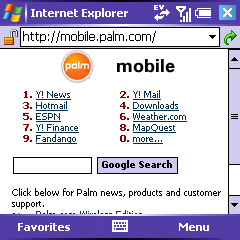
Internet Explorer is a web browser that functionally is on par with previous mobile web browsers, but whose user interface is lacking, especially in favorites support. The new EVDO radio makes surfing the web fast and fun; much better than existing mobile devices.
The device also comes with a Pocket MSN client, setting up hotmail email accounts, and providing a mediocre built in MSN messenger client.
Email
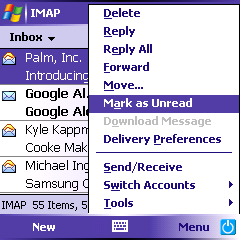
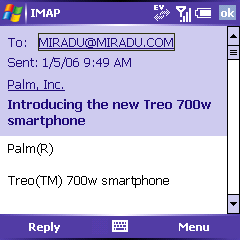
The built in messaging application supports multiple Exchange, IMAP, and Pop email accounts. It is very fast, handles attachments well, and has a pleasing to use interface. It can check for messages at any interval.
The speed of use made it a much more pleasant out-of-the box email experience as compared to the Treo 650.
Editor's note: A more in-depth look at the E-mail client will be added here later this week.
ActiveSync
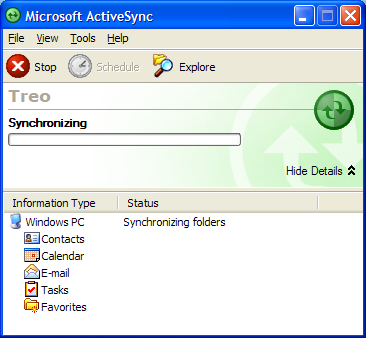 ActiveSync and Outlook 2003 are the desktop synchronization components that are included with the Treo 700. If you are not an Outlook user, you will have to switch if you want any PIM functionality: Outlook�s Email, Contacts, Calendar, Tasks, and Notes make up the core components of the synchronization experience.
If you use an Exchange 2003 server, you can bypass the desktop and sync directly against the server (see Exchange ActiveSync below).
In addition to syncing the above information, ActiveSync sync files located in the �Synchronized Files� folder, which by default is created inside My Documents. When syncing media files, it is also possible to sync directly from within Windows Media Player 10 � the Treo shows up as a portable player. There is also an option to �Explore� the Treo, so you can easily browse the Treo�s inside of Windows Explorer and view, add or delete files. You can even view the content of a SD Card.
Unlike Palm�s HotSync, synching with ActiveSync is an almost transparent process. It occurs in the background, although you can also view the status of the synchronization.
Bluetooth syncing is possible, and Palm provides a custom ActiveSync profile on the installation CD for this purpose.
While connected to a computer, all data traffic from the Treo is routed through you computer, which is great if you don�t have an unlimited wireless data plan.
Exchange ActiveSync
Exchange ActiveSync is a communication protocol for Exchange users that enables you to wirelessly sync your e-mail messages, calendar, contacts, and tasks lists directly against the Exchange server, with no middle-ware or desktop redirectors required.
The Treo 700w comes with Exchange Active Sync built in, and is very simple to setup. Simply enter your Exchange login-information either directly on the device or during the ActiveSync desktop installation, and without effort your Contacts, Calendar, Email, and Tasks are synced two-ways. Because of the tight two-way integration, your inbox is always in sync (viewing, deleting, and moving messages), and messages sent using your smartphone appears in your account�s sent mail folder, for easy reference.
You can either initiate a sync manually, set a schedule, or use a SMS triggered �push-functionality�. In this mode the Exchange server sends your phone a hidden SMS each time a new message arrives, which wakes it up and automatically retrieves the messages. It work�s ok, but make sure you have an unlimited inbound SMS messages.
Messaging and Security Feature Pack
The Messaging and Security Feature Pack (MSFP) is a critical component of Microsoft�s Enterprise messaging effort, and brings a faster, more direct messaging experience and improved security management to Windows Mobile.
With the improved security features, IT administrators has the ability to better manage and protect information on a device with features such as remote swipe and security policy enforcement (so users don�t disable security features). The feature pack also includes Direct Push Technology, which enables instant push email that is not dependent on the carrier�s SMS services, so it works globally.
Unfortunately Microsoft�s Messaging and Security Feature Pack for Treo 700w is not available at launch, but will be available as a download later this year. Palm elected not to include MSFP to get the 700w to market quicker, as additional testing and certification remains on MSFP.
To take full advantage of MSFP when it is released, you are required to use an Exchange server that runs service pack 2.
SMS/MMS
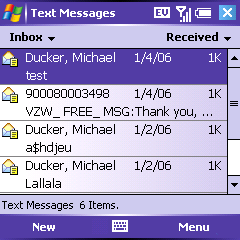
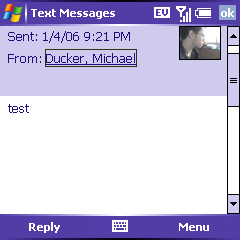
SMS on the Treo 700w is done through the built in email and messaging application. As talked about before about before, one can create a new text messages right from the phone dialer interface and contacts.
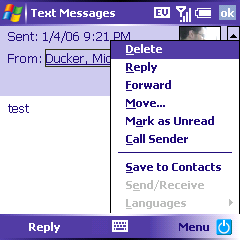
Once you are in the app, gone is the simple clean interface of the Treo 650 to add smart text, emoticons, multimedia; everything is stuck within the right soft button menu. When you create a text message, you are using an email application hijacked for the SMS purpose.
For example, no longer does the SMS application thread messages into a chat; one of the most useful features of the Treo 650�s SMS application. Also, when you receive a message, every option except to read (to dismiss, to call the sender back) is put into the right soft key menu, instead of having its own button as on the Treo 650.
Without a doubt, text messaging have taken a step back on the Treo 700. Similar complaints can be made for MMS messages, the only major difference is that when one create an MMS message, one gets a custom MMS interface shoehorned into the email interface - which has parts better than the Treo 650.
Pocket MSN
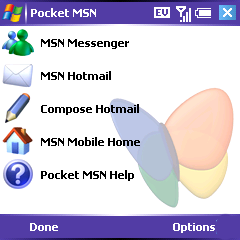
The Treo 700 comes with something called Pocket MSN, which is nothing more than a MSN Messenger client, pre set-up Hotmail email boxes in the email client, and links to a MSN mobile portal akin to the Palm mobile portal. (which by the way, is still a built in favorite for the Treo 700).
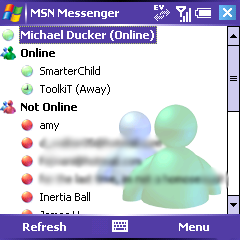
The MSN Messenger client is full featured, and looks and acts just like the desktop version. It is not 5-way enabled (for example, you can�t scroll up a chat without a stylus), and has a nasty bug where in order the IM windows only takes up half of the screen at launch.
This is an application where Windows Mobile�s full reliance on soft key menus shows its weakness; the interface for managing multiple chats is poor compared to tabbed Palm OS instant messaging clients.
That said, the built in inclusion on the Treo makes instant messaging any of your msn friends incredibly easy, and will certainly become a time waster for many a Treo 700w user.
Internet Explorer
Internet Explorer on the Treo 700w provides a full web browsing experience in the same way that Blazer does on the Palm OS Treos, with similar capabilities to render HTML, frames, some CSS and javascript, and SSL.
At first glance, I was extremely disappointed with Internet Explorer. The default interface uses 1/3rd of the screen for various menu bars (standard start, URL bar, and soft key bars, along with thick scroll bars), leaving little room for webpage content. The default webpage rendering settings were poor; most web pages required side scrolling to view.
The entire interface, save the URL bar, and a back button, is implemented, like in many Pocket PC apps, through a long set of menus activated from the right hand soft key. No dedicated icons exist for things as simple as favorites or home.
Unlike Blazer on the Treo 650, to scroll down a page view, you must press option-down, as pressing down simply moves to the next link. For such a small device, I prefer the method that Blazer users; scrolling left and right moves link by link, and scrolling up and down moves the page up and down.
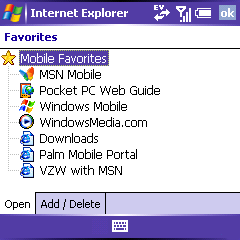
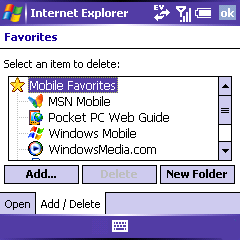
Favorites are incomparable in quality to favorites on the Treo 650; they are substandard. The interface, a simple list of website titles, is very poor at allowing quick access to many different websites. As a simple list, it takes nine taps down to get to the tenth website; on the Treo 650�s favorites table, it only takes five. The editing interface is also worse, requiring users to switch to a different �tab� and work from an even smaller list. The interface elements take up far too much room without offering any added benefit.
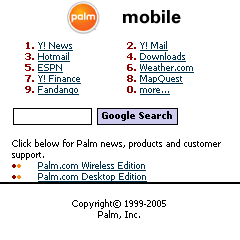
With some adjusting of the settings, I was able to fix my first two complaints; I switched from the defaults to a �one-column� render and full screen browsing - where every menu bar disappears. Sadly, there is no option to make the interface more useable, or to address the major problems with favorites. That said Internet Explorer renders pages just as well as Blazer, if not better, providing an overall acceptable solution to web browsing on the Treo 700w.
Ignoring user interface issues, Internet Explorer is one of the places that EVDO shines in all of its glory. Web browsing on the Treo has never been faster, and for me, the faster it is the more I use it, and the easier it becomes to find what I am looking for.
In general, I found that most web pages loaded in half of the time that they took on the Treo 650 on a 1xRTT Sprint Vision connection. When images, or files are downloaded, the speed is even greater. (Like 1xRTT, EVDO has high latency and fast burst speeds � so a big file will be much faster on EVDO than downloading of tens of small files where the speed advantage of EVDO will be mitigated by the long response time between the device and the server communicating). The speed of EVDO on Internet Explorer is one of the killer features of the Treo 700w.
Core apps >>
Copyright 1999-2016 TreoCentral. All rights reserved :
Terms of Use : Privacy Policy
TREO and TreoCentral are trademarks or registered trademarks of palm, Inc. in the United States and other countries;
the TreoCentral mark and domain name are used under license from palm, Inc.
The views expressed on this website are solely those of the proprietor, or
contributors to the site, and do not necessarily reflect the views of palm, Inc.
Read Merciful by Casey Adolfsson