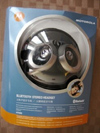
It was a great day here on Charles Babbage Road. I received not just one, but two Bluetooth stereo Wireless headset/headphone combos. The kind editors at TreoCentral must have picked up a minor quip I made somewhere that Id like to review both. In light of so many riches, the question is where to start. Both headphones sit on my desk charging, but the Motorola HT820 gets the nod over the Nokia BH-601 for two reasons. First off, its supposed to charge in just two hours (the Nokia is stated to take three). Second, it can be used as a cabled solution, so ANY Treo user could use it. And please take notice that these headphones also double as headsets with microphones built into the earpiece. It must be the season, because I had no idea they were so feature rich.
Design
The headphones are of the backphone variety that curl around the back of your neck. The first thing you might notice is that theyre hefty and snug. The ear cushions are plush. On the top of the phones on the left are volume up and down buttons. The top right allows you to skip forward or backwards one track. Both sides of the headphones sport a multifunction button with the familiar Motorola M emblem glowing bright blue when charging. In music mode, the M can pause, stop, or start music.
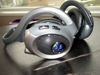
The charger (110-220v) is lightweight and the plug itself folds neatly back into the charger. The end of the cable is shaped like a mini-USB cable and fits in the right earpiece. The package also contains adapter plugs for European and South American outlets, though surprisingly not United Kingdom (where I am of course). The headphones are rated for a massive 17 hours of talk and 14 hours of music, burning out several charges of most portable devices.
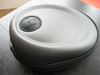
Motorola certainly doesn't skimp on the case either. Its a hard-shell foam case with a spot for accessories as well as the headphones. The AC adapter cinches down with a Velcro strap, the headphones sit around them, and the included stereo cable tucks into a little mesh pouch. Nice. With a purchase such as this, its not worth taking any chances and a case as good as this is a necessity.
The Quick Start Guide is exactly that. The first panel introduces you to all of the buttons with a full color picture. The next panel discusses how to plug in the charger the end that plugs into the headset is a mini-USB. A USB to mini-USB cable (not included) will charge them as well, albeit much slower.
The rest of the panels on the Quick Start guide detail Bluetooth pairing. Youll need a Bluetooth 1.1 device for voice calls and 1.2 with A2DP (Advanced Audio Distribution Profile) for music. Currently, only the Treo 750v fits the bill. Furthermore, the AVRCP (Audio Video Remote Control Profile) is required for track control.
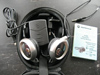
The manual, written in 12,000 languages is thick, though pocket sized. Theres not much that you cant either figure out by yourself or isnt covered by the Quick Start Guide. The manual does remind you that the tethered music cable can be used for Airplane mode when you cant use Bluetooth devices. This is actually a handy reminder for those who might not consider taking the audio cable with them. Speaking of modes, you should consider that this is one headset you probably dont want to use in the car as it covers both ears.
Features
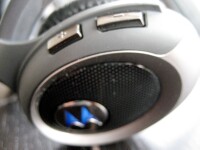
The Quick Start guide states that you should hold down the multi-function for six seconds to put the headset into pairing mode and darned if it wasn't exactly six seconds. Windows Mobile makes pairing easy through the Bluetooth devices screen. The charge that Windows Mobile makes you dig for some features is true in this case, but in reality a minor quibble in practice. Follow the on screen prompts to pair and enter the familiar pass code 0000 and you're all set.
The Quick Start Guide suggests you make a test call. No way! I went straight to the music. I tapped on the start menu, wait, what was that? A little click. The headphone transfers ALL sounds from your device including system sounds. You may decide to turn them off.
So I fired up a little Norah Jones and these suckers are beautiful. They have a deep, rich bass . The only thing I find confusing is that there are now three ways to control volume. The device has a system volume control, Media Player has its own volume control, and finally there is the one in the headset itself that seems to have about 12 steps up or down.
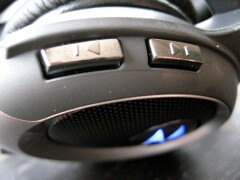
The track controls work as advertised. I just wish you could hold them down to fast forward through a song rather than simply skip a track forward. I dont know if its a limitation of the headphones or protocols. Either way, the volume controls and track controls are very easy to locate and use with the volume above the left ear and track controls above the right. The face of each earpiece has the multifunction button which allows for stopping, pausing or starting the music. The music will pause automatically when you are either taking or making a call.
As for sound, these are good, though nothing exceptional. The bass is dynamic, the mid-range is a bit muddy and the highs can get a bit clipped. I suspect the wireless feature muddies up the mids and MP3 encoding tends to clip the highs. Id suggest encoding music at 160mbps (rather than the standard 128) with variable bit rate.
When you use these as a wired solution, the sound is wonderful. The rich bass is still there, but the mids come through clearly and on higher bit rate music, the highs really are high. The stereo separation is fantastic. Major kudos go to Motorola for adding in a wired solution even if it does highlight the deficiencies of the wireless system.
Phone calls sounded a bit echoey, unfortunately on par with most (though not all) Bluetooth headsets Ive used. The microphone is nestled up by left ear, just a pinhole for sound. The distance from microphone to mouth, despite DSP (Digital Signal Processing) is noticeable. However, I do have to say Bluetooth 1.2 (rather than the 1.1 implementation on the Treo 650) does seem more robust and the signal travels better over distances and around corners.
The headset is also a bit bulky and heavy at 100 grams. Wearing them does make you look like one of several characters out of Star Wars. I found it a bit tight around my ears at times. Despite these drawbacks, I do really enjoy using them. A wireless solution, combo headset/headphone is quite a boon.
Next Page: Conclusion >>





