Not long ago we introduced you to CorePlayer's predecessor, the freeware TCPMP. While TCPMP (The Core Pocket Media Player) is a terrific application, it never really had the slick, contemporary user interface (GUI) that most Palm apps have these days, and most of the features of the application are a bit too technical for the average Joe or Jane. It's still available if you want it but if you yearn for a little less geekiness, more features, and a prettier interface, you might want to take a serious look at its new commercial reincarnation: CorePlayer.
CorePlayer ("CP") improves on TCPMP by adding a shiny new GUI, which is customizable through various skin plug-ins, and better control buttons. It still has the VCR-style controls that its predecessor had, but CPs buttons are repositioned and enlarged a tad to make them more fingerable.
The time and audio volume sliders are also improved, with an easier to notice bubble with which to set the position, and the playlist feature now appears with just one tap of the playlist button, albeit that one is a smidgen on the small side and may require some stylus pulling to activate. A similar button displays the information for the currently-playing track or file, if any is stored in its headers.
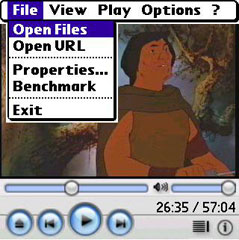
Strangely, the open file button has what at first appears to be an eject icon. A file folder would be more appropriate and intuitive, but at least opening a new file is just one tap away. In fact, most of the buttons throughout CP are larger than their counterparts in TCPMP, and larger buttons means less stylus folderol, which makes for greater ease of use all around.
There are also more viewing modes available, including the windowed and full-screen (matted) modes, In addition to those, you may now also set a zoom aspect and the pixel aspect ratio, which determines if the CP displays the video as a square, TV-like image, or as a widescreen presentation. This is useful if you are watching a video recorded from a wide-screen, non-standard source, or copied from a DVD. (Egads!)
CP also supports a pocket-full more media formats than TCPMP does, and the developers promise that the next release (v1.5) will support the Internet Protocol Television (IPTV) format, which means that youll be able to watch Video on Demand content using your Treo.
Beyond that, other interface upgrades, such as the improved playlists that support moving tracks and video files around to organize them and allow you to save and load playlists make CP more than a worthy upgrade from TCPMP.
Upgrading Woes
The downside of CorePlayer is its inability to auto-update itself over the air via your wireless Internet connection. Unlike many other similar or competing applications of this type, CP does not have an automatic Check for Updates feature, nor does it allow you to manually do so or download said updates over your Treo's built-in data connection.
Instead, when you want to get the latest release, youll have to download it manually and install it. Worse yet, the CP website does not have a mechanism for registered users to do this. Rather, they rely on the company from whom you purchased CP to distribute the updates, which means youll need to save the registration and keyfile e-mail that you get when you've purchased CP online and click on the download link in it every time you want to upgrade to the newest release.
This causes a lot of headaches, as if you lose the original e-mail link, youll have to contact whomever you purchased CP through to get the latest version, or try asking CoreCodec for it directly. Thankfully they do have a good user support area on their website, and all of your product registration keys are stored online in a user account that they create for you the first time you purchase a new product from them. This means that you can always log into your CoreCodec.com account to view your registration codes in case you ever lose them, or need to perform a hard-reset on your Treo and do a restore.
In any event, CP is updated regularly, which means youll need to keep checking their website to see if you can upgrade to the latest version and figure out how to get it when you need to do so.
When in Doubt, Neuros It
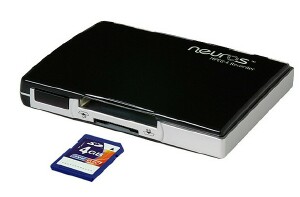
Frankly, there is nothing more satisfying or exciting than plug-and-play media. Rather than having to sit down and copy your media files to a card, or spend hours encoding your DVD library in formats that your Treo can play, you can stick an SD card in your Neuros Recorder recorder (you did buy one, didn't you?).. and just punch buttons or set recording timers on its little remote.
With the Neuros, not only can you record TV shows and movies off cable, but you can also connect it to your VCR or DVD player and record content from those machines without worrying a whit about the hassle of Macrovision-protected content. Since the Neuros uses analog inputs, if you can see it on your TV, the Neuros can record it to MPEG-4 (and other format) files in many qualities and video sizes. Check out my review linked above for the details.
Then, once youve got everything you need safely nestled on your SD card, just slap it in your Treo and watch it whenever and wherever you want to with CorePlayer. Moreover, because you are limited in the space you have to store files on your Treo only by the capacity and number of SD cards you own, you can continually expand your portable video library with more or larger cards. If you have a Treo 700p, you can use the new, larger 32-bit cards in 4GB capacity, with even larger (8GB-32GB) cards just around the corner. Try doing that with an iPod!
The beautiful thing about the Neuros CorePlayer solution is that the videos recorded with a Neuros on an SD (or MMC) card play directly in CorePlayer, so all you need to do is pop the card in your Treo and youre ready to go. No wires, no Bluetooth, no hassles of any kind.
Options Galore
Potentially the most amazing, and the most perplexing feature of CP is the wide variety of options for you to toggle. CP has an enormous system of user-definable settings, which you access through its menu systems. Set up a preference to never dim your backlight if you wish, or tell CP not to interrupt you while watching a movie by turning on the Disable Non-Critical battery warnings" option. Of course, this means that your Treos battery will run down faster, but if youre just sitting back and killing time while watching Futurama, its a handy feature to have.
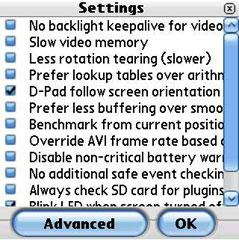
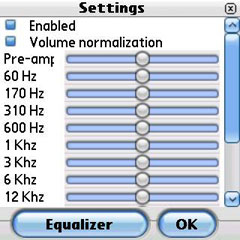
You can also set up more video and audio playback options than youll probably ever need, but its cool to be able to rotate the display and play your stuff in landscape mode when you desire, or select to use full-screen mode by default. You can also twiddle the video brightness, contrast, saturation and color offsets with ease, or use the highly advanced 10-band equalizer settings to fine-tune your sound output. The EQ also has a pre-amp and volume normalization built in to adjust the bass output level and balance out exaggerated sounds. Real handy if you're playing back a movie you recorded from commercial TV that breaks into commercials that shout at you.
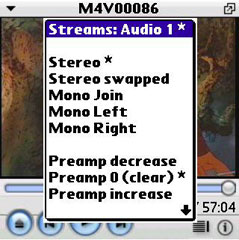
Whats more, you can opt to play back files at slower or faster speeds, meaning if you taped the Superbowl and want to watch a play in slow-motion, you have that option. You can choose to smooth video playback, and control dithering settings if you desire, or select which audio channels you hear during playback. This is useful if youre using a headset to listen to your files, as you can select mono join from the audio settings menu to pump both the left and right channels to your headgear.
Of course, the ability to store all required codecs and plug-ins on your SD card is also extremely handy, as it keeps your Treos limited internal RAM free of clutter and conserves space.
Next Page: The Big Finish >>





