This installment in the Treo For Newbies series answers questions you might not have asked, but might have if you knew to. Well give pointers on where to look for answers to your questions, and how to keep your Treo from harm.
As with Part 1 and Part 2, Ill assume youve already got your Treo hooked up to a carrier. For help with that, Ill have to send you to the service provider of your choice. Sorry bout that. Also, forgive me if I cover stuff you already know.
Well explore some of the options for protecting your Treo from harm, on the go or not, and where to look for answers to your questions. This information applies to all the Treo models, whether PalmOS or Windows Mobile. PalmOS has been renamed GarnetOS but thats not an issue. Yet.
First things first
Two or three milliseconds after you remove a new Treo from its cozy box, you should get it a screen protector. If you bought a used Treo, check it for screen protection and if you find none, install one as soon as possible. Really, the Treo screen isnt all that fragile, though it will break, but its scratchable according to the incontrovertible law imposed by Murphy. Bouncing around in your pocket, purse, or wherever, the screen is susceptible to knocks and scrapes from keys, coins, and stray chunks of concrete. Although replaceable, its an expensive part. You did opt for the dropped/lost/stolen insurance your carrier tried to peddle?
Treos come from the factory with a plastic covering that keeps the screen clean on its merry way to you, and thatll do until you get something better, or even better.
Encase your Treo
After you get the screen protected, you can work on protecting the rest of the device from physical harm. This quite simply means, buy a case. Theres a mind boggling variety to choose from, offering levels of protection from not much to bank vault. The choice takes pondering, even among the many entries in any given category. Consider where youll use your phone, and how much of it you need accessible. Then forget the logic and go for style!
Rather than detail the vast array of cases, Ill just insert pictures of some of the ones I like. If this seems like a lot of cases, remember I have four Treos. And counting.
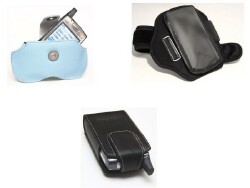
Covertec Horizontal Case
ItzKitz SportsBand Case
Monaco Vertical Pouch Case
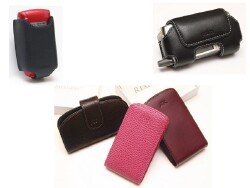
Palm Leather Holster for Treo 750, 700p, 700w|wx, 680, 650, 600
Palm Leather Side Case
A trio of slick RexRegina designer cases
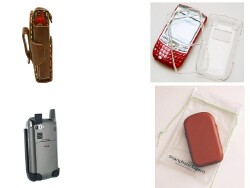
Speck Case(no review published yet)
Super Slim Hard Case (Crystal) for Treo 680
Smartphone Experts SafeGuard Holster for Treo 750, 700p, 700w|wx, 680, 650, 600
SmartPhone Experts UltraSlim Pocket Pouch Case
Treo 411
Once your Treos safe from harm, you can continue your quest for information. There are plenty of sources. My favorite (naturally) is the TreoCentral Forum. Everyone is welcome, whether a TreoCentral customer or not. You dont need to do any kind of sign up to read whats there, and with a few searches you can probably find answers to even the most esoteric of questions. There are even sections for non-Treo topics, and many threads comparing Treos with various competitors.
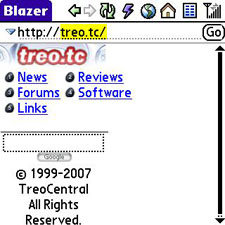
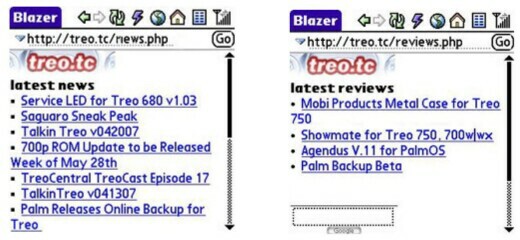
You can browse the forums from your computer, but theres a shortcut to get the TreoCentral articles, news and forums directly on your Treo - formatted in a way thats considerate of the small screen. Go to Blazer (tap Home > Web) and enter treo.tc in the Go line. Then tap your choice from the small menu that appears. TreoCentral content delivered from this URL is devoid of graphics, and will be easy to navigate on the small screen without side-to-side scrolling. You can access TreoCentrals articles, news, and reviews and read about the Treo on your Treo, while sitting in a coffee shop waiting for your mocha. Extra chocolate biscotti all around.
As you can tell from the accessories and Bluetooth forums, one of the most burning questions among Treo users is: Whats the best Bluetooth headset? You can compare them side by side (by side, by side
there are a LOT of them) with the popup web app on this link. Dont try that one from the Treo. Its huge, and graphics intensive, and best viewed on a w-i-i-i-de monitor.
The Treo knowledge base section of Palms support website can be helpful with troubleshooting. Frankly, the TreoCentral forums are better and more extensive, but Palm has a better search engine, with hot issues flagged at the top for easy access.
Then theres the documentation - the manual you got with the phone that you tossed out when you got it. No need to rummage in the closet for it, just download an electronic (PDF) copy to your computer. The PDF lets you search electronically for the topics you need, instead of poring through a paper index. If youre considering a new Treo model, the documentation can help you decide.
For updates and device drivers, browse to Palms Downloads section.
More protection
Protected from physical harm, your Treos precious information might still be at risk. Well tiptoe past the specifics, so as not to tempt the Gremlins in Charge, but theres loss, theft, and electronic mishaps that necessitate a hard reset that puts everything out back to factory fresh. No case, no screen protector, will be of any use to recover your data. You need a backup.
I havent yet found any software, or even magic, that will fend off disaster altogether. So, it might be wise to protect your data from unwelcome eyes with security software. Remember, nothing beats a good backup.
Conclusion
That does it for Part 3, thanks for watching. I hope this has been helpful, or at least entertaining, and that your Treo experience is an enjoyable as mine.





