
If this article reads more musical than usual, its because Im practicing my preaching: Ive got pTunes on my Treo 680 piping through my Palm Hybrid Headset/Headphones while I slave away at the wordprocessor. Music soothes the soul, and mine definitely needs soothing, but in this antique high-rise I get the additional benefit of drowning the drone of the window air conditioner that keeps me cool. Did I mention three computers and their peripherals, each with fans and motors?
You probably already know about Pocket Tunes pTunes in the Apps screen - Treos built-in MP3 music player. Set it going in the background and listen to music while you do other things like talk on the phone, skate, jog, bicycle, work out, sew, commute, stroll, or write articles for TreoCentral. However, often its inconvenient to poke Treo buttons or tap icons to change its tune. So much easier to bark Next Track! and have pTunes make the changeover.
VoicePlayIt, a new PalmOS program from VoiceIt Technologies, lets me do just that. I say Previous Track, and it returns to Rossini. Next Track goes to the Gershwin, then Repeat Track keeps the Rhapsody in Blue or the Concerto in F playing until I command No Repeat. Its all so sweet it seems like pure magic -- after some setup and a quick training session that lets the program know what I sound like when I drawl Stop, Play and the other commands.
Usability
I found VoicePlayIt to be easy as rhubarb pie to set up the first time, despite a lack of instructions for doing so. Before we go any further, let me emphasize that VoicePlayit does not work with Bluetooth headsets. You must have a wired headset or earphones that have a built in microphone, and the thing must be plugged in to the Treo before you try to train its voice recognition. Sure, Treos have a microphone, but the training cant operate with it. The program wont detect that theres no headset plugged in, so youre on your own to read the caveat. I didnt, and got frustrated.
Once I figured this out, a decidedly duhhhhh situation I admit, voice training sailed along. The defaults worked perfectly with the Palm headphones the first time, and the program behaved reliably on the first attempt.
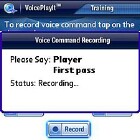
If you dont turn the automation off, VoicePlayIts mellifluous-voiced female narrator gently directs you to speak commands in turn after waiting a full second past the proverbial beep. The delay gives the program time to assess and compensate for background noise. You utter each command three times practice makes perfect and when done the program displays an amplitude graph of the resulting digitized command and speaks it back to you, automatically storing it. The other buttons dont do anything while youre in automation mode really, they ought to be covered up or removed, as they can confuse.
Disable the automation (see the Settings panel from the programs main screen), and you can replay, re-record, and skip around among the commands to listen to or re-do them. For first time use, the automation is brilliant, a welcome, considerate touch. I turned the voice prompts off after I learned the drill.
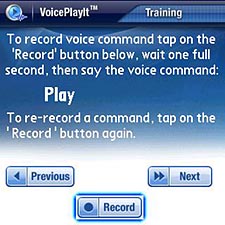
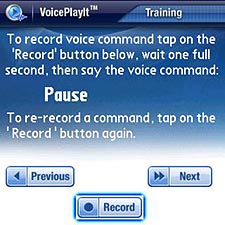
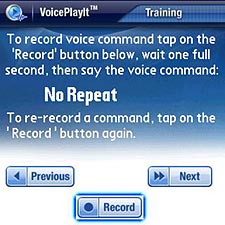
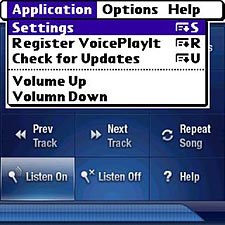
The program recognizes the commands Play, Stop, Pause, Next Track, Previous Track, Shuffle, No Shuffle, Song Info, Repeat Song, No Repeat, Manage Playlist, Volume Up, and Volume Down. In addition, Player, which comes first in the training sequence, can implement an addressing system to prevent accidental commands. If the option is checkmarked in Settings, you have to speak Player before any command, a slow process, but it could be useful.
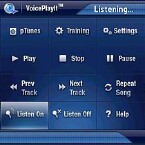
The control screen offers buttons which operate pTunes just like the voice commands, and the top-leftmost one brings up the pTunes display itself. Use the Apps button to return.
Operation

After training the program, the next step is to get some music going. The company recommends playing MP3 music from an SD card, and so do I. The cards make a convenient way to organize a music library, dont take up valuable system memory, and you can make up several with different selections. The program itself must live in device memory, of which it consumes about a megabyte. It can be slimmed down to 110 kilobytes by using FileZ or other utility to remove the graphics and voice over files vpit-001.prc and vpit-wave.prc, but dont do this till you know the program well. Do not remove anything else!
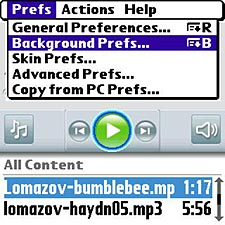
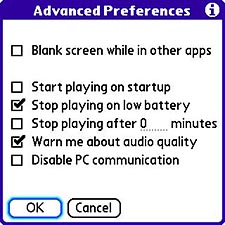
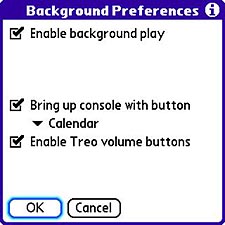
Besides having a wired headset or earphones hooked up, VoicePlayIt depends on pTunes Background mode. Pull down the pTunes menu (Menu button or tap the top-left edge of the screen), choose Prefs > Background Prefs and then checkmark Enable Background Play. For VoicePlayIt to work, you have to run pTunes first. Select some music tap the musical notes icon to choose a source if none is shown then tap the icon to play. To have pTunes cycle through available tracks, use the Select all option before you play.
With music coming out of your headphones, press the Treos Apps button (Home by any other name), and tap the VoicePlayIt icon. If you dont turn off voice announcements, it welcomes you, even over the music. Tap the Listen On button (bottom row). When you start the program, the Listen On button is highlighted, but the program is NOT listening for your commands. You have to tap the button, even though its lit up. This could use some rethinking.
While listening VoiceDialIt awaits your command. Listening appears in the status bar at the top of the screen. Say Pause or Next Track, and the program goes through some calculating it announces what its doing in the status bar replays what it heard (unless you turn that option off), displays its translation if it recognizes the command, and pipes the result to pTunes, which isnt even visible. In a few seconds, pTunes will comply with the request after a beep. Beeps are good.
Incoming
What if the phone rings? No problem there; pTunes already knows how to handle the situation, and VoicePlayIt cooperates. The music pauses, resuming when the call terminates. Beautiful.
The Listen Off button is useful if you need to talk to other people in the room, in the café, on the treadmill machine, wherever. VoicePlayIt tries to recognize anything it hears, including cats meows, sneezes, doorbells, and anything else it thinks is above the ambient level you trained it to ignore. To keep it from getting confused, just have it stop listening till you need it. An Unlisten voice command would be welcome, but there isnt one.
The program doesnt know or care what words you say or in what language, though its interface is only English. I spoke fatiddle, instead of Play, during training, and it worked. I also tried changing the background noise without re-training the program. Reducing it made no difference the commands still did their thing but changing its whole character didnt set well. For best results, train the program in the environment in which it will be used. Really, though, for lower amounts of ambient sound than my office is beset with, this probably wont make as much difference.
A word of caution. The companys promos rave, VoicePlayIt really comes in handy while you are in the car
Wait!
Please, please dont block up both your ears while youre driving. I might need to blow my horn at you!
Theres not much documentation in the program itself. The tips screens are nearly useless, except for reminding about the settings for pTunes v4, and a couple of other gotchas. However, the companys website includes a forum section dedicated to the program. Theres not much there yet, because the program has only been available since mid May 2007, but this is the place to ask questions and benefit from other peoples experiences.
You can download (or view) a fairly decent documentation in PDF format at this link.
Settings
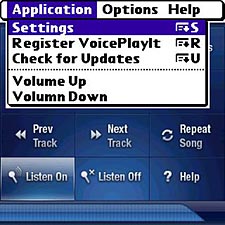
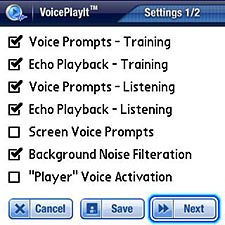
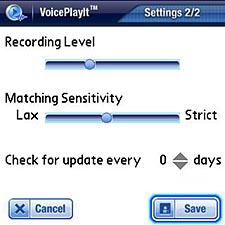
VoicePlayIt offers settings that let you turn off its training wheels when youre ready. You can, for example, disable the friendly voice prompts to speed up operating the program. The defaults for Recording Level and Matching Sensitivity worked the first time for me, but you can adjust them if the program misidentifies commands, or to fine tune the recording process. Two things are missing, however. There are no ticks to indicate what the settings are, no indication of how fine the fine tuning is. And theres no Reset option that I could find. With no tick marks, its impossible to know where the original settings might be after youve moved them.
I gave VoicePlayIt a bad-case scenario, my office, and purposely tried to defeat it by speaking its commands with different inflexions a slur, a lilt, a drop. The program figured them out uncannily, and appeared to have no difficulty dealing with high ambient noise, even though its maker warns against such situations. Oddly, I found that it worked much better with my Palm Hybrid Headset than with my high-end The Boom Quiet headphones. It took some fiddling with these microphone and sensitivity settings to get The Booms to work with the program. Maybe the Quiet is so quiet the program cannot believe what its getting.
You can get VoicePlayIt here for $19.95.
Next Page: Conclusion >>





