Home | Stories | Reviews | TreoCast | Treo Store | Accessories | Software | Discussion | Mobile | About | Search
 
treocentral.com >> Products & Reviews >> Accessories
Motorola Bluetooth H670 Headset

Thu Jul 12, 2007 - 10:25 AM EDT - By Douglas Morse

Overview

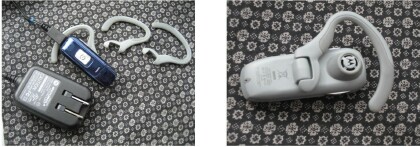
The Motorola Universal Bluetooth Headset H670 is wholly unremarkable. The packaging doesn’t have many features to tout except a ‘secure and comfortable fit’ three ear hooks included. It’s easy to pair and has ‘outstanding audio’ and ‘lightweight’ – in other words pretty much what any Bluetooth headset should advertise. It does have a Power on/off switch that is actually different than other headsets I’ve tested.

Design

The glossy blue face (Matching the Razor I’m told) and flat industrial gray backside do nothing to win this earpiece design awards, though certainly nothing to distract either. The earhook has soft rubber reinforcement on the outside with a stiffer plastic. There are three different sized earhooks included and this can be set for left or right ear use with ease. The speaker rests gently in the ear, a nice compromise between an earbud and something that rests further off.
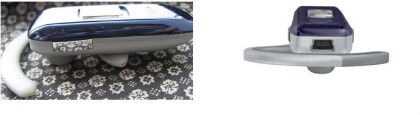
There are volume up and down buttons on each side of the earpiece up towards the ear. On the top is a spot for the mini-USB charger (the ac adapter is lightweight). The most noticeable difference between this and other headsets is the multifunction button. In some respects, it works just like any other you’ve used. Tap once to answer or end a call. You can redial by holding the button or use it to dial by voice. Of course this button can get a heavy workout to pick up a second call.

One thing this multifunction button does NOT do is turn the unit on and off. The entire switch itself slides up and down. There are times when you simply don’t want to bother with the earpiece, change wireless headphones, or don’t want to risk accidental calls. So the slider switch is a much easier way to keep track of whether or not the H670 is on or off than waiting for a blinking blue light that may never come.

I should mention that below the slider switch is the indicator button. It also has far too many functions telling whether the unit is powering up, pairing, in standby, connected or has a low battery. Fortunately, you can disable the indicator light and the aforementioned power on/off switch is then quite a boon. The headset also allows you to swap the volume button orientation as well.

Features

A basic headset these days, like the H670, has many features hidden away. The ability to switch volume buttons, turn off the idiotic blinking light, and even swapping earpieces is good stuff. The sound is exactly what you’d hope for in a meat and potatoes headset. Solid. It’s entirely unremarkable in a good way. This is the sort of earpiece you can use day in and day out, and not really think about it. The range is good and I didn’t notice any unusual artifacts, buzzing, or problems, nor did callers report any. Motorola generally makes excellent products and this headset, though not snazzy, delivers solid performance. I should mention that like many of the headsets I’m now testing, this is Bluetooth 2.0 which will help ‘future proof’ it. The device is rated for 8 hours of talk time.

If I have a minor issue, it’s with the slider switch, though not in the way you’d expect. I really do appreciate the simple slide up and down to turn the unit on and off. The thing is, in the on position, it rattles just slightly. This only happens when you wiggle your head (not a likely occurrence). It’s just when I first noticed it, I tried it a few times to see if I could recreate the phenomenon. I could, but under nearly all circumstances, it doesn’t happen. But once you know the little rattle is there, you look for it, or try to recreate it. Perhaps I’ve just got a touch of OCD, but who knows.


Conclusion

You can’t go wrong with the H670. The sound quality is excellent, the design comfortable, and it’s easy to use. The dedicated on/off switch is a nice, though not essential, touch. If you hate the blinking LEDs (I do) and plan to turn them off, then the slider switch is actually an excellent addition. I think it’s a bit over priced, but perhaps that will drop soon, and it might be worth it if you have a Bluetooth 2.0 device or hope to get one soon. The minor rattling of the on/off switch was annoying, but unlikely to affect you in real world use. Just say this isn’t a headset for active use; just for normal around home, office or strolling.

3D view photo via Motorola website


Treo accessory store

Criteria 

Rating

Design 4
Features 4
Sound Quality 4
Cost/Benefit 3
Overall
(not an average)
Pros
  • Rock Solid sound
  • Comfortable
  • On off slider switch
  • Bluetooth 2.0
  • Cons
  • Bit Pricy
  • Slight rattle on off switch


  •  
    User Opinions
    No reader opinions available.
    Would you recommend Motorola H670 Bluetooth Headset for Treo 755p, 750, 700p, 700w|wx, 680, 650?
    Yes   No  

    Product Info
    Details
    > Name Motorola H670 Bluetooth Headset for Treo 755p, 750, 700p, 700w|wx, 680, 650
    > Company Motorola
    > Fact Sheet & User Opinions
    Availability
    > Available
    Pricing
    > $59.95

    Sponsored Links


    Motorola H670 Bluetooth Headset for Treo 755p, 750, 700p, 700w|wx, 680, 650 from
    TreoCentral Store


    References
    Actions
    > Print this page
    > Digg!


    Cases

    Chargers

    Bluetooth

    Headsets

    Keyboards

    Memory
    Protectors Cradles
    Styli


    More Treo Accessories

     Leather Side Case
    Palm Side Case
    Side-loading leather belt clip case
    Just $24.95 BUY

    More Side Cases
    Stylus (2 Pack)
    Palm Stylus (2 Pack) for Treo Pro
    Keep extras at home and at the office.
    Just $14.95 BUY

    More Styli
    Micro-USB Travel Charger
    SPE Micro-USB Travel Charger for Palm Pixi / Treo Pro, Treo 800w
    Fold in plug makes it more compact
    Just $9.95 BUY

    More Wall Chargers
    Treo Screen Protectors  (3-Pack)
    Screen Protectors for Treo
    Protect your screen!
    Just $12.95 BUY

    More Screen Protectors
    Pen Stylus  (3-Pack)
    SPE Pen Stylus for Treo 755p, Treo 750
    Pen and Stylus in one! (3-Pack)
    Just $14.95 BUY

    More Styli
    Leather Zip Case
    Palm Leather Zip Case for Pixi

    Just $36.95 BUY

    More Pocket Pouches
    Slip Case
    Palm Slip Case for Pixi

    Just $27.95 BUY

    More Pocket Pouches
    H17 Bluetooth Headset
    Motorola H17 Bluetooth Headset

    Just $89.95 BUY

    More Wireless Headsets
    Micro-USB Travel Charger, Touchstone Compatible
    Seidio Micro-USB Travel Charger,Touchstone Compatible for Palm Pixi, Pre

    Just $19.95 BUY

    More Wall Chargers
    Media Cable for iPod
    RedFly Media Cable for iPod for Treo Pro, Treo 800w, Treo 750, Treo 700wx, Treo 700w

    Just $29.95 BUY

    More Mobile Companion
    BackBeat 903 Stereo Bluetooth Headset
    Plantronics BackBeat 903 Stereo Bluetooth Headset

    Just $89.95 BUY

    More Wireless Headsets
    Cruiser Bluetooth Car Kit Speakerphone
    Jabra Cruiser Bluetooth Car Kit Speakerphone

    Just $89.95 BUY

    More Speakerphones
    HS-500 Bluetooth Headset
    BlackBerry HS-500 Bluetooth Headset

    Just $69.95 BUY

    More Wireless Headsets
     
     
    Creating smartphone communities
    Android Central - Android reviews, news and forums Crackberry - Blackberry news, reviews and community TiPb - iPhone news, accessory reviews & forums
    Pre Central - Palm Pre Review, News and Community Treo Central - Treo & Centro News and Forums WMExperts - Windows Mobile Reviews & News

    Copyright 1999-2009 TreoCentral. All rights reserved : Terms of Use : Privacy Policy

    TREO and TreoCentral are trademarks or registered trademarks of palm, Inc. in the United States and other countries;
    the TreoCentral mark and domain name are used under license from palm, Inc.
    The views expressed on this website are solely those of the proprietor, or
    contributors to the site, and do not necessarily reflect the views of palm, Inc.

    Explore more: The iPhone Blog | WM Experts | Crackberry | CentroSpot | Android Central
    Smartphone Accessories: Windows Mobile Accessories | iPhone Accessories | Blackberry Accessories
    Fuze Accessories | G1 Accessories | Xperia Accessories | Touch Accessories | Instinct Accessories
    Bold Accessories | Blackjack Accessories | HTC Accessories | Centro Accessories | Motorola Q Accessories
    Mogul Accessories | Tilt Accessories | Nokia n95 Accessories | Duo Accessories | Verizon XV Accessories
    Dash Accessories | Shadow Accessories | Voyager Accessories | Venus Accessories | Touch Accessories
    Curve Accessories | Dare Accessories | Venus Accessories | Curve Accessories | Bold Accessories
    Omnia Accessories | Incite Accessories | Epix Accessories | Saga Accessories Pre Accessories