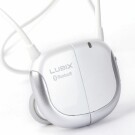
Since the Treo, like many smartphones, lacks a standard 3.5 mm audio jack, Bluetooth stereo headsets have become a compelling alternative. Even if the Treo did include a 3.5 mm jack, wired earbuds are a pain to untangle and manage neatly. A typical Bluetooth headset resolves these issues at the expense of earbuds principle advantage--portability. This is where the Lubix UBHS-NC1 Stereo Bluetooth Headset shines.
Design
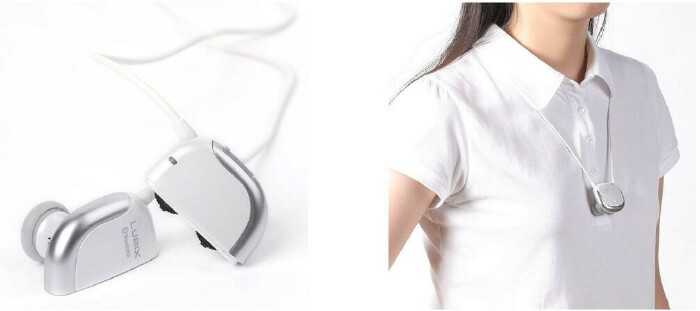
Despite sporting one of the worst names in the annals of consumer electronics, the Lubix UBHS-NC1 makes a name for itself by its clever design. Each of the earphones is half of a single unita rounded rectangle with earbuds jutting out on one side, and a smooth finish on the other. When not in use, you wear the unit by attaching the two haves together, with the smooth side facing out. The connection is magnetic, accompanied by a solid, reassuring click. The cord between the headphones functions as a lanyard. When talking or listening to music, the cord drapes behind the neck, and has an adjustable choker to take up the slack.
You can also stow the Lubix very neatly in your pocket by winding the neckband around the unit, through the earbuds; then wrapping the final portion of neckband around the outside of the earbuds, and securing it with the choker. It takes about ten seconds to wind or unwinda fraction of the time it would take to untangle a typical wired headset.
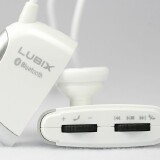
The left headphone harbors all of the units controls: volume and 3D Sound; connection and disconnection; and track play and navigation. Lubix has crammed an amazing amount of functionality into the two control buttons. Finally, there is a separate power switch.
The non-replaceable battery is supposed to charge in 2 hours (my charges averaged 3), and yield 6 hours of continuous talk time, 5 hours of music time and 80 hours of standby time. Unfortunately, I was unable to verify these figures, for reasons that will become apparent later. The unit is charged with an included USB cable that plugs into a USB adapter, also included.
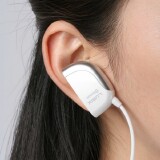
In use, each 4-ounce headphone is light enough to stay in place without earhooks or headbands. A large and a small pair of eartips are included (I prefer the small), which offer sufficient traction for non-athletic activity. For more rigorous activity, get eargels.
Aesthetically, opinions on how the headset looks in use vary. The pair obviously looks like two Bluetooth earpieces, so some users are more self-conscious about that than others. Considering the wide variety of available form factors for headphones these days, these dont look particularly out of line to me. I never received odd looks or comments about them.
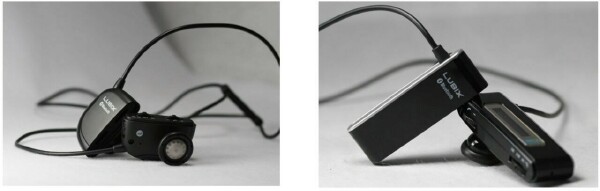
The Lubix comes is available in black and white versions. The TreoCentral Store carries the black version. A caller ID model, the HBHS-LC1, has an OLED display on the left headphones side, and retails for $119.95. I honestly dont see the added value of a phone number displayed 90 degrees from the users line of sight, but some users may find pulling the unit from the ear for a quick glance more convenient than pulling the Treo out of a case or pocket.
Setup
Pairing the Lubix with the Treo is a familiar enough procedure. In the Treos Bluetooth app, turn Bluetooth to On, select Setup Devices, then Trusted Devices, then Add Device. You hold the talk button (indicated by a phone icon) on the Lubix down while the Treo scans, enter the passkey of 0000 when asked, and voila--the Lubix becomes a Trusted Device.
According to Lubix, the device supports multi pairing, which allows the use of the headset with multiple host devices simultaneously. You can, for example, listen to music streamed from your laptop, then take a call on your Treo. With no BT on my desktop or laptop, I was unable to test this feature.
A SAG State of Affairs
Here is where things get ugly. I tested the Lubix with a Treo 755p. Several vendors list the Lubix as a sale item for the Treo 750, the Windows Mobile flavor. Lubixs own marketing materials list several dozen phones purported to be compatible, from Nokia feature phones to Samsung smartphones. The compatible Treos on that list are the 650, the 700w and the 700p.
Unfortunately, I have to conclude that its not entirely compatible with the 755p. The weak link seems to be Softick Audio Gateway. After replacing the 1.11.1109 version of SAG with the current 1.12, following the instructions on Softicks website, the Lubix at least became functional, but not consistently. There were brief, occasional dropouts when I walked fast. The same happened a couple of times when I was completely stationary.
The worst part was SAGs frequent lockups when switching from Internal Speaker to A2DP Device, or vice versa. Each freeze required a soft reset, which on the 755p (sans reset hole) is not fun. I spent hours on Softicks forums and support pages, methodically implementing every suggested solution. I tried:
- leaving the headset off, then activating and pairing it immediately before use
- using different media players: mOcean 3.0.18, TCPMP 0.71 and pTunes 4.0.2
- alternating the sequence of launching the media player and SAG
- waiting 30-60 seconds after switching between Internal Speaker and A2DP Device
- hard resetting, then installing only SAG for use with pTunes
Nothing worked. There were, however, times where the Lubix and SAG would work for an hour or two, but not as the result of any of the above remedies. I should also point out that after reading testimonials on various forums, several 700p owners claim to have no problems with the Lubix and SAG 1.12, and one TreoCentral forum member claims to have had no problems with the latter pairing and the 755pcontrary to my own experience. Treo 750 owners consistently claim to have great results with the Lubix, and I believe them, since Windows Mobile supports A2DP natively.
Its hard to generalize from such anecdotal evidence, but at this point I would only recommend getting the Lubix if you have a 700w or 750. If youre sold on getting one for your POS Treo, consider waiting until Softick release SAG 1.13.
Believe it or not, Im going to go easy on Lubix on the compatibility issue, since I havent tested it personally with a Treo on the manufacturers own compatibility list, and since most vendors sell the product specifically as a Treo 750 accessory.
Sound Quality
For phone calls, the incoming sound was quite good, but I received several complaints about the outgoing sound before the complainers were aware that I was using a new product.
Quite good is also how I would characterize the music quality. Interestingly, this might actually have to do with SAG. For some reason, I noticed a marked improvement in the sound quality after purging SAG 1.11 and doing a clean install of 1.12. Running 1.12 without first uninstalling a previous version probably leaves some of the old configurations in the PDB files.
I was initially cynical about the 3D Sound enhancement claims, but the enhancements really do work as advertised. Pressing the talk button, while listening to music, cycles through five sound modes, starting with Normalthe unenhanced setting, denoted by a double beep. The enhanced modes are:
- XOME: Simulates loudspeakers by moving the spatial locus of sound out of the head. Nice for acoustic music. It tends to flatten the midrange and distort the highs with electric music.
- LIVE: Soft 3D field effect simulating live performance. The highs are muted and the reverb is noticeable. Better for ensembles than solo performers.
- WIDE: Creates a panoramic sound image by centering instruments and spreading the main vocal. Not very distinguishable from LIVE.
- MEX: Creates a wide stereo image, and enhances low frequencies for richer bass tones. The most natural sounding of the enhancements, and the one that became my default.
Next Page: Conclusion >>





