As the virtual stopwatch hits minute four, I can honestly say I am impressed. Transplants five minutes 'till routing claim has been achieved, and sooner than expected. As the software calculates the route from my home to the store, the ease of use of version 4.0 is apparent. Gone are most of the hiccups and glitches of version 3.0, as well as the tedious state-by-state map installation to an SD card from the last version's DVD.
I applaud the ease of the pre-loaded 2gb card, which, by the way, has over 900mb of free space available for whatever else you want to put on it other apps, photos, music, games, etc. Why I would ever need Michigan data, I dont know.. but I am glad to know its there. Who wants to screw around figuring out which States to load onto a card before a trip, or if that card will hold everything?
So EMTAC is doing a card-based version of what TeleNav does over-the-air.. giving you maps and navigational ability on every road in the lower 48, whether you need it or not.
I can see where this process might take longer than five minutes for some people, especially those who have never used any GPS software before.. If you don't have Bluetooth turned on and dont know how, that could eat up a minute or two, but then maybe you shouldnt have a Treo. If you didnt set the GPS in a window or head outside to get a GPS fix, that could munch up another couple of minutes. But overall, EMTAC's new way of pre-loading everything onto a card is not to hard to set up, even for the inexperienced.
Updates
One of the updates to the new EMTAC Navigator software is that it ships with 2007 NAVTEQ map data on its tiny storage card. Other changes I've noticed include the increased speed of the software when entering data or zooming in and out, which is much more fluid.
For those with previous versions of the software and those who have read my 3.0 review, you will know EMTAC's linking to the Treo's address book was a sore spot. It would let you use some addresses, but not others, without any apparent rhyme nor reason.. overall I would say the older version worked about twenty percent of the time. Although the address book support in V4.0 is not 100%, I'd guesstimate it has improved to about 75-80%. The older software had serious problems with parsing street names how many ways can you enter the word "street" into the address field of one of your contacts?
- Street
- STREET
- St
- St.
- st
- st.
- ST.
- ST
Did I miss any? And the same problem existed for other flavors of map names, like Boulevard, Circle, Crescent, Drive, Highway, Road, Terrace, Place, and so on. Or one way might work unless you added an apartment or suite number on the same line, and then not work. The V3 software just did NOT understand that different abbreviations or capitalization or punctuation as in my "street" example above all meant the same freakin' thing. It was totally hit-or-miss as to if you could tap a contact from within the EMTAC software and route to it, or get a blank stare from it.
Periods and other ways of abbreviating can still mess with its accuracy, and give you the dreaded blank box. Stick to the basics of st, ave, blvd, etc and you can get the address book linking to work. Yeah, it's much improved, but.. it still needs some fixin'.
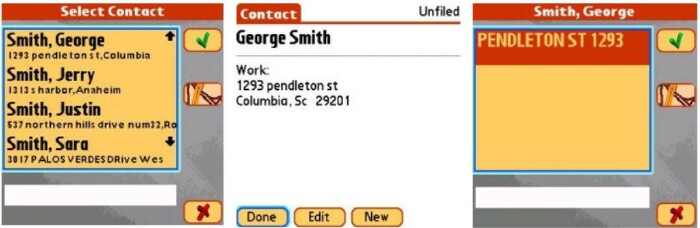
The address book linking still has the hit or miss feel of version 3.0, either it finds it and routes you to it, or it doesnt. I think if the software does not find it as I have it listed in my contact book, then it should let one enter part of an address and edit it so you can route to it. Of course I can find the address on its own by using the address or zip feature
but if it is described and hyped as a feature, let me use it 100% of the time.
If I keep the periods out of my contacts' street name abbreviations, then for the most part I can route using the address book feature. TeleNav does not offer contact list support at all yet for Palm OS, so this is a feature that EMTAC has that TeleNav lacks. But TeleNav DOES offer this feature on their supported Blackberry devices, so maybe the problem lies more in the Palm contact book, rather than the software. I'm not a coder, I couldn't tell you. Regardless, it still needs some work.
The rest of the interface
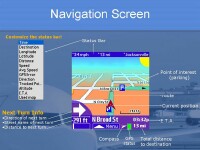
Here are some shots of the main interface of EMTAC Navigator V4, once you're routed and on the way somewhere.. this annotated picture nicely points out and describes all the stuff you'll see on-screen, saving me a few hundred words trying to explain it :) ..
The navigation screen is VERY pretty and colorful, and again, offers both 2D and 3D views.
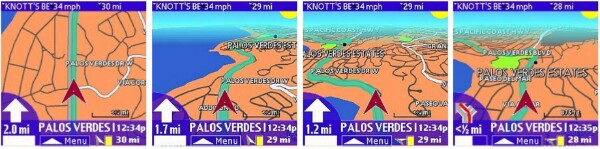
There are three "read-outs" at the top of the nav screen and each can display a different parameter, although the font used is VERY small on a two inch screen a couple feet from your face.
Voice prompting, yes. Street names?.. sorry..
Like its predecessor, and unlike both TeleNav and Mapopolis, EMTAC V4 does NOT speak ANY street names at all.. either robotically, or with a human voice. It has a couple dozen female voice prompts to tell you when you're approaching a turn, if you're over the speed limit, destination ahead on your right, make a U-turn, and so on. I think this is an inferior approach as it means you have to look at the screen MUCH more often to see where you are and when you'll have to make a turn than if the program just TOLD you "In one quarter mile, turn left onto Rhode Island School of Design Terrace." (Yes, that's a real street name)..
Mapopolis had a "night colors" mode so driving after dark you didn't have a bright screen messing up your night vision. EMTAC (and TeleNav) both lack this feature, but you can always dim down your Treo's screen after the sun goes down.
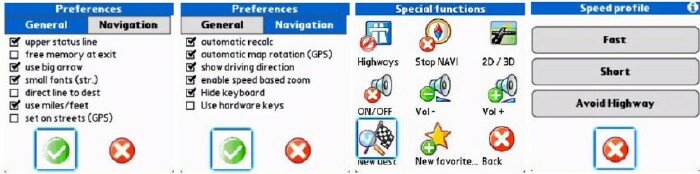
EMTAC V4 also has plenty of Preferences toggles, some of which are displayed here and well-documented in the manual.
Next Page: Conclusion >>





