Like the NR2P, the OSD requires wall power, but only draws about 5 watts. It's always "on". There's no power switch, but when not in use, it goes into a standby mode. One touch of nearly any key on the remote wakes it up instantly. There's no boot-up delay at all. A single LED tells you its state –
- Green = powered and in standby mode, and in all playback modes.
- Red = recording.
- Orange = it's doing a firmware upgrade.
The LED is NEVER off unless you pull the power cord. I'd like to see a firmware change so the LED blinks green or orange as a visual indication that you've set recording timers.
Menu City!
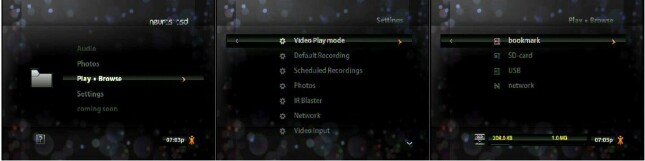
The OSD takes an entirely different approach to its on-screen menu system than the NR2P. It took me a couple of days to get comfortable with its multi-level menus and discover where everything is. On screen menus use (mostly) a bold, white sans serif font and a lot of icons. The menus are displayed as a bright overlay atop your video source, which is dimmed down behind them.
You navigate the menu system and scroll through the choices with the five orange buttons on the remote, like a Treo's d-pad.
On any screen with a question mark in the lower left-hand corner, the
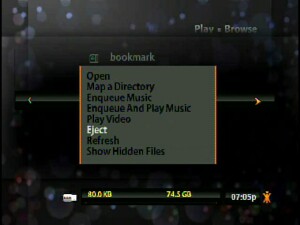
remote's "?" button brings up context-sensitive help windows. On any screen with an orange symbol Neuros calls "Xi" (say "Zye".. which is short for eXtra information, punch the Xi key on the remote for a context-sensitive, scrolling list of actions you can take, depending where in the interface you are, or during recording and playback, such as deleting and renaming files and timers, copying files from one Storage device to another, and many other functions.
The remote's back button takes you back a menu. Hit it a couple times and you'll exit the menu system entirely, hear a faint audible "click" as the OSD goes into standby mode, and you're looking at your regular TV signal again.
I won't bother with a blow-by-blow description of every OSD menu option.. the screen shots in this review should give you an idea, but there are dozens.
Psst! Do a YouTube.com search for "Neuros OSD" and you'll find (as of this writing), at least two dozen videos folks (including Joe Born, Neuros Technology's President) have made about the OSD – from unboxing, to how to use the remote, the menu system, and lots of operational tutorials. Neuros' own Web site is also filled with video tutorials.
My thoughts for improvements after a few weeks of use.
I've had countless emails and discussions with Neuros' Product Manager, who graciously gave me a lot of his time, walking me through OSD operation, answering all my questions, and listening to and even implementing some of my suggestions for firmware changes. Neuros really has their ears open to OSD owners and journalist feedback.
But no product this complex is perfect, and after using the OSD constantly for a few weeks, here are a few changes I'd like to see in future firmware updates.
- Recording timers – the OSD "way" is to set a date, a start time, and duration in HH:MM. The VCR way was to set a date, start time, and stop time. I think the latter makes more sense, rather than the OSD's way which forces you to do "how long do I want to record?" math in your head. Quick, if a movie you want to record starts at 11:20pm and ends at 1:45am, how many HH:MM is that? The OSD should have both ways when scheduling a recording.
- There's a "jump ahead 30 seconds during playback" dedicated key on the remote (basically a commercial-skip button).. but no "jump back 30 seconds" key. Implement one in the firmware. Maybe I want to watch a scene again.
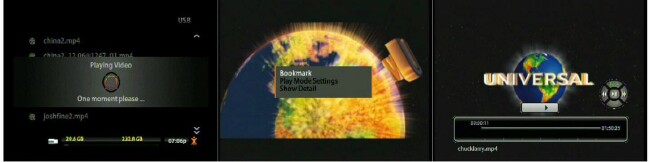
- It's cool to set bookmarks during playback. You can call up a slick on-screen progress gauge with a moving marker that displays the time. Bookmarks appear as green dots along that gauge. But if you set some bookmarks, exit playback, then later play the same recording again, the bookmarks you set have vanished. The OSD should remember them from one playback session of the same file to the next.
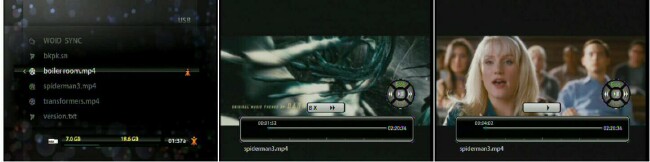
- With so many levels of on-screen menus, I'd like to have different colored menu backgrounds.. sometimes I still get lost in the OSD's menu tree. Using colors for the background, or even the menus' fonts would be a helpful visual aid. And speaking of fonts, NTSC by its very nature is blurry. My living room TV is a 25" RCA from the 1990s. I'd like the ability to change the OSD's menu font sizes and styles, just like I can do in a Web Browser, or in MS Word, in which I'm typing this review. Firmware is just software, so why not?
- Each new firmware update brings improvements. The NR2P had visual thumbnails and showed the size in KB or MB of each recording. For some inexplicable reason, these two features went away in the OSD. I'd like to have them back again.
Conclusion
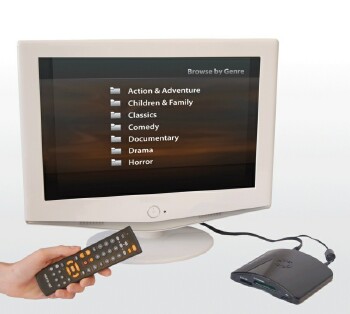
Despite my few gripes, I love the OSD. It's a giant leap forward from the NR2P, both in specs and features. Its Linux OS opens it up to firmware developers and offers countless possibilities. It makes beautiful MPEG-4 recordings with no audio distortion, and has both built-in quick presets to record for playback on a TV, smartphone, iPod, PSP, plus you can tweak every recording parameter in its Advanced Mode. Name and rename recordings before and after you make them without having to copy them to a computer first.
You're no longer limited to memory card capacity, since the powered USB port lets you connect any size hard drive you want, and record, store, and quickly select and play an enormous number of TV shows, movies, DVDs, MP3s, and image files.. and thanks to its analog inputs, if you can watch it on your TV, the OSD can record it, no matter what the source device. The Ethernet port lets you network the OSD plus search / select / watch YouTube videos on your TV.
The OSD's casework is gorgeous, curvy, and sexy, yet still a tiny thing that'll easily merge into your home entertainment system no matter how crowded it is. The programmable remote control is vastly improved over the NR2P's.
I think the OSD is a device with almost unlimited potential and possibilities. Frequent firmware updates mean this is a reality, not a pipe dream. Once you learn how to use it, you'll WANT to use it and show it off. As cool as the NR2P was, with the OSD, Neuros really hit one out of the ballpark.
|
|
| Pros |
Records and plays back high quality DRM-free MPEG-4 videos
No more 2 hour recording limit!
Open source Linux OS.
Pause during recordings.
New USB port – connect a hard drive for massive Storage
New Ethernet port – network it!
Search, select, and enjoy YouTube on your TV!
Programmable remote control
Unlimited scheduled recording timers.
Name your files before and after you record them.
IR blaster controls your cable box
Frequent firmware updates
Compact, low-power, curvy, sexy design
Built-in help system
If you can watch it on your TV, the OSD can record it
|
|
| Cons |
Somewhat steep learning curve.
Deserves a full booklet manual, not just a fold-out sheet. |
|





