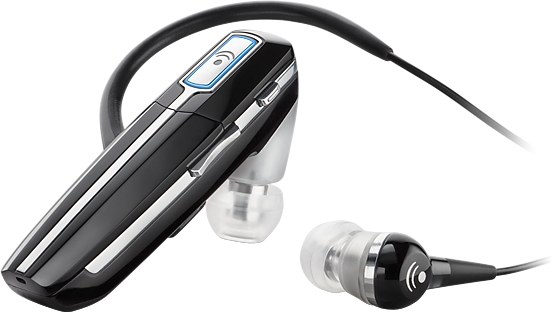
For such a fiercely competitive market, not much distinguishes Bluetooth headsets these days. A manufacturer can usually find one unique parameter to catch a consumers attention: one headset is the smallest, another ones the cheapest, while still another has the most attention-getting industrial design. The $85-$100 price point seems to offer the most interesting array of features to justify a purchase. Since so many decent headsets are available at half the price, companies have to offer something truly compelling for prospective buyers to think twice.
The Plantronics Voyager 855 caught me by surprise. I was expecting a sleek design that competed on exceptional sound quality, real or alleged. On receiving the box, the first thing I noticed is the One HeadsetCalls & Music blurb. The Voyager features a second earbud with a plug-in cable for listening to music via the Bluetooth Advanced Audio Distribution Profile (A2DP).
Design and Ergonomics
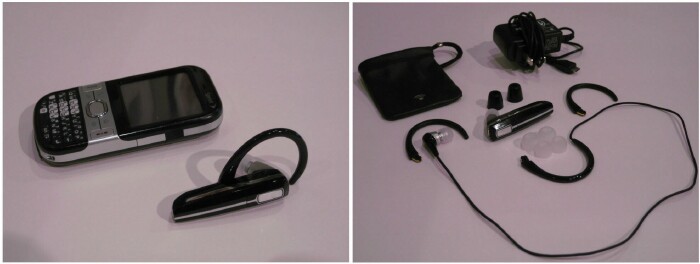
The Voyager is very easy on the eyes, with its black casing and silver trim that color coordinates fabulously with the black Centro. Like the Centro, the black casing is slick and picks up fingerprints all too easily, unlike the matte black Id prefer. The big silver button on the face is the call control button for answering and ending calls, and for powering the headset on and off. The top edge features a tiny mute button and a volume rocker.
Plantronics has accounted for all users unique wearing preferences by including three sets of noise isolating eargels in different sizes. As usual, I preferred the smallest set, and still had traction problems. Ive always had bad luck keeping earbuds of any type (expect Sonys) in my ear for more than a few minutes, and psychologically dont trust them. Fortunately, the package includes a pair of earhooks, which can be mounted from either direction for wear on either ear. I prefer the Voyagers earhook receptacle design, a simple molded slot open on both ends, to an integrated hook on a hingea potential point of failure. The slot is lined on the inside with terminals for carrying the signal to the stereo cable. For those comfortable with eargels, the headset is designed for use without the earhook.
The headset is very lightweight and well balanced. During the few minutes I managed to keep the Voyager in my ear without the hook, the unit did seem to vanish from my awareness, and took less getting used to than most headsets in terms of fit and heft. The weight is 11 grams for single-piece use, 15 grams with the stereo cable.
The Voyager features a nifty slide-to-talk boom-extended microphone, which slides out about an inch to accept calls, and slides back into the body to end calls. A tiny notch on either side of the boom is used to grip when sliding. Initially, at least, theres enough friction between the boom and the headset body that the headset tends to come off the ear (especially without the earhook) when extending the boom, unless you brace the unit at the back with your index finger. Once the unit is broken in over time, bracing the headset probably wont be necessary.
The headset charges through a now-rare but increasingly common micro USB adapter, requiring a wall charger. Unfortunately, charging directly from the computer isnt an option. Fortunately, the charger is branded, making it identifiable among the morass of chargers and cables that plague the average gadget freak. The Voyager is rated to give up to 7 hours of talk time, 6 hours of listening time, and 160 hours of standby time.
The package also comes with a carrying pouch, which normally isnt a major issue for those who wear headsets ubiquitously, but is useful here for carrying the optional stereo earbud or corralling the extra eargels and earhooks.
Setup and Operation
Also included is a clear, well-written manual that doesnt take the owners previous BT headset experience for granted. Since the Voyager is light on multifunction buttons, seasoned headset users can intuit their way through most operations.
The pairing process couldnt be simpler. Upon powering the unit for the first time, the Voyager defaults to pairing mode, and stays there for 10 minutes. Theres no button to hold down while running through the Treos Hands-Free Setup procedure. Pairing took less than a minute, using the usual passkey of four zeroes.
Making calls is an equally familiar process. Calls are dialed from the handset and automatically transferred to the headset. There are two optional methods for answering and ending calls: sliding the boom microphone out and in respectively, or pressing the call control button.
Stereo Playback
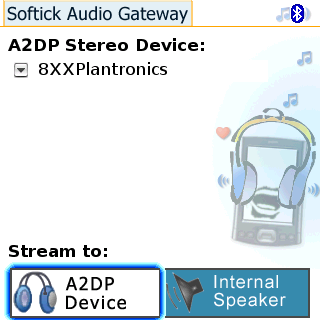
The stereo cable has an earhook that snaps into the aforementioned slot. Unlike Windows Mobile Treos, which support A2DP natively, Palm OS models require third-party software. Softick Audio Gateway remains the one and only solution. Many users rave about SAG, but Ive found compatibility with various headsets to be mixed, at best. Softick is forced to play catch-up with each new headset and media player software that hits the market, so snags are no surprise, but are still frustrating.
The streaming audio aspect of A2DP works reasonably well on the Voyager, though I did have one OS lockup during my testing, which is par for the course with SAG; but one freeze in several hours of testing is a minor issue in the scheme of things.
The real problem was the alleged support for the Audio/Video Remote Control Profile (AVRCP) between the headset and SAG. Both the hardware and software are supposed to support AVRCP, which allows the headset to directly control track playback. According to Plantronics documentation, the mute button should pause and play a track; and holding the up or down volume button down should select the corresponding next or previous track. None of these worked when tested with pTunes, Kinoma, and TCPMCall of which Softick claims are supported in conjunction with SAG. Ive used SAG with other headsets without running into remote control problems, so its unclear which component is dropping the ball. It should be pointed out, however, that non-remote track control works fine directly from the handset.
Sound Quality
Frustrated with inconsistent testimony from callers on the other end, Ive started testing outgoing sound quality in a more controlled setting by calling myself and leaving test messages on voicemail, comparing the results to handset messages and headset messages from the best unit Ive come across so far, the Jabra JX10 Series II.
Plantronics claims its AudioIQ technology enables exceptionally clear calls. For one of the pricier headsets on the market, the Voyagers sound quality, both for calls and music, is unremarkable. I tend to think that manufacturers throw in a custom DSP algorithm to lay claim to an innovative sounding trademark. With or without AudioIQ, the bass was rather weak, especially for music, and distortion at moderately high volumes is noticeable. For best results, keep the handset volume fairly low, and make needed adjustments from the headset. The quality isnt poor, but neither is the customer who can afford this product.
Update: We just had a reader write in and let us know that the AVRCP controls work for her via SAG on both the Centro and the Treo 755p.
You have to press and hold on the volume up rocker to go forward one song (likewise on the down button to go back), and the mute button does, in fact, pause the music. I've used with pTunes.
Thanks French!
Conclusion
I love the design of the Voyager 855. The wearability is excellent due to the overall light weight and the selection of earhooks and eargels. The call quality is good enough, but there are better sounding sets available in the same price range. If youre looking for a great stereo headset for extensive music listening, consider a dedicated pair expressly designed for the purpose.
For its overall functionality, this is an above-average headset if you mainly need to handle phone calls, but would still like the option of streaming music without the bulk of a second headset.
Check out Dieter's mini video review on WMExperts.
|
|
| Pros |
Very light and comfortable to wear
Second earbud for supported A2DP stereo Bluetooth
Telescoping microphone
|
|
| Cons |
Unexceptional sound quality
Stated AVRCP support not working with SAG |
|





