Home | Stories | Reviews | TreoCast | Treo Store | Accessories | Software | Discussion | Mobile | About | Search
 
treocentral.com >> Stories >> Commentary
Tip o' the Week: Master the Menu!

Wed Apr 30, 2008 - 9:39 AM EDT - By Brian Hart

Overview

Of the many things I like about TreoCentral - the articles, reviews, latest news, the forum, and the TreoCentral Store, to name a few - the one thing that drew me to the site in the first place was, and still is, the community. Every time I've had a problem with my Palm or just want to know how to do something new, I can always count on the knowledgeable and friendly forum members to be helpful.

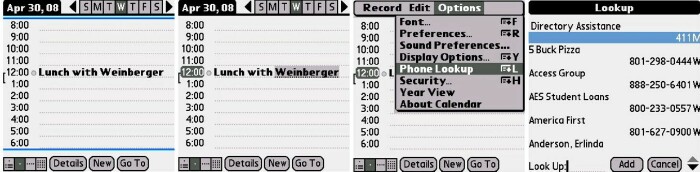
In response to my previous Tip o' the Week (Contact Lookup), I received some helpful responses from forum members. Antonio gave a shout-out with some more information about contact lookup from the Calendar, Tasks, and Memos apps. Unbeknownst to me, if the name you highlight is longer than eight (8) characters, then the Lookup feature will just drop you into the Contacts app in the A's. So, as Antonio pointed out, if the name is longer than eight characters, then just highlight up to eight and all is well. Thanks, Antonio!
I drew inspiration for this week's Tip from our very own forum member, "FastFrank", who responded to last week's Tip with a Tip of his own. So, in the spirit of the TreoCentral community and without further ado, let's dive right in with this week's Tip, Master the Menu!

How, exactly, can YOU be a Menu Master? It really doesn't require any navigational jujitsu -- all you need is a Palm device, like a Treo, with a 5-way navigator (D-pad). Lets say you want to delete many (or all) of your email in Versamail. After opening the app, you hit your Menu button and Select All is highlighted (since it's at the top of the list). You have a couple options in navigating and selecting inside the Menu. You can hit a corresponding shortcut button on the tiny keyboard, or you can take advantage of the easy one-handed operation of the 5-way.
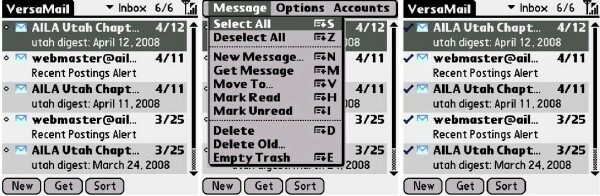
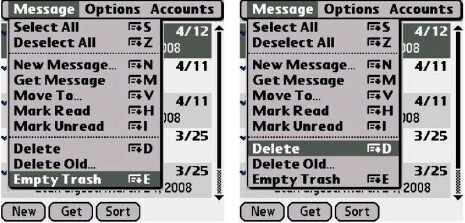

For purposes of this Tip, go ahead and use the 5-way. In case you didn't know, you can scroll in reverse! This is particularly useful once you've filled your email Trash with old email and want to empty it. You may have noticed that Empty Trash is at the very bottom of the Menu. Instead of scrolling to the bottom of the list or risking hitting a "W" or "R" when you really meant "E" on the keyboard, just push your 5-way up once and -- tada! -- Empty Trash is highlighted and with just two presses of the selector button, your work is done! FastFrank pointed out that this can save some button wear on your Treo!

Just remember, Grasshopper, that you can be a Menu Master in any menu on your Palm. It's a little tip that may be taken for granted and not fully appreciated, even by a wily old Palm veteran. Come on back next Wednesday for another Tip!


Disclaimer: Tip o' the Week makes no guarantee, express or implied, that any tip found herein will be new or particularly useful to the reader (but you can always drop a few quarters in the Tip jar for Antonio and FastFrank).



 
References
Actions
» Print this page
» Digg!


Cases

Chargers

Bluetooth

Headsets

Keyboards

Memory
Protectors Cradles
Styli


More Treo Accessories

Pen Stylus  (3-Pack)
Palm Pen Stylus (3-Pack) for Treo 755p, 750, 680
Extra Styli!
Just $14.95 BUY

More Styli
Holster II
Helix Holster II for Treo 755p, 750, 680
Sheer-Strength Technology
Just $19.95 BUY

More Holsters
Treo Screen Protectors  (3-Pack)
Screen Protectors for Treo
Protect your screen!
Just $15.95 BUY

More Screen Protectors
1200mAh Battery
Palm 1200mAh Battery for Treo 750, Treo 680
Extend your talk time!
Just $14.95 BUY

More Batteries
 Pen Stylus  (3-Pack)
Palm Pen Stylus for Treo 700p, 700w|wx, 650
Extra replacement styli
Just $14.95 BUY

More Styli
Signature Case-Holster COMBO
Case-Mate Signature Case-Holster COMBO for Centro
These unique leather case and holster combos offer the best of both worlds.
Just $39.95 BUY

More Form-Fit Cases
Legion Smartphone Case
Swiss Mobility Legion Smartphone Case for Treo
Combines elegance with functionality
Just $24.95 BUY

More Organizer Cases
Jeweled Encrusted Heart Charm
Mobi Products Jeweled Encrusted Heart Charm for Centro
Enhance and add some flare to your phone!
Just $5.95 BUY

More Charms
Shooting Stars Charm
Mobi Products Shooting Stars Charm for Centro
Enhance and add some flare to your phone!
Just $5.95 BUY

More Charms
Cupids Heart Charm
Mobi Products Cupids Heart Charm for Centro
Add some sparkle and flare to your phone!
Just $5.95 BUY

More Charms
Star Charm
Mobi Products Star Charm for Centro
Enhance and add some flare to your phone!
Just $5.95 BUY

More Charms
Discovery 645 Bluetooth Headset
Plantronics Discovery 645 Bluetooth Headset (B-Stock) for Centro, Treo
Ultimate DSP Bluetooth Headset
Just $34.95 BUY

More Bluetooth Headsets
Aqua Key Heart Charm
Mobi Products Aqua Key Heart Charm for Centro
Enhance and add some flare to your phone!
Just $5.95 BUY

More Charms


Copyright 1999-2008 TreoCentral. All rights reserved : Terms of Use : Privacy Policy

TREO and TreoCentral are trademarks or registered trademarks of palm, Inc. in the United States and other countries;
the TreoCentral mark and domain name are used under license from palm, Inc.
The views expressed on this website are solely those of the proprietor, or
contributors to the site, and do not necessarily reflect the views of palm, Inc.

Explore more: Phone different | WM Experts | Crackberry | CentroSpot | Android Central
Smartphone Accessories: Windows Mobile Accessories | iPhone Accessories | Blackberry Accessories
Centro Accessories | Motorola Q Accessories | Mogul Accessories | Tilt Accessories | Nokia n95 Accessories
Pantech Duo Accessories | Verizon XV Accessories | iPod Nano Accessories | Dash Accessories | T-Mobile Shadow Accessories
Blackjack Accessories | Xperia Accessories | HTC Accessories | Touch Accessories | Instinct Accessories

