Looking for a way to insure your Treo or Centro doesn't accidentally get turned on in your pocket, purse, or case? Looking for a "better" keyguard function than what comes standard on your device? Want a small utility, that does one thing, and does it well? Ah then, check out TopGuardEX by RNS::.
Features
TopGuardEX enhances and improves on the standard Treo/Centro keyguard by offering the following:
- When the keyguard is activated, the display can show the time (on Treo 600 and 650s only), the phone signal and battery levels, and whether bluetooth is enabled or not
- Optionally allows the hard buttons to be disabled so that only the power button will turn on your device
- Optionally disables the keyguard support when the device is plugged in or charging. The concept here is that when the device is in it's charging mode, preventing inadvertent key presses is not needed
- Very small footprint, about 12 kb. Stated to work on Palm Treos and Centros. Tested here on a Centro
Usage information
After hotsyncing the one file - tge_full.prc - let's take a look at this small utility.
The first surprise you may encounter after having hotsynced the file, is that the application is not listed in the launcher. No need to worry, TopGuardEX's settings can be found by bringing up your Treo/Centro's "Prefs" applications. Once there, towards the bottom under "Other" you'll see "RNS::TGE". Note that the readme documentation did not mention this hidden behavior.
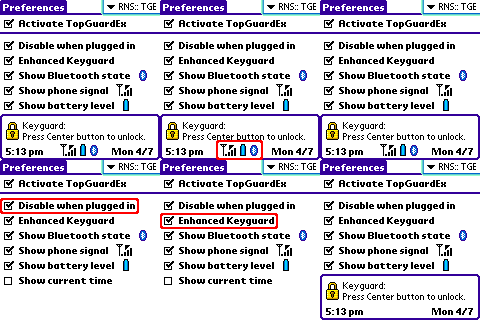
When you Select "RNS::TGE", you are presented with the main screen. This screen contains checkboxes for the various options. I'll briefly describe each here.
Activate TopGuardEX (Activate is the default). Once you have activated TopGuardEX, the following checkboxes select the various features and options you wish displayed when the keyguard is shown.
Disable the use of TopGuardEX when plugged in or charging. This is a useful option because when you have the Treo/Centro charing or in a dock, the keyguard will not be active. Since the main purpose of the keyguard is to prevent the device from being powered on accidently, it makes sense to disable it when tethered to a power source.
Enhance the Keyguard. While not obvious from the description, when this option is checked, only the dedicated power button will turn the device on, the other hard buttons will not. If you leave this option unchecked, any of the main buttons on the device will cause the unit to power on, and switch to the application assigned to that button. The benefit of enabling this option is to better prevent inadvertent power drain while in your pocket by minimizing the possible ways the device can be turned on. We all know how easy it is for buttons to get pressed when carrying a device in your pocket. One nice thing about the Centro is that most of the hard buttons are flush with the front of the device with only the 5-way nav button and the keyboard buttons sticking up.
Show the Bluetooth state (on or off). Good to see this so you won't be wasting power if you're not intending to use Bluetooth at the time.
Show the relative phone signal.
Show the battery level.
Show the current time. This option will only appear on older Treos - 600 and 650, since newer Treos and Centros already display the time on the keyguard display.
Note that in the case of the last three (bluetooth, phone signal, and battery) a small icon appears next to the selection to let you see the current value - nice touch.
While still in the TopGuardEX application, pressing the Treo/Centro's "menu" key, you will see options to display helpful "Tips" (basically descriptions of each of the above options), as well as support information in the "About" screen.
From an ease of use perspective, this software has no surprises. I was able to navigate all checkboxes and options using only the Centro's keys - no stylus is needed (something I always like to see).
The application was very stable and didn't cause any crashes or conflicts during my testing.
Once you've configured TopGuardEX (and most of the defaults make sense), to see it in action, you will of course need to enable keyguard support on your device. This is done in the "Prefs" application, in the keyguard setting. Once you have enabled the keyguard, power off your device. The next time you power on the device, you will see the enhanced display TopGuardEX provides. Basically the built-in keyguard display will now also contain indicators for bluetooth, phone signal and the battery level. Pressing the center button unlocks the device. If you choose not to press the center button, the display will remain active for around 5 seconds, then the device shuts off.
Conclusion
This is a simple to use, reliable piece of software that enhances the Treo/Centro's built-in keyguard support. Its biggest value in my opinion, is its ability to disable itself when plugged in, as well as being able to prevent accidental battery drain by preventing the hard buttons from turning on the device.
You can get TopGuardEX here for $9.95.
|
|
| Pros |
Simple utility providing one main function, thus easy to use
Optionally disabling the keyguard support when plugged in is a nice idea
Optionally blocking hard buttons other than the power button from turning on the device is a great feature
Small (12K) and very stable
|
|
| Cons |
Providing Bluetooth, phone signal and battery levels on the keyguard display is only of minor value
Priced a tad high considering the functionality and the competition |
|





