I have to admit that I've not taken advantage of RSS (Really Simple Syndication) feeds in the past. The benefit of RSS feeds is the aggregation of several news or information bits into one place, usually with small summaries of news items for your reading pleasure. In addition to collecting RSS feeds on your desktop, you can also collect RSS feeds for viewing on your Palm Centro and Treo device with mRSS version 5.0 from MotionApps. mRSS is available for download from the TreoCentral store for $19.99. Read on to see how you can stay current with news from your favorite sites while on the go!
Installing mRSS on my Centro was simple using HotSync, and after installation, I started up the software and dove right in. The interface is large enough to use either your finger to navigate between screens or the 5-way directional pad. Given that my fingers are a bit large for the Centro's small screen real estate, I opted for the 5-way. Moving around within mRSS is fairly easy with the 5-way. Pressing up and down on the 5-way highlights your options on-screen, then pressing left or right on your 5-way will trigger your highlighted selection and advance you to the next screen. Or, you can press the center button on your 5-way to select the function you want. By the way, if you plan on using any application the utilizes the internet like mRSS does, be sure you have an adequate data plan for your phone service so you don't get 'sticker shock' when your cell phone bill arrives.
Feed Me!

When you open mRSS, the first thing you will notice is the straight-forwardness of the application. Graphically, it's not fancy. It's a useful application that relies more on function than form. The main menu features "My RSS Feeds", "Settings", and "Tips". The "Tips" area simply walks you through a tutorial of using mRSS. It's particularly helpful if you are a first-timer with RSS feeds, so as you may have guessed, I found it helpful!
"Settings" allows you to change the article text size from small ("S") to XXL. You can set mRSS to update your feeds automatically and adjust the frequency of the automated updates as well. You can also delete articles in this area and adjust the 'Clicker' volume.
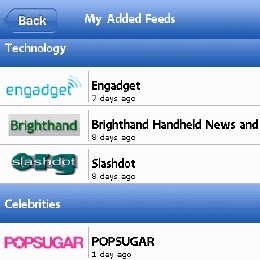
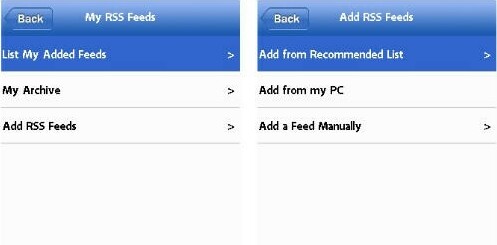
"My RSS Feeds" is the real meat in this application. It is here that you can access the list of your added feeds, view your archive, and add new RSS feeds to your list. Adding RSS feeds can be done in a few ways. First, you can add a feed manually (if you have a little know-how; many sites have an RSS icon in the address bar and, once clicked, will provide you the RSS feed web address), add from your PC, or add from a recommended list that the kind developers at MotionApps have provided for ease of use. Adding from your PC is intriguing because this allows you to surf, search and find RSS feeds on your desktop computer and then import these feeds to your Centro or Treo via mRSS. For the sake of simplicity, I chose the easiest option: adding from the recommended list. This is a great way to get started with using RSS feeds and there are many different feeds spread among several categories to choose from: anything from Cars, Celebrities, Finance, Food, Fun, Geeky (has my name all over this one), News, Technology, Science, and Sports. Once you are browsing among the recommended feeds, you can just tap "Subscribe" or select with your middle button on the 5-way. Also, you can hit the "Update" button to update the list of recommended feeds if new ones have been added.
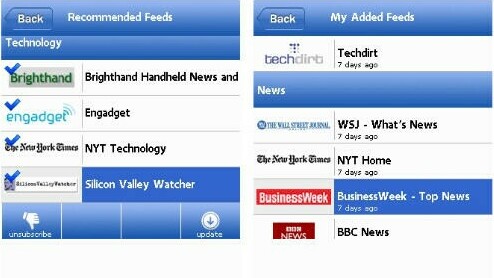
Once you've created a list of feeds, you can update your feeds automatically or manually and few the stories within each feed, very similar to viewing email. Once viewed (or not viewed, depending on your interest), you can delete items or empty them altogether. When you select a particular story to view, the screen then displays the complete text along with several options along the bottom of the screen: delete, archive, browser, and font. Delete and font are rather self-explanatory. I suppose 'archive' is also; if you press archive, then the story is added to your archive for easier navigating and viewing later. Tapping 'browser' opens a browser window within mRSS giving you access to the story as it appears on the website you have subscribed to. Unfortunately, the browser experience on the Palm is somewhat lacking, and mRSS hasn't really improved on the native browser (Blazer). It may have made more sense to just access Blazer rather than incorporate their own browser, but it is what it is. With that said, it's still a treat to be able to open the story on your feed and jump to the web site to view any pictures associated with the story (given that no pictures are viewable within the feed).

Conclusion
If you like to have nearly up-to-the-minute access to news or updates to some of your favorite web sites, then mRSS by MotionApps ($19.99) may be for you. It offers simple navigation within the application and relies less on fancy graphics and more on simple function. The real beauty of this application is the ability to get your favorite RSS feeds while on the go. Even though the built-in browser is no improvement over the native Blazer browser, it provides a nice touch to be able to jump to the complete story (with pictures, if any) on the site of origin, then a simple tap to return. If you want to be fed by feeds on the go, then mRSS is a nice addition to your Palm Treo or Centro!
|
|
| Pros |
Simple interface for one-handed use
Access recommended feeds or create your own
Import feeds from your desktop computer
|
|
| Cons |
Requires a robust data plan, preferably unlimited
Built-in browser seems pointless if not improving on Blazer |
|





