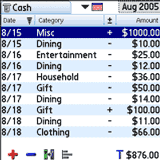
When Palm quietly dropped Expense from its suite of built-in appsand the conduit for it from subsequent versions of the Palm Desktopno tears were shed. Well, almost. A vocal minority had come to rely on the app, even designing Excel macros around data transferred from it for report generation. One now-defunct company even built an entire conduit app of its own around Palm's Expense: Informed Palm Expense Creator. I used to track all of my expenditures with it, from bills and gadget purchases right down to changed dropped in the parking meter. When Palm dumped support for Expense, I was not happy.
After a brief stint with Iambic's AllMoney (now Ultrasoft Money, then a long stint with SplashMoney, I wanted to find a tracker with a less busy interface. Ultrasoft Money has a cleaner UI than SplashMoney, but it's also one of the pricier personal finances apps out there. I decided to start with inExpense and work my way up the price curve to see which program offers the most return on investment. At $14.95, inExpense is nothing if not, well, inexpensive.
Setup Problems
For those who don't need a desktop conduit, a standalone PRC file is part of the download. The desktop installer is potentially confusing: an EXE file that installs a conduit that integrates the the Palm Desktop, not a standalone desktop app. The file simultaneously installs the desktop conduit and the device prc on the next HotSync.
When trying to run the desktop installer under Vista, I got the error dialog, "pInstaller (not responding)." After trying to wait out the process for a couple of minutes, I got anxious and interrupted the install with the Task Manager. Checking the Palm Desktop's Install Tool, I noticed that the prc file was loaded and ready for the next sync. The HotSync went on for several minutes, and I terminated it yet again. Despite the continual HotSync loop, the prc installed after all.
That left the desktop component to contend with. I found that I could no longer sync, even after uninstalling and reinstalling the Palm Desktop several times (the databases were safely backed up on the device's memory card).
A few hours later, after repairing the damage, I set a restore point in Vista, deleted the inExpense prc from the device, backed up the inExpense-less Centro image, and tried installing everything from scratch. This time it worked. The trick was to wait out the "not responding" error message, which took about five minutes; but the conduit and devices files installed correctly. Consider yourself warned.
Entering and Editing Transactions
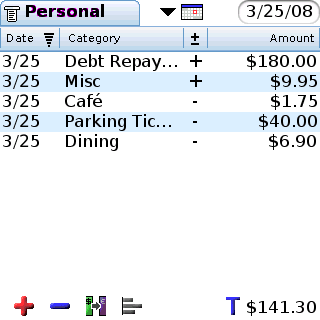
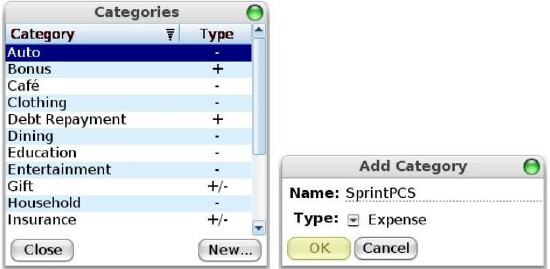
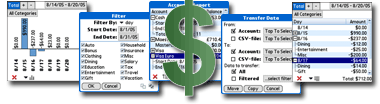
inExpense opens in a blank Transaction View window, showing a list of incomes and expenses when populated with the appropriate data. You can create your own income/expense categories from scratch or accept inExpense's 14 default categories to which new custom categories can be added.
On the top left title bar you select the account you would like to view or amend. The dropdown menu gives the option of adding a new account category (e.g. Cash, Visa, Fidelity) with entries in currency or mileage. While inExpense technically offers complete 5-way support, you have to use the Menu key to access the Account title bar (Tools | Accounts). You can't move the focus to the title bar with the 5-way.
Another quirk in the 5-way is the time range dropdown. inExpense's menu to select day, week and month view doesn't highlight the calendar icon you've selected. You have to make the appropriate selection from memory. For instance, if you're in Day View, you know that you have to navigate down two presses on the 5-way to select Month View. The date (or date range) selector is on the upper right.
The center pane is the list of incomes and expenses showing Date, Category, /- for incomes/expenses, and Amount. Below the list are /-buttons to add incomes/expenses, an Exchange icon to transfer monies or currencies between accounts, and a icon that toggles between "T" and "B" showing the turnover or balance to the right of it.
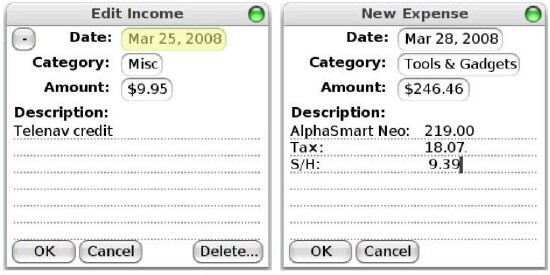
Clicking on a or - button brings up a New Income or New Expense form, in which you can enter the date, category, amount and description of the transaction. Entering an amount requires using the touchscreen, which I found a little odd, since you have to use the keyboard in the description field (no doubt a pre-Treo legacy issue). The Exchange form has parameters for date, target account for transfer, amount, conversion rate, and an automatically converted "To Amount."
Report Viewing
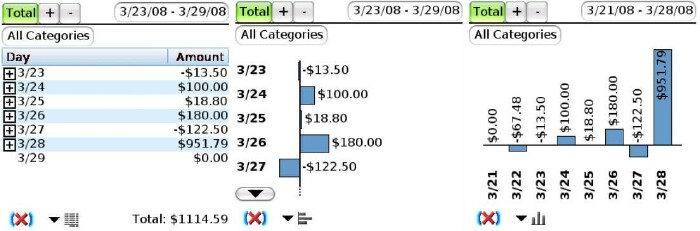
inExpense's report views offer a columnar Text Mode, and a choice between portrait and landscape Chart Modes. The text mode lists dates that expand or collapse to show or hide their individual transactions. The chart mode shows date turnovers in bar graph form. Despite the Treo's square screen, the landscape mode actually provides a better view, since there's more free space to display larger transactions on the interface's left and right edges. All report modes give the option of viewing all categories or selecting a filtered view. You can filter by day, date, month and year; start and end date; or checked and unchecked transaction categories. All categories can be additionally filtered by incomes-only or expenses-only.
Backup and Synchronization
As soon as you start entering data into inExpense, it's a good idea to back up the entries before syncing even if it's a single entry. Otherwise the inExpense folder won't appear in My Documents, despite the conduit showing in the HotSync Manager.
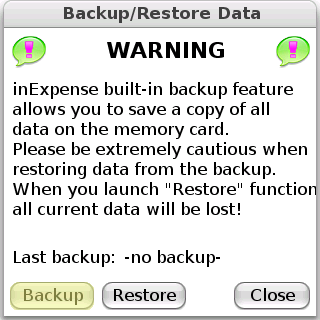
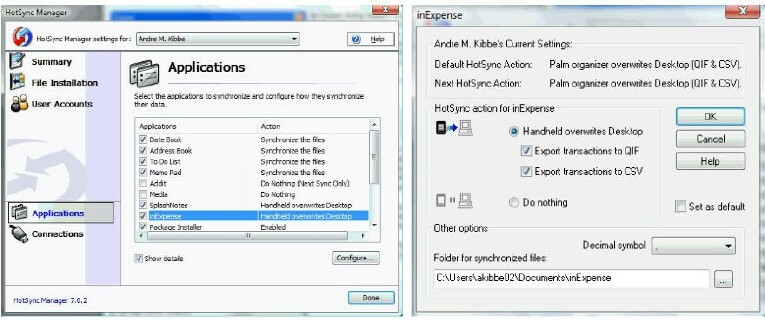 An autosave feature would be helpful, since it may not be obvious to some users that a card backup is a prerequisite to getting the data exported to Quicken/Quickbooks or Excel. More importantly, frequent backups are vital because the Restore function overwrites the current information. Unlike a word processing app, where losing a few paragraphs might cramp your style, missing a single transaction could throw your calculations off by hundreds or thousands of dollars.
Another optional safety measure to take advantage of is inExpense's password protection. You can configure it to require a password on each startup, or after a designated timeout.
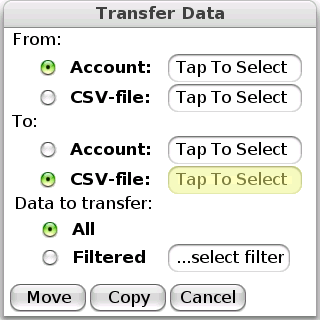
As with report views, exporting account data provides options for transferring the entire account record, or a filtered one to the target file. By default, the conduit saves each account simultaneously as separate QIF and CSV files, but either one or both can be unchecked.
Conclusion
I've used SplashWallet for years, so for better or worse, that's my benchmark. It's clear that inExpense isn't as slick as the former. It's intended to be a more robust version of Palm's Expense, and priced accordingly, not a comprehensive personal finance application. For instance, you can't wirelessly send and receive QIF data to and from your bank, as you could in SplashWallet. inExpense offers two-thirds of SplashWallet's or Pocket Quicken's functionality at one-half the price or less. If your only needs are basic tracking of expense with the ability to export to Quicken or Excel, inExpense is more than up to the task.
But Vista users beware: be sure to back up your device and set a restore point!
|
|
| Pros |
Intuitive interface
Comprensive account filtering
Password protection
|
|
| Cons |
Desktop conduit has no standalone application
Potentially problematic installation on Vista
No scheduled backup |
|





