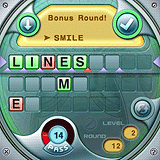
Having recently reviewed Farkle by Smartbox Design, I realized I didn't have Word Watch by Smartbox installed on my Centro, so I bought the game and thought I'd share a bit about the game for those of you who also like word games.
From the Smartbox Design Web site:
Word Watch is an entertaining word jumble game that pits you against the clock in a race to unscramble words before the timer winds down. Word Watch offers distinctive game play with added bonus rounds that give you another chance to unscramble words. Play your way through all the levels.
Let's delve into the game and check out all of its great features!
Features and Setup
Word Watch is compatible with the Centro as well as the Treo 650, Treo 680, Treo 700p and the Treo 755p. You can download the free 80-round trial from Smartbox Design or from the TreoCentral store. Registration is only $14.95 and entitles you to unlimited play! Trust me, you'll want to register this game if you are a person who enjoys word games!
Some of the key features of Word Watch are listed below:
Features:
- Three games, each with their own appeal
- Stay challenged with 18 difficulty levels
- Word List with 50,000 entries
- Special interface that helps you solve the word
- Stunning Graphics and Enhanced Sound
- Install to device or memory card
- Trainee tips to get you started
- Strategy tips to help you win
- Help section with instructions
- Unique blend of strategy and jumble solving
Having looked at the basic features, let's take a look at the game itself!
The Rules of the Game
Try to make a word using all the letters. Solving the word moves you up through levels. If you can't use all the letters, make the longest word you can. At the end of the round, remaining letters become red tiles. 8 or more red tiles and the game ends.
For this game, all you'll need is your stylus and your brain. Tap letters to move them up to the upper row. The check button will turn green if the word is in Smartbox Design's word list.
When you have letters on the upper row, you can tap the triangles between them to 'nudge' them left or right. You can move a root word to the right to make room for a prefix, for example.
Word Watch and Untimed games have a Bonus Round. See Bonus Round help under the help menu for more information.
Words entered appear in a list above. The longest word you have made this round appears at the bottom of that list.
As you work through the levels, the words to be solved get longer and longer. To be promoted, you need to solve the full-length word consistently and have a minimum number of red tiles.
Bonus Round.
The Bonus Round is key to long-term success.
If you pass, or if time runs out before you solve the full-length word, each letter that your longest word didn't use turns into a red tile.
Any round where you solve a full-length word and you have one or more red tiles, you get a Bonus Round.
During the Bonus Round, make a word at least as long as in the round you just solved, using as many red tiles as possible. Each red tile you use goes away!
With that out of the way, let's crank'er up!
Three ways to play
From the game menu, you can choose from 3 basic ways to play the game: Practice, Word Watch and Untimed - all of which I'll touch on here.
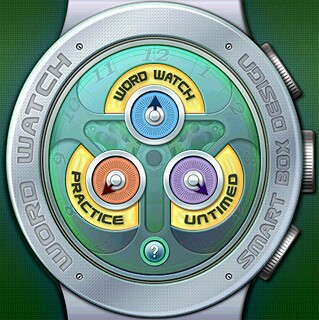
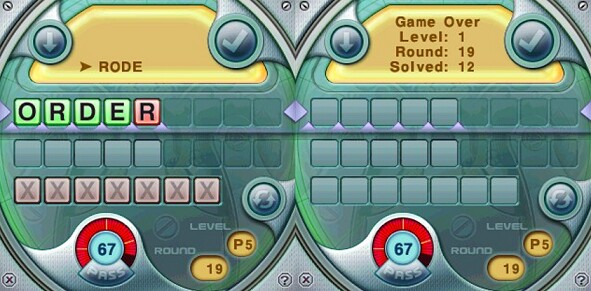
In the Practice mode, you do just that - you practice making words from the given amount of letters you select - anywhere from 5 letters to 9 letters. I found the 5 letter rounds to be most enjoyable and I really enjoy seeing just how many rounds I can complete before the red tiles fill up and my game abruptly comes to an end. In the practice mode (as well as the other 2 modes), your goal is to take the word tiles, which are scrambled, and make as long a word as you can. Should you, for instance, make a 5-letter word from 5 given tiles, you've successfully fulfilled the requirements of that round. Should you fail to make a 5-letter word, try to make at least a 4-letter word, 3-letter word, etc. Do the best you can, as the tiles you don't use turn red and are placed in the row below the main tiles. Once the red tiles row is filled, you can't miss another word or the game is over. See an example of this below.
The 6-letter rounds are a bit tougher than the 5-letter rounds, but with time, I got used to making the words with that one extra letter. WOW, did it get harder when I tried the 7-letter word rounds! I did get better after a few games, but those extra two letters really do make quite a difference. Now, if you want a challenge, play the 8 or 9 letter rounds. Whew! Talk about pressure! I was actually able to play both for a few rounds, and believe me, playing at these levels actually improves your ability on the 5 or 6 letter word rounds, hehe. Now, this was all practice, mind you.
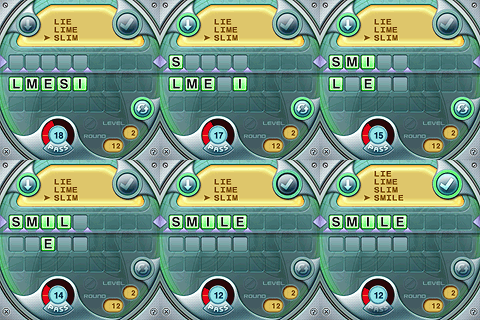
Playing the actual game of Word Watch is a bit different. The rounds consist of all lengths of words, from 5 to 9 letters. If you successfully arrange the letters into a valid word, then you're presented with the next challenge, which adds another letter, and so forth. As in the Practice mode, if you fail to make a word from all the letters, but do happen to make a valid word with some of the letters, you are penalized with the number of unused letters in the form of red tiles. Should your red tiles exceed the allowed number, your game is over. However, in Word Watch mode, after each successful word you make, you're presented with a 'Bonus Round' in which you can attempt to make a word, of set length, using at least one of the red tiles in conjunction with current tiles or other red tiles. If you're successful in making a word, the number of red tiles you used are removed, hence extending your game (hopefully). In the example shown below, I had a red tile. I successfully unscrambled 'CROSS' and was presented with a 'Bonus' round. I used the letters from 'CROSS' and combined with the red 'D' and spelled 'CORDS', which removed my red tile!
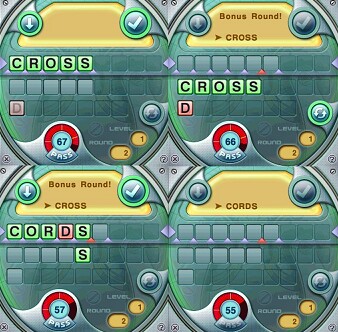
In playing the regular game, I find it's easier to remove the red tiles if I can survive to the 5-letter word rounds, then interject as many of the red tile letters into the bonus word as possible - this makes removing the red tiles easier for me!
Now, with the Untimed mode, you can play at your own leisure! No timers counting down.. just relax and try to unscramble that pesky word, taking as little or as much time as you want. I find this is even more helpful than Practice mode for helping to train your eyes and brain to unscramble the letters and make the necessary words. If the phone rings, you can answer it without having to pause the game or power off your device. As in the other modes, you'll have to solve 5,6,7,8 and 9-letter words - so, trust me, this is no push-over!
Other Game Features
Smartbox Designs made another winner when they made Word Watch. The graphics and sounds are top-notch and the game is pretty self-explanitory and the rules are simple to learn. If you have questions, however, there is a built-in Help menu which can be accessed at any point in the game by hitting the menu key and selecting Help. Here, you can read the basic game rules and a more indepth explanation of all the available moves of the game and an explanation of the bonus round.
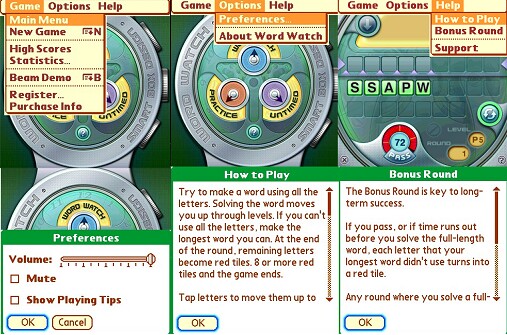
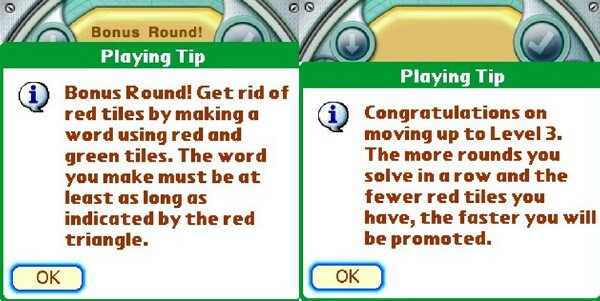
There are also playing tips you can choose to display if you're new to the game or turn off if you don't care to see them anymore - this can also be accessed with the Menu key and selecting Options, then Preferences. Above are a couple of playing tips and a sample of the in-game help screens.
Conclusion
I've played Word Watch on my Palm devices for years now. If you're a word game junkie, this game is definitely for you! There are games marketed with the idea that they will help keep your mind sharp. I can't imagine that these games could accomplish this any more effectively than Word Watch does.
Sure, there are games out there with more exciting graphics and game play, but if you want to play a game that won't wear on your nerves and has great replay value - then, Word Watch is the game for you!
I'm even digging my Tungsten T3 out of the box I packed it in when we moved recently so I can also play Word Watch on that Palm device.. IF I can locate that box hehe.
If you wish to register after the trial has expired, it's a very reasonable $14.95 to register and unlock the game. Considering the many, many hours of game play I've already gotten in just the last couple of weeks, that's basically a dollar a day and it's free to play afterwards if you want to think of it that way. What have you got to lose since there's a FREE trial? Download Word Watch and check it out for yourself, today!!
|
|
| Pros |
Great graphics
Nice sound effects
Great replay value
Can play timed or untimed
|
|
| Cons |
| I am sure eventually I could memorize the over 50,000 words in the word list (grin) |
|





