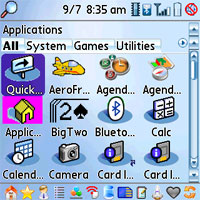
The Palm OS always gets high marks for its easy accessible nature.
Unlike some other platforms, the Palm OS doesn't hide it's applications
in nested menus. It's no wonder the built in launcher serves its
purpose quite well. But what if you want to take that ease of use to a
new level. Propel Professional allows you to even more easily select
applications to run, but takes that concept and applies it to other
Palm data as well. This review will briefly cover just what Propel
Professional can do, and whether it's worth your hard earned money.
Key concepts
Propel Professional is a replacement for the built - in
launcher. Of course it doesn't remove the original launcher - you can
still get to it, but by default, it becomes the launcher that is
invoked when you press your Palm's "Home" button. So what does it offer
over the built - in launcher? The thing that stands out the most is the
way you launch applications. You can of course select applications via
the 5-way, or the stylus, but that's not as powerful as using the
keyboard - especially if you have a Treo or Centro. In Propel, you just
need to enter the beginning character of the application, followed by
any other character contained in the name of the application. So for
example, to launch "Pocket Tunes", you would enter a "p", followed by
maybe "u". As you enter the characters, Propel filters the possible
matches dynamically, and if configured to, it will automatically launch
the application once a unique match has been entered. Trust me, this is
easier to actually do than it probably sounds. And once you start
using it, you will quickly be able to launch virtually any application
within only a few keystrokes.
Propel extends this concept beyond just launching applications though. You can also discover contacts, files, music, photos, documents,
applications on the SD card, memos, spreadsheets, etc. Also via the
creation of a special type of memo, Propel can even launch websites via
bookmarks contained within the memo. You simply create one or more memo
entries that contained URLs to your favorite websites. Once Propel sees
these special memos, it will automatically create launchable entries
for the websites.
Say it and it shall be so
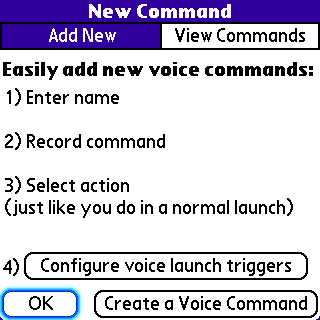
Propel Professional allows another unique way to launch things. Voice
commands. You simply enter the name of the voice command - Call Home -
for example. You then record a voice command that you want to use, and
lastly, you select the action you want performed when that voice
command is matched. The action you select can be virtually anything you
would normally be able to launch via Propel, so you can have it start
an application, dial a phone number, go to a website - you name it
(actually you speak it). In my testing, the voice recognition was
pretty good. It does allow for some sensitivity adjustments if needed.
By default, you can configure Propel's voice recognition to kick in
when you press the side button. This makes for a pretty useful feature,
especially when you need to focus your attention other than on your
Palm device - such as when you are driving.
Views
Propel organizes your screens via "Views". You can use views as
different ways to arrange the content of your Palm. You can configure a
view to display any of the following items:
- Applications (in main memory or on the SD card)
- Contacts (by first, last, and or company name)
- Bookmarks
- Memos
- Documents (including docs, spreadsheets, presentations, PDF
files, etc)
- Audio files (music files, as well as play lists)
- Photos and videos
By creating multiple views, you can easily change the displayed and
searchable content from just applications, to just contacts, or just
music files - you get the idea. Propel includes pre-configured views
for applications, contacts, files on SD cards, Music, memos, and one
called "Power User". The Power User view basically includes all types
of items. So from that view, you can select almost anything you could
possibly want to do - from launching a program, to emailing a contact,
to playing your favorite Pocket Tunes playlist.
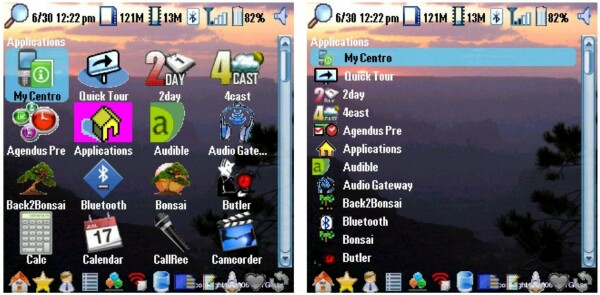
All of the views can be edited, and you can decide which Views you want to cycle through when you ask Propel to switch views. The items in a view can also be displayed in icon or list modes:
In addition to views, you can also designate "favorite" items. These
"favorites" can be configured to appear 1st in any view.
Opposite of "favorite", you can "hide" an item, and it won't appear at all. Good way to get rid of some of those never used application icons.
Customization
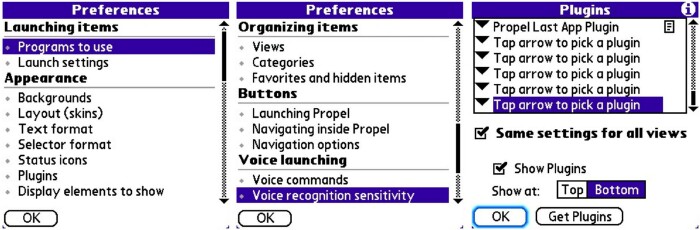
Propel allows you to customize almost every aspect of its behavior:
- Which programs to use when launching various items such as
email, phone numbers, SMS messages, websites, music files, documents,
memos, etc
- How to activate Propel
- It's background, skin layout, text sizes and colors
- Which status icons and display elements you wish to appear
- Which plugins you want to appear, and on which views. I
won't get into plugins but to say there are some pretty cool ones
available - things like a nice big clock display, a "last app" launched
display, an i-Bar, as well as integration with other popular programs
such as Power Hero, and 4cast weather.
- You can even use a set of external icons to replace the
built in application icons.
Operation
So how does Propel Professional operate in the real world? You might
expect, given all of the features and functions, that this program may
perform slowly. But you'd be wrong. I found the searching and launching
of applications and other items to be nearly instantaneous. Propel
pulls this off by keeping track of all of your items internally so that
each item can be quickly discovered. Maintaining this internal list is
done via "updates". These updates can be handled in the background,
upon demand, or after each hotsync. I allowed Propel to handle its
updates in the background, and that seemed to work well. On my Centro,
if I asked Propel to perform an update, it would take it about a minute
to scan everything in memory and on my 4 gig micro SD card. This
updating is one downside to using Propel, especially if you are adding
applications, contacts, or memos frequently - since they won't show up
in Propel's list until an update has been performed.
Propel is definitely designed to be used as your default launcher, and to be activated via the home key. However, that disabled one feature I really love on my Centro - I make heavy usage of the "hold down the
home key for a pop up list of last used apps" that the built-in
launcher provides. This feature gets disabled when Propel is configured
to use the home key.
Summary
Propel Professional provides almost anything you can imagine
in a Palm launcher. It is truly unique in its ability to search and
launch applications, contacts, memos, bookmarks etc using the
innovative approach of filtering via keystrokes. I found myself very
quickly memorizing 2 or at most 3 keystroke sequences which would
launch my favorite applications. In addition, using the voice command
capability seems really promising, especially for dialing favorite
contacts, hands free.
While $24.95 is not cheap, I think the function provided and the
unique approach makes this a good purchase. Propel is also available in
a stripped down, standard version for $14.95. The standard version is a more basic launcher, and is missing the ability to launch certain types of items (calls, emails, SMS, music, bookmarks), and the ability to use voice launching.
I would say if you have ever wished you could enhance the built-in
launcher, or wished you could more easily find content within your Palm
- check out Propel Professional. It really delivers, and is actually
fun to use.
|
|
| Pros |
Awesome approach to choosing applications, contacts, and
other content especially with a keyboard smartphone
|
|
| Cons |
Updating is necessary after installing new applications or editing content before it will appear in Propel lists.
Normal usage disables the Palm built-in [Hold home key
for list of latest used apps] function |
|





