Palm developers seem to be bundling their apps more than ever these days. Companies like MotionApps, SplashData and Resco are repacking their greatest hits at favorable pricing for users. Resco has released its $29.95 Resco Explorer in a suite with apps like Sudoku, Photo Viewer and others for $59.95. Hopefully this trend signals more than a fire sale from companies considering switching platforms.
Whatever the reason, Resco Suite packs a hefty toolkit for power users, including more than a few utilities that should have been included natively the Palm OS.
What's Included
Resco Suite is built up of six applications - five utilities and a game:
- Resco Explorer 2008
- Resco Backup
- Resco Viewer (or Resco Photo Viewer)
- Resco IDGuard
- Resco Neeews
- Resco Sudoku
It should be pointed out that what constitutes a separate app can get blurry. Resco Explorer has a backup utility that has much of the functionality of Resco Backup, and the same is true for Resco Viewer. But the standalone apps do have additional features. It looks like Resco is devoting its core development to Explorer, then augmenting the feature set of its individual functions for selling separately.
Let's take a closer look at each of the applications.
Resco Explorer
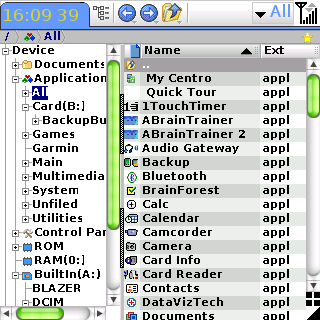
I reviewed Explorer in full a couple of months ago, so I'll stick to a basic description here. Explorer is a robust file manager with a number of tools, including a backup utility, FTP/LAN/VPN client, zipper/unzipper, document and image viewer, and launcher. It gives you a Windows Explorer-style map of your device, and supports the same file operations you would expect from the desktop: copying, moving, renaming, deleting, and more. It even has context menus - the equivalent of right-click operations - by tapping and holding on files.
Its hallmark as a file manager is that it actually works as advertised. For instance, many file managers are theoretically capable of copying any file from the memory card to the device, but some files never seem to transfer in practice. For instance, if you try to copy the PRC for the DUN hack to main memory with an app like Filez, it never works. With Explorer it transfers without a hitch.
You can do all sorts of cool things, like installing Palm apps downloaded over the air directly from their zip files. You can browse files on your computer via Bluetooth, you can FTP files via Bluetooth to your computer or a remote server (Resco includes a 1GB account at DriveHQ with your purchase). You can set file associations to define which app opens which file - e.g. whether a text file opens in Documents To Go, or natively in Explorer. If you're hardcore, you'll definitely want this app.
Resco Backup
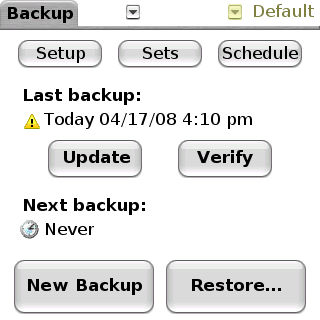
As mentioned, Explorer does have a basic backup utility, which is sufficient for casual users. Though it has a couple of more-than-minimal features, like file selection/deselection, adjustable compression and password protection, it's not on the level of BackupBuddyVFS or Resco Backup.
Resco Backup adds scheduling, incremental backup, definable "project" groupings (Contacts, Phone Data, Preferences, Camera Images, or a customizable set). One feature I like is the "Exclude List," which came in handy this week. I downloaded the latest upgrade of pTunes, and immediately noticed dropouts in Bluetooth music streaming - the latest pTunes doesn't appear to mesh well with Softick Audio Gateway. So I added pTunes to the Exclude list, backed up the rest of the device image, and performed a hard reset, leaving the ROM version of pTunes intact. The Bluetooth problems disappeared at once.
Included in Backup is Resco Locker, which helps prevent memory leaks from background apps that don't play well with the NVFS file system. MMNotify (a Versamail notifier) and Softick Audio Gateway are a couple of apps notorious for freezing or crashing the Treo that benefit greatly from Locker.
Resco Viewer
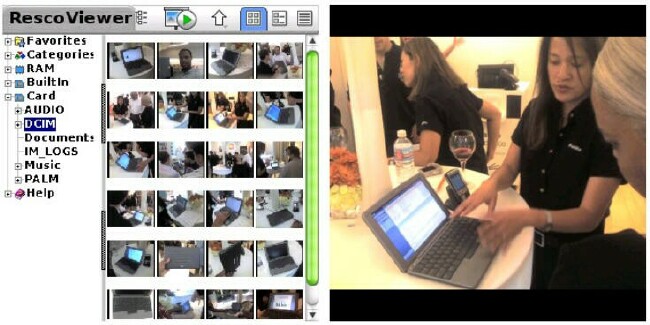
Resco Viewer (or Resco Photo Viewer, as the company sometimes refers to it) goes way, way beyond the functionality of Resco Explorer's native viewer. Both support JPEG, BMP, GIF, Tif/Fax and PNG file types. Where the native viewer allows you to toggle between Tree and Icon views, Resco Viewer adds a Thumbnail view whose image size can be adjusted. The EXIF metadata, if it exists, can also be viewed for each picture.
You can set three zoom levels when viewing individual images: Shrink to Fit Screen (wide screen), Shrink to Fill Screen (full screen), and Full Size (no shrink). You can encrypt an image, which will replace the thumbnail with an icon denoting its protected status. You can also resize (downscaling by up to 8x), crop, rotate and further compress an image, or adjust its contrast, brightness and gamma levels.
The Custom Slideshow (CS) feature is a little more robust than post 680/7xx Treos. Like the slideshow tool in the Treo's Pictures & Videos app, you can add background music, define the slide delay interval, and choose from several transition effects (like dissolves and wipes). Unlike P&V, with CS you can choose the length of each slide, have text slides, overlay text captions on images (not just stylus-drawn annotations), and choose from a few more transitions (like stripes and spiral).
Resco IDGuard
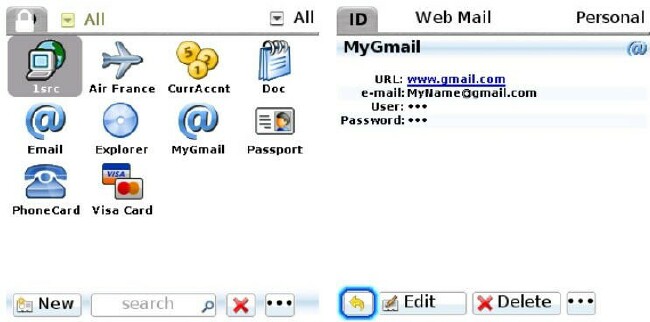
IDGuard allows you to create more than one database, which can be thought of as a user profile. For instance, you can make a "public" database to share with another user (along with the password, of course), and a personal database for the information you want to keep to yourself.
For anyone who draws a blank when trying to think of good uses for an application like this, the first screen that comes up after creating a database is an array of 10 sample records: things like "MyGmail," "Passport," and "Visa Card." There are even more predefined templates to choose from, like "Bank Account," "Voice Mail," and "Web Account"; and you can create your own templates as well. These can free text (like memos) or have defined fields like PIN, Name, Account#, etc.
Notes and binary files can be attached to a record, complete with compression and encryption. When attaching a file, IDGuard gives the option of deleting the original, so that if the file's default handler was something other than Resco's, it can't be used to preview it.
Resco has no desktop client of its own for IDGuard, but you can import XML or CSV records from KeePass, CSV records from Adarian, and vID or PDB records from SplashID.
Resco Neeews!
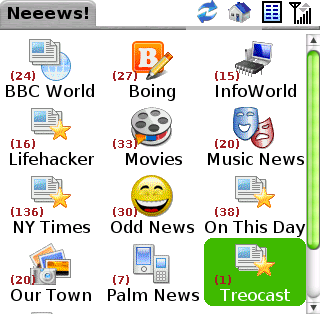
Resco avoids calling this an RSS reader, but that's what it is in essence, supporting RSS and Atom feeds, and even podcasts. Each "Newspaper" is a feed that allows you to adjust how far back in time you want articles to update from (e.g. last 24 hours) and the number of articles per feed. The articles usually consist of a collapsible summary paragraph below a headline that links to the parent article, which opens in your default browser.
Neeews! has 13 feeds pre-installed by default, like BoingBoing and the New York Times. The feeds can be displayed in an icon or list view, and any feed can be added to your default launcher, just like an app. You can add from about 500 predefined feeds, search for new feeds, or add dynamic feeds. Dynamic feeds are feeds based on search terms - for instance, a feed of Flickr photos on the latest übergadget announced at MacWorld this morning, or the latest blog posts on it as aggregated by Technorati.
OMPL files (list of feeds for newsreaders) can be imported and exported. The podcast management is great for feeds once they're added. I had trouble finding podcasts using theapp's search tool, and had to grab the URLs of the podcasts I wanted from my laptop and manually add them to my Newspapers. That shouldn't be a problem if you already keep your podcast feeds in your OMPL file.
Resco Sudoku
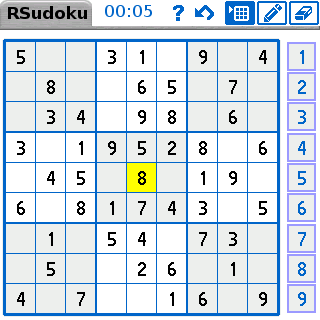
Unlike the Astraware version bundled with the Centro, you're immediately on the clock when you start Resco Sudoku, which gives the game a sense of urgency and heightens the fun. It starts out in a Very Easy setting that's true to its name, it's easy to play the game for the first time while learning Resco's interface for it. The layout is nice, taking up a little more of the screen than many versions I've seen, giving it a clean look. There are also a few additional skins in the installation folder if you need to spruce things up.
Resco has all the usual Sudoku features: pencil marks, hints and keyboard shortcuts. There are six levels of difficulty to choose from, or you can create your own game. Your playing times are ranked at the end of each game from fastest to slowest. You can see these on a statistics page with your average playing time.
Conclusion
Let's do the math. Explorer, Backup, Photo Viewer, IDGuard, Neeews! and Sudoku are $29.95, $14.95, $19.95, $19.95 and $14.95 respectively: $99.75. Resco Suite is $59.95, and these are all excellent, non-trivial apps. If you don't already have Explorer, it's worth getting the bundle over the standalone version. It's still amazing how much power and utility is left in the Treo once you have the right applications to get under the hood.
|
|
| Pros |
Robust file management for power users
Better value than purchasing standalone apps separately
Less buggy than free alternatives (like Filez)
Excellent networking options
|
|
| Cons |
Interface has a learning curve
Unrelated apps (e.g. FTP, photo viewer, Sudoku)
No desktop client for IDGuard |
|





