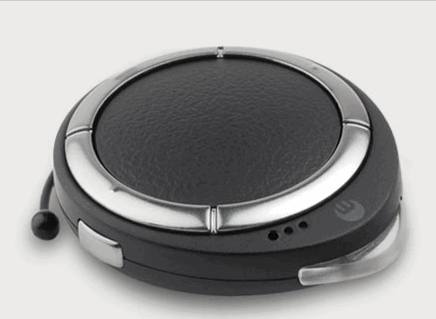
Some Bluetooth headsets are just too advanced for their own good. Companies overzealously design their products to reconcile conflicting agendas. They try to provide many features while, in an effort to keep the design streamlined, provide too few buttons and status indicators. For the end user, who just needs the headset to work with the absolute minimum learning curve, feature-laden headsets are often a losing proposition.
Comparing the Bluetrek UFO's interesting features on the spec sheet with a photograph of the headset's sleek design, it would be easy to assume that more functionality has been shoehorned into the unit than users can manage without memorizing multifunction button press sequences. But Bluetrek has a couple of interesting tricks up its sleeve.
What's Included
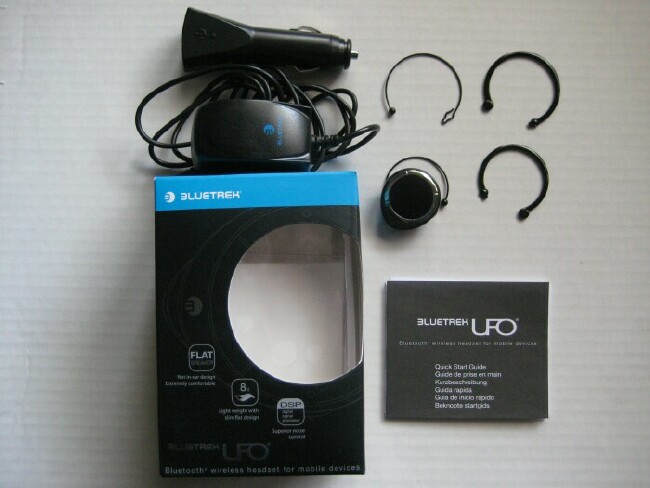
Unlike a few competitors with headsets in the same price range as the UFO, Bluetrek hasn't cut corners with accessories. In the package are:
- The headset
- 2 sizes of metal wire earhooks
- 2 sizes of plastic earhooks
- A wall charger
- A car charger
- A USB charger
- A Quick Start Guide
Notice that there are three chargers. You're not stuck with a single proprietary wall charger, a common cost-cutting measure these days. The standard-to-mini-USB cable is about four inches, making it as convenient to use with a laptop as it is with the car charger. The cable is thick enough to stand straight up and keep the headset suspended while charging so if you don't like wearing a headset not in use while driving, you can keep it mounted on the car charger, where it's easily accessible for incoming calls.
Setup
Using the UFO for the first time wasn't exactly the out-of-the-box experience that you get from Jabra or Plantronics. It was completely uncharged. It took a couple of hours to charge the battery, and unlike many headsets, the red indicator doesn't turn another color when charged; it simply turns off, making its status less confusing. The unit is rated at six hours of talk time, eight days of standby time.
With no autopairing, you have to press and hold the Talk button for about 7 seconds until the indicator flashes red and blue. Not seeing the indicator alternate to blue, I inadvertently shut the unit off a couple of times. Once the Treo's Handsfree Setup detects the Bluetrek, everything is normal enter the four-zero passkey, and you're off. Whereas I can pair a new Jabra headset in about 30 seconds, the Bluetrek took 3 minutes of trial and error.
Design and Comfort
Bluetrek have smartly laid out the control and indicator components to closely follow the contour of the headset's teardrop design. The company's press releases compares the UFO's size to a quarter, but it's actually a little larger than a half-dollar. The translucent indicator bevels out slightly from the extended side of the teardrop, while the rest of the body is symmetrical. The headset can be worn on either ear, and while the earhook mount rotates enough to adjust for comfort, it doesn't swivel laterally; you have to remove the earhook and replace it if you need to flip it 180 degrees.
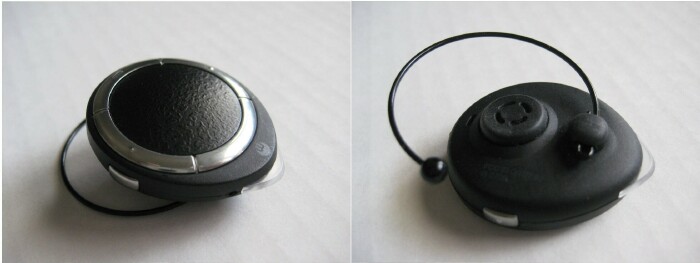
In a minor but awkward design choice, Bluetrek has mounted the microphone hole so that if the lettering on the inside is upright, the hole is on the top side, away from your mouth. So it's better to wear the headset on your right side, with the lettering upside-down. The volume-up button is on top when worn in this fashion.
The best design choice is the speaker, which is not in-ear, but slightly protruding from the body of the unit. With the earhook to hold it, the headset rests comfortably on your ear rather than in it. As someone who's perpetually annoyed with earbuds and eargels, I can't stress enough what a relief it is to wear a design like this. The only thing holding me back from making the UFO my default headset is needing A2DP stereo.
Of the four earhooks, I found either size of the two plastic ones to be vastly more comfortable than the wire ones.
Assignable Favorite Buttons
The ring on the inside of the teardrop is a fantastic design. It's split into four crescents, three of which are buttons. The one to the rear is the Talk/End button, and the two to either side of it are dedicated "favorite" buttons. Each stores a pre-programmed number that you store in the Treo using the following format: [favorite button number (1 or 2)] [S] [10-digit number] [T]. So two stored favorites representing, say, your work and home numbers would look like:
- 1S2121234567T
- 2S3102345678T
Map the numbers to the headset buttons by holding the volume-down button for about three seconds. The headset beeps and flashes once to confirm storage in position 1, twice for position 2. And now you can call She Who Must Be Obeyed anytime, with the touch of one button.
Placing calls from the headset is a pretty standard procedure. My only gripe is having to press-and-hold to redial the last call or worse, to reject an incoming call. It's too easy to not hold long enough and inadvertently accept the call, or to hold too long and turn the headset off.
As you might expect, voice dialing is supported enabled by your software or network.
Voice Alerts
What is that triplet of beeps interrupting my conversation once a minute (he asks, consulting the manual)? Oh, a low battery. Is the phone really off (taking headset off to look at the indicator)? Uh, no I guess I have to hold the Talk/End button down for another 38 seconds.
Memorizing beep sequences might be fine for protocol droids in faraway galaxies, but not for me. To remedy this, the UFO uses voice prompts for the following:
- Low battery recharge notification
- Reject a call
- Call a favorite number
- Redial the last number
- Headset connection status
Granted, when you own a headset for any length of time, you'll learn to interpret beep indicators, but after experiencing voice alerts, you'll realize how much more convenient they are.
Sound Quality
This one is something of a paradox. The distortion is light, but more noticeable than other headsets in the same price range. But somehow, the voice on the other end is actually more audible. The headset seems to amplify the bass through the midrange, making the bulk of the voice rock solid, so the slight buzz during incoming sound is more of an issue for audiophiles than callers. A couple of mitigating factors are the noise reduction, keeping ambient sound to a minimum, and a highly effective echo cancellation much needed on my Centro.
Conclusion
Most rectangular and oblong headset form factors are distracting, but the UFO contours nicely to the human ear, blending in naturally. More importantly, the fit on the ear, with the device's relatively flat speaker, makes the UFO one of the most comfortable headsets to wear on the market. If you don't need a stereo headset, the ergonomics alone are enough reason to consider the BlueTrek UFO before competing models.
The ease-of-use can't be beat. Between the favorite buttons and the voice alerts, the UFO has the same flat learning curve of budget headsets, but with the sophistication of those in its own price range.
|
|
| Pros |
Includes wall, car and USB chargers
Dedicated buttons for two preprogrammed numbers
Voice alerts instead of beeps
|
|
| Cons |
Press-and-hold required to reject or redial calls
Slight distortion in upper midrange |
|





