When I was growing up, two magazines that were always on our coffee table were Road & Track and MotorTrend. Needless to say, I spent many a rainy afternoon thumbing through them gazing at all the cool cars. So it was curious to me to find that there was such a thing as a Bluetooth headset that was branded MotorTrend. Seriously
Did the magazine guys get into the headset business because headsets were being used in cool cars? Or maybe it had something to do with its Max 4x. Perhaps that feature enabled the headset to work in especially noisy environments, like the pit at a raceway. Of course, that got me thinking about my Jeep
my noisy Jeep. This headset (Model MT-BT10) had an over-the-head design and claimed to have extreme noise canceling capabilities. It pretty much beckoned me to try it out.
Getting Started:
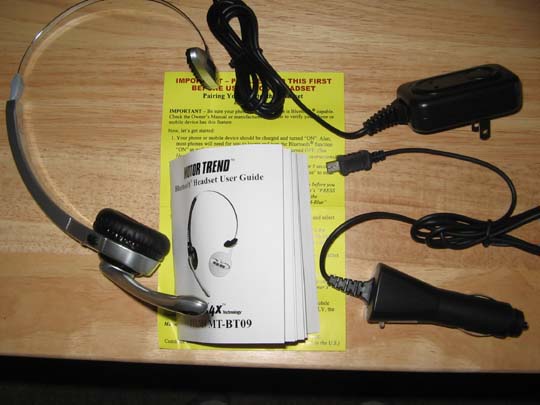
It showed up in the kind of blister package that were all familiar with when it comes to over-the-head style of headset. After taking my box cutter to it, out came the MT-BT109 Bluetooth headset, a user guide, a travel charger and a car charger. So first things first, I plugged it in to give it some juice. The connector is located on the earpiece underneath a rubberized cover.
Just to play it safe, I let it go overnight. The next day I went to town.
Note: The MT-BT109 comes with a long lasting rechargeable battery that can be in use up to 8 hours before needing a recharge.
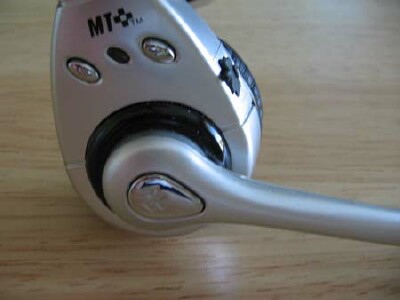
On the boom piece where the mic is located, there is a Function button that has the Bluetooth symbol on it. That button does pretty much everything (perhaps it should have been called the Everything button). If you press and hold it for 2-3 seconds, it powers up and the little blue light above the Function button will flash.
Pairing was very straightforward. From the Off position, press and hold the Function button for 5 seconds, which causes it to enter pairing mode (alternating red and blue light flashes). Just like other headsets, the magic code is 0000. I was in business in a flash (pun intended).
Design/Comfort:
I have to say that in general, I found the over-the-head design comfortable. I wore it with the earpiece on my right side and the grippy thing just above my left ear.
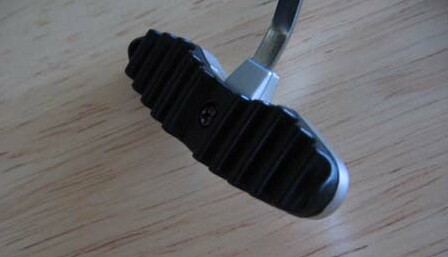
Speaking of comfort, lets discuss that grippy thing. If youve worn over-the-head style headsets, you know that on the opposite side of the earpiece is usually a padded, oval-shaped piece that helps hold things in place. For the MT-BT109, this piece was made out of rigid plastic with ridges (I kid you not). On a comfort meter of 1 to 5, this was like a 2. What were they thinking?
The earpiece side was amazingly comfortable. The boom with the mic was easily adjustable. And the Function button, which was nearly the size of my Centros D-Pad but teardrop shaped, was easily accessible. Tap on to answer or engage your phones voice command system. Tap off to hang up. Pretty simple stuff.
However, the volume buttons were an entirely different story. They are tiny and to me, kind of annoying. In fact, I found myself using the volume control on my Centro and LG phones rather than muck with those volume buttons. Fortunately, I didnt need to adjust volume too often.
Circling back to the Everything/Function button, I did have one issue. It was almost too easy to push and as a result, I often hung up by accident when doing something as innocuous as adjusting the headset. Oh well
The Jeep Test:
When using it around the house, I found the Motor Trend MT-BT109 actually pretty cool. Mostly that was because it was easy to put on straight away to answer a call. Im not one to keep a headset on all day. I had found that while using the Jawbone, getting it situated on my ear quickly was a hassle. That wasnt the case with the MT-BT109.
So I cut to the chase and jumped into my Jeep to really give it a try out. I was especially curious to see if the MAX 4x technology, which was supposed to block out 4-times the external environmental noise, REALLY worked.
The results were mixed. I called my brother in New Jersey and could hear him fine as I was barreling down the freeway. However, after a few minutes, he said he had to go and that we should talk again when theres less wind. Aha! Looking at the headset and comparing it to my corded umeVoice theBoom O, I saw the problem.
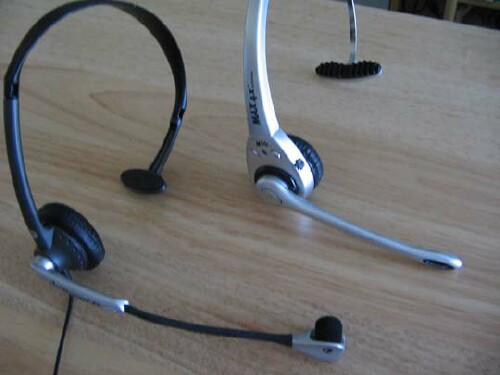
The mic on theBoom O had a wind shield/screen (looks like a fuzzy little ball). The Motor Trend MAX 4x was bare. Who would have thought a fuzzy ball could make so much of a difference?
Duly noted, the MT-BT109 has become my house Bluetooth, with the Aliph Jawbone being the Jeep specialist.
Conclusion
Selecting a Bluetooth headset is a very subjective exercise. There was a lot to like about the Motor Trend MAX 4x (thus the reason has become my house headset). And there were areas definitely in need of improvement like losing that horribly uncomfortable piece of rigid plastic that keeps the over-the-head headset in place. Seriously, it just needs to be soft like the ear pad on the speaker and Id be in headset heaven.
As for how it is marketed, I find myself scratching my head. This Motor Trend headset is actually from a company called PowerMate Cellular Inc., which is a division of Powercam, Inc. of Brooklyn, New York (got that?). Theres nothing really car-related about it, except some folks will use it in a car (but not a top-down Jeep). In fact, the only motor thing about it was the smell. Im not kidding when I say that when it was first removed from the blister pack, it had a sort of rubbery new tire smell. Now I suspect that it has something to do with that rigid plastic piece I despise.
The PowerMate Cellular MT-BT109 headset works well and may be ideal for occasional Bluetooth headset users who dont want to look like a borg or are uncomfortable having a headset clamped to an ear. Dont let the Motor Trend name trip you up. You dont need to be a gearhead to enjoy using this headset. But if you do get one, for now, I highly recommend heading to Longs or CVS and getting yourself some moleskin to pad that rigid plastic piece.
|
|
| Pros |
Easy to use
Lightweight
Great Bluetooth option when you don�t want something dangling from your ear
|
|
| Cons |
Needs a wind shield/buffer for the mic
Rigid plastic piece is uncomfortable |
|





