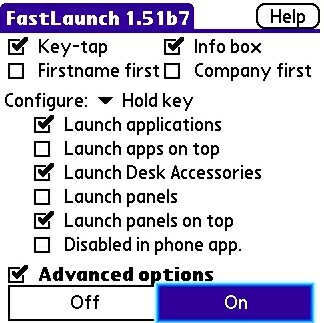
One of the things that I always liked about the new favorites pop-up menu on my former Treo and current Centro is that you could access your most recently used programs quickly and easily. One of the things that I DISliked about this feature is the lack of customizability. Enter FastLaunch.
Operation & Use
For those users absolutely obsessed with getting the maximum usability, FastLaunch might be for you. This small program takes your Palm OS Treo or Centro to another level. Incorporating a multi-tasking-type feel into it, you can quickly switch into and out of programs.
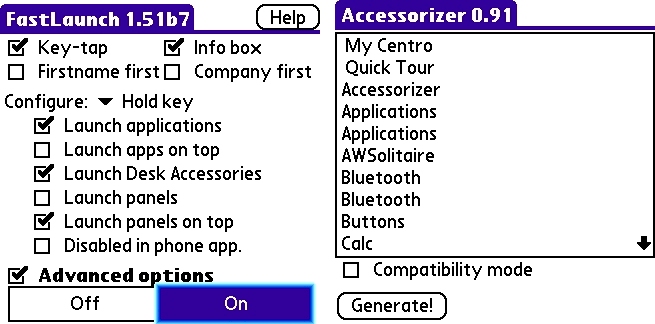
There are two components to the FastLaunch program the FastLaunch program itself and the Accessorizer. You actually do not need to install the Accessorizer to use the FastLaunch portion of the program. However, in order to run programs on top of one another (much in multi-tasking fashion) you will need to have the Accessorizer installed.
Also included with the program are four Desk Accessories: PrintIt (print screen to compatible tcp/ip network printer), ScreenDumpDA (save screenshot to SD card), NightMode and Reset. Just a quick refresher here: a Desk Accessory is a small program that can run on top of the application that is currently loaded. This allows for quicker access to simple information without completely exiting out of a program.
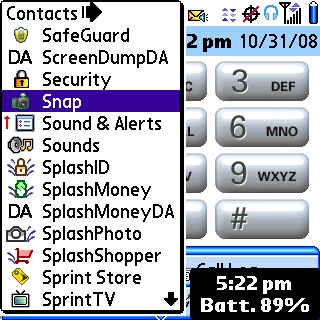
The beauty of this program really lies in its simplicity. There are two basic ways to use it. When you are in a program and need to switch to another you can simply hold down the first letter of the program that you are wishing to access. This will bring up a list of all programs that start with that letter. If you are searching for a Contact that starts with that letter, FastLaunch also gives you a list of contacts to choose from as well. In this fashion FastLaunch is more of a launcher. This will quickly launch the selected application but will not allow Multi-Tasking.
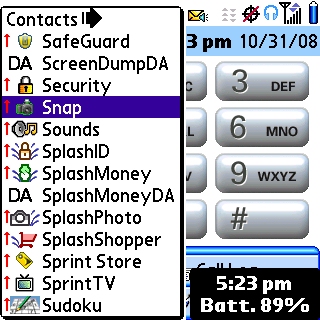
In order to take of advantage of the multi-tasking ability, press the option key first (you know that little white button on the lower left-hand side of the keyboard?) and then hold down the first letter of the program you wish to launch. A little red arrow will show up next to each program listed and this will actually launch the program on top of the one that you are currently using. To exit back to the previous application, simply press the home button. Pretty slick, eh? It certainly comes in handy when you need to look up information but dont want to lose something that you might be currently working on. This functionality works with most applications, however, there are a few that you will find it does not (Resco Explorer is one such program.)
Conclusion
As I mentioned before, the beauty of this program is its simplicity. Its a great find at an amazing price. It takes a little bit to get used to what you can do with it, but this will be time well spent. FastLaunch is a must have for your Treo or Centro especially if you love to customize your phone with functionality that Palm should have put in in the first place!
|
|
| Pros |
Save precious seconds loading programs
Quickly switch between applications
Small memory footprint
|
|
| Cons |
Documentation is limited to one help screen
Multi-Tasking is not compatible with all programs |
|





