
For many Treo users, third-party launchers seem like a solution looking for a problem. What's so hard about hitting the home button and navigating to the app you want? Even the highly touted feature of most launchers, the ability to run applications directly from the SD card, seems like a capability coveted only by geeks who desperately want their Treos to mimic a PC, with the memory card acting as a hard drive.
Of course, many casual users woefully underestimate how many apps and files they'll accumulate over the lifetime of their Treos. There are basically three types of smartphone users in the world: ones who treat their devices like feature phones, never installing an application, document or media file; power users whose phones are more tricked out than most people's desktops; and everyone else.
Since those in the latter category never consider themselves power users, they often never get to experience how much easier using a Treo can be with a good launcher. The fact is, if you have to scroll on the default launcher screen to get to an app, or if you handle documents and media files of any kind, you owe it to yourself to at least demo one or two launchers.
Design and Setup
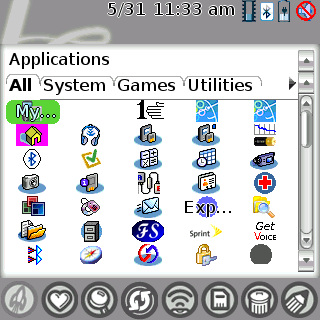
A launcher is for launching things, right? Well, not as the makers of Initiate define launching. The app has two primary navigational modes: browsing and launching. In browsing, you highlight your way through app and file icons within a category, then make your selection what standard launchers do. In the mode Initiate calls launching, you type in the name of the app or file you're looking for. This turns out to be faster than browsing in most cases, since you usually only need to enter the first couple of name's letters to hit pay dirt.
Initiate comes in two flavors: Initiate and Initiate Pro. The standard version of Initiate offers the basic functionality we've come to expect from an application launcher: tabbed categories, drag-and-drop transferring of apps between categories, skins, custom backgrounds, and the ability to launch apps either from RAM or the SD card. The Pro version launches document and media files from assignable applications, has support for plugins, dials and launches applications by voice, and can use Contacts to initiate calls, emails or text messages. This review is based on the Initiate Pro.
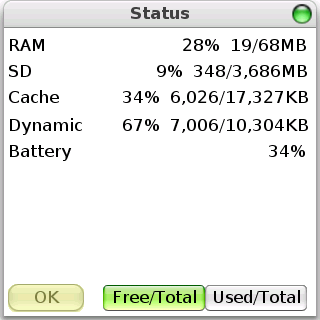
Initiate starts in the Applications View, which is similar to the native Palm launcher. The status icons are also similar, but only function as single block. In other words, tapping the Bluetooth icon doesn't take you to the Bluetooth app; all of the icons open a Status page that numerically reports RAM, SD, Cache, Dynamic Memory, and Battery usage. The whitespace on the left of the row shows the letters you type as you're searching for a file or app. Below this is a row that shows you which view you're in. The views are explained shortly.
Above the app icons are the tabs for categories. I've never found this feature terribly useful for viewing purposes in any launcher (only four tabs can be seen at a time), but it does make it a little easier to reassign an app to a different category: you just drag the icon to the desired tab.
The first button with the home icon is what brings you to the Applications View if you're in another view. The button immediately to the right is the Power User View. When this is selected, the launch shows everything that can be launched: every contact, every MP3, every memo, every application, and so on. The next button, Select View, allows you to select your view from a list instead of the buttons. The star icon in the middle, Favorites, is a view of a short list of apps empty by default that you manually add to avoid having to look through dozens of icons to find your most used selections.
The Autolaunch button toggles an unglamourous but exceptionally practical feature, Autolaunch. Autolaunch lets you type in 2 or three letters of any application or file for Initiate to launch automatically. I found the results to be sporadic with MP3s, mainly due to inconsistent tagging prior to transferring them to my Centro (some titles begin with track numbers). But for the most part, I concentrated on the main function I was interested in, which was launching applications, which worked fabulously. For instance, I can launch Softick Audio Gateway (which now has an embedded launcher for pTunes) by simply typing "au." With most files and apps, however, Hobbyist Software recommends searching by omitting the vowels, which makes sense when the names share similar spelling.
The next button is Update List, which scans the SD card and internal memory for changes. The icon on this button seemed to cycle a lot, since I have an 8GB microSD card that's nearly full. Then there's the SD card button, which allow you to copy or move a selection to the SD card, or access the default file manager. This brought up Filez on mine, but Initiate makes it easy to change the associations for any function, so I switch the file manager to the much more capable Resco Explorer. The Beam button that is self-explanatory, as is the final button, Delete.
Voice Launching and Dialing
Full disclosure here: I've never been a fan of voice activation, voice dialing, voice recognition, or any interface that requires a microchip to figure out human idiosyncrasies. I like knobs and buttons. I don't have the patience to repeat myself when I could just hit a preset in a fraction of the time.
But as voice activation goes, you could do far worse than Initiate Pro, which costs about the same as most device-native voice control apps, but throws in a launcher to boot. Up to 15 contacts can be set to voice dial, and an unlimited number of apps and files can be voice launched.
According to the manual, you can configure Initiate to voice dial and voice launch without the actual launcher open, but I couldn't find the trigger setting in the "Launching Initiate" preferences where this was supposed to be changed. By default, the side button is supposed to trigger voice control, but I have that mapped to Blazer, and I like it that way. To complete this review, I changed the side button to launch Initiate and set a voice tag for Web (Blazer) and a couple of phone numbers.
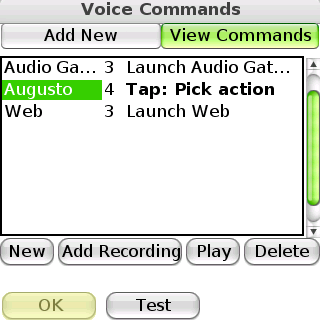
The voice dialing is a little tedious to set up, since it's recommended that two or three recordings of each voice command be made, but the result is that it's pretty accurate without manually adjusting the strictness of the recognition algorithm.
Skins and Backgrounds
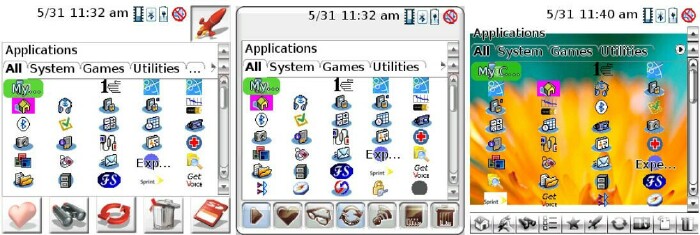
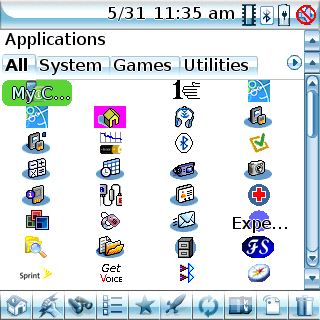
No launcher would be complete without some customizable eye candy. Both versions of Initiate support skins and backgrounds, as well as a number of adjustable parameters: the number of columns in List or Icon Mode, Show/Hide Text, Transparency, and Single or Double Resolution (double being necessary to see more than three columns of icons). Here's the default look of Initiate:
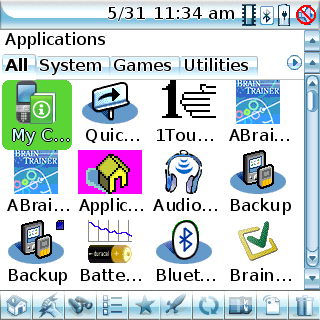
And here's Initiate in my preferred setting: double resolution, four-column icon mode, hidden text:
Hobbyist Software's website has 10 free skins you can download, as well as instructions for designing your own skins.
Conclusion
Launchers add power, convenience and aesthetics to a vanilla setup, so after using an app like Initiate Pro, it's hard to go back to the Palm's native launcher unless you're very set in your ways. For some users, the VoiceIt-powered voice launching and dialing might be reason enough to use Initiate, with the launching and skinning features as a bonus. Unless you're unmoved by voice activation and don't need file launching, I would recommend the Pro version. But at least demo it to see if you can do without the extra layer of neat features.
This review was based on Initiate Pro version 3.42.
|
|
| Pros |
SmartSearch and Autolaunch enable fast launching by keyboard
Excellent voice dialing and voice launching of apps
Extensible skinning and plugin architecture (Pro only for plugins)
Launch calls, emails or SMS from Contact (Pro version)
|
|
| Cons |
Cannot launch apps outside of Initiate (e.g. from Phone app)
Default layout wastes screen space
SmartSearch for MP3s is inconsistent
|
|





