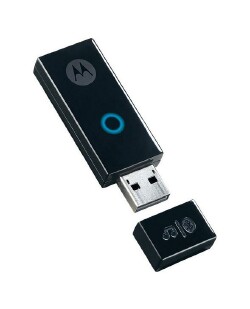
So, you have those Bluetooth headphones/headsets for use with your mobile phones, and they're good for use with such devices. Take my Samsung SBH700 Bluetooth headset for instance. I use it with my Treo 750 a lot and really enjoy the sound. But, wouldn't you LOVE using these headphones or headsets with your PC? Wouldn't it be AWESOME to be able to listen to your music, streamed wirelessly to your Bluetooth headphones? Well, Motorola has just the answer for you! I recently acquired the Motorola Bluetooth Stereo PC Adapter D200. This adapter could be just what you're looking for. Read on!
From the Motorola Website
Features:
- Bluetooth Class 1
- Glowing multi-color indicator light to show status
- 58mm x 20mm x 8mm (2.3 in x 0.8in x 0.3in)
- 10g (0.3 oz)
- Plug-and-Play easy setup with no software to install
- EasyPair simplified setup between Bluetooth devices
- Saves the last five connections simply push the button to switch devices
- USB connector
In the Box
Since the Motorola D200 requires no software installation, the only contents included were the adapter itself, a quickstart user guide and a safety information booklet. The user guide comes in both English and Spanish versions and is quite comprehensive without going into unnecessary details and includes a short trouble-shooting section with a support telephone number and a link to Motorola's Web site. The D200 is about the same size as many flash drives, approximately 2.3" in length and weighs only 10 grams or about 0.3 ounces.
Features and Specifications
The D200 is plug-and-play and has a range for Bluetooth class 2 devices of 10 meters or around 33 feet. For class 1 devices, the range is extended to 100 meters or 330 feet - pretty impressive.
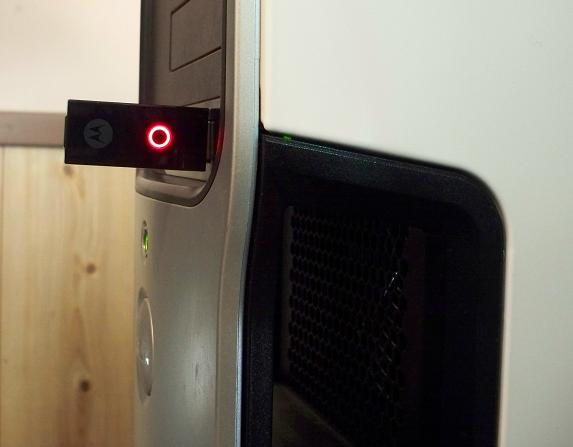
The D200 can be paired with multiple devices, up to 5 in fact. I paired it with 3 of my devices to test this and had no problems at all. Once you've paired with 2 or more devices, you simply push the button on the end of the D200 opposite the USB connector for 3 seconds or until the light begins to quickly flash. The current connection is dropped and the D200 searches for the other devices which have previously been paired with it. If, after 2 minutes, no device is found, the unit goes into idle mode, and the indicator light will glow red. I like this feature, as you can basically shuffle through multiple devices pretty quickly and dependably.
Although I don't care for VoIP applications, the D200 is capable of routing audio to a Bluetooth capable headset from applications such as Skype. You can even be listening to music with Windows Media Player or Winamp, and the music will be automatically paused should you receive an incoming VoIP call. This is also a nice feature for those of you who do use such programs. Though the calls are actually made to your computer, you can even control certain operations such as answering or ending a call, muting/unmuting or increasing or decreasing the call volume remotely with your Bluetooth phone.
I paired my Samsung SBH700 because it is a Bluetooth stereo headset. When I cranked up Winamp and played one of my favorite songs, man, did that music sound good to my ears! The SBH700 has always sounded good, don't get me wrong. But, when I played the first song, those headphones came to life! So much so that my wife confiscated them and took them to work for herself! I also tested the music with my MotorROKR EQ5 and my Jabra BT8040. The EQ5 also came to life once the music came pulsating through! The BT8040, while a one-ear headphone, also sounded very good as I listened to music streamed via Bluetooth from my PC - awesome! As mentioned earlier, streaming to a different device was as easy as pushing a button, waiting for the D200 to connect and you're off and running!
Setup
The D200 required no drivers for installation on my desktop running Windows XP Professional. In fact, you shouldn't need to download any drivers unless a necessary driver has been unintentionally removed from any computer running Microsoft Windows, as the D200 uses standard Windows audio drivers.
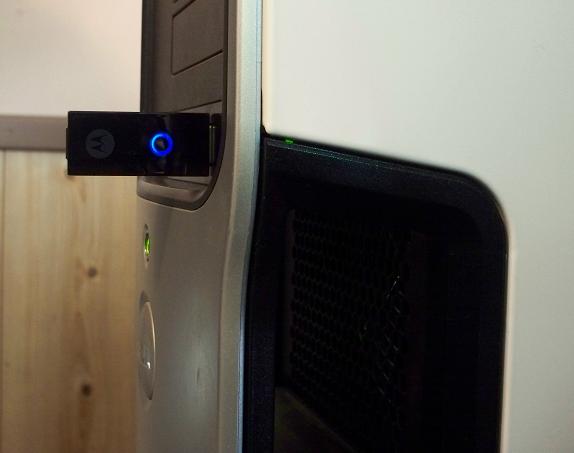
Setting up the D200 was straight-forward and required no actions on my part, other than plugging it into an available USB port and waiting. The indicator light flashes blue as it searches for a Bluetooth enabled device that is in pairing mode. If one is found, the flashing blue light turns to a solid blue light to indicate pairing has been successful and you're ready to stream music to your A2DP capable Bluetooth device! Once paired, the next time you plug the D200 into a flash drive on your computer it will search for previously paired devices. If none is found, the light will glow red, indicating it is idle. The D200 features EasyPair, which means you won't have to enter a 4-digit code when a Bluetooth device is found. I like this feature, a LOT!
Conclusion
This was the first time I'd even heard of a Bluetooth stereo PC adapter, so I wasn't sure what to expect. Believe me, this device serves a VERY useful purpose! Being able to stream music from my PC to my Bluetooth headset or Bluetooth speaker is extremely enjoyable! The fact that I can pick and choose music from THOUSANDS of music files available on my PC means that I'm not limited to the handful of songs the limited space of the storage cards in my Centro or Treo 750 offer. This is the biggest advantage to me, as I have literally THOUSANDS of songs to choose from, or, I could listen to YouTube videos or most any audio stream online streamed via the D200.
At $34.95, the Motorola D200 Stereo Bluetooth PC Adapter is a good buy, as you can take it with you wherever you go, be it work, school or anywhere in between!
|
|
| Pros |
Ability to stream audio/music via Bluetooth from your PC to your Bluetooth-enabled device(s)
Affordable and portable
Ability to pair/connect with 5 different devices
VoIP support
|
|
| Cons |
| None other than I am sure my wife will end up with this one, causing me to have to buy another for myself |
|





