Twenty-five years ago I had my first experience with a computer.
I sat down at a terminal in what they used to call a computer lab. There were
three terminals in this lab with fixed seating like in a diner. The computers
had no screen and no RAM and instead of a hard drive they used punch cards. I
remember thinking to myself when I first sat down at a computer, "I wonder what
this thing can do?"
On that first computer, in a programming class, I learned how to
write applications like a game that would allow you to play Tic-Tac-Toe. After
I mastered all the things this first generation of computers could do, I
remember thinking to myself, "Is that all there is?" (Just like the Peggy Lee
Song)
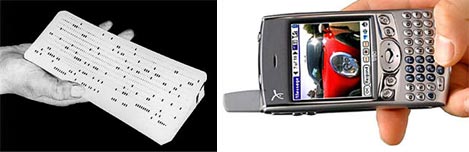
As I write this we are awaiting the release of the Treo 600
(pictured above) which is a handheld computer that easily fits in your pocket,
has a camera and telephone built into it, and is millions of times more powerful
that those old computer terminals. It is truly amazing how far we have come.
The Technological growth curve is exponential in nature. Today I look at the
current handheld computing technology and I once again ask myself, "Is that all
there is?"
This article is about the history of my Bullet Train User
Interface and the new Bullet Train UI that I developed for the Treo 600.
Power is Useless Without
Control
Three years ago I purchased a Compaq iPaq Pocket PC that ran on
Microsoft's Pocket PC OS. I thought the hardware was amazing but that the
software and User Interface was weak, so I designed a new UI for it which I
dubbed Bullet Train. The first half of this article uses materials from my
original presentation to Microsoft three years ago.

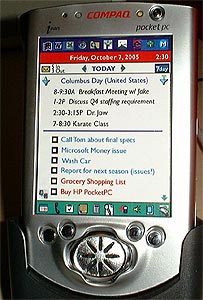
Picture to the left is my original BulletTrain UI for the Microsoft
Pocket PC on a Compaq iPaq.
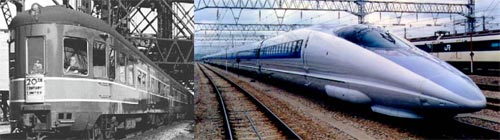
I presented Bullet Train to Microsoft by saying "One way to
analogize Bullet Train is to recognize that the current Pocket PC UI is like an
old fashioned passenger train. It is inefficient, bogged down, slow, and has a
bumpy ride. Bullet Train conversely, is like being on an Innovative, Ultra
Modern, High-speed train that gets you from point A to point B as efficiently as
possible."
I came up with the name Bullet Train because this intriguingly
simple UI gets you to every destination quickly and efficiently. As a matter of
fact, Bullet Train can get you to just about any destination in just one simple
tap.
My premise was simple: Bullet Train makes the PocketPC platform
ten times easier, ten times simpler, and ten times more powerful. Bullet Train
is designed as a freestanding program, which replaces the Today page as well as
supplementing the Start Menu.
This next image accurately illustrates the major challenge I was
trying to overcome. Simply stated, I told Microsoft that "the current UI is
oversimplified. The training wheels are getting in the way, Big time!"
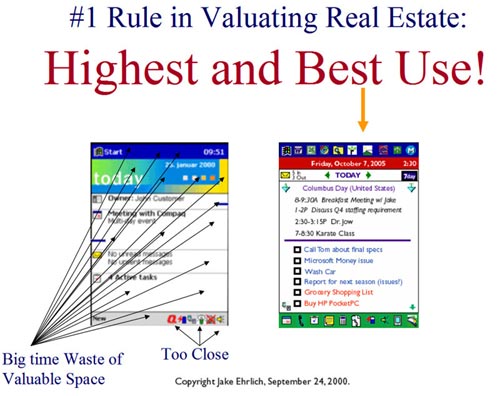
In the next slide from my 2000 presentation to Microsoft I
illustrate how I eliminated with BulletTrain, the learning curve associated with
going from the Palm to the PPC. The number seven with the arrows on the top
left represent shortcuts to the core MS apps on the PPC:
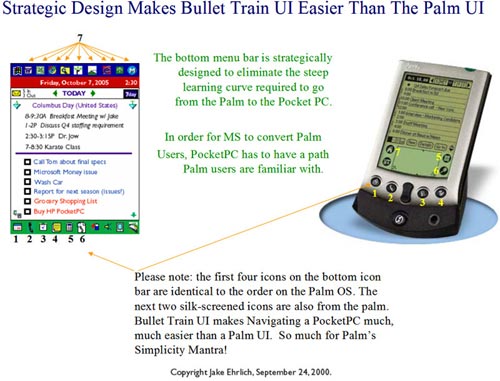
The essence of Bullet Train was that you should have all your
important info on one screen including your appointments, dated to-do items and
you should be able to launch any program in just one tap. I invested several
hundred hours working on the original Bullet Train UI. I sent a detailed
presentation to Bill Gates and a copy to the Pocket PC division at Microsoft. A
representative from Microsoft's PocketPC team contacted me and told me they did
not want to modify their existing user interface.
After my Microsoft experience I kept going on my
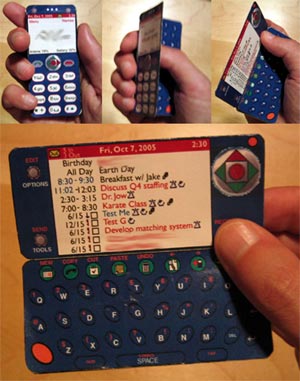
own making models and experimenting with UI and form factor. The pictures
below are models I made three years ago.
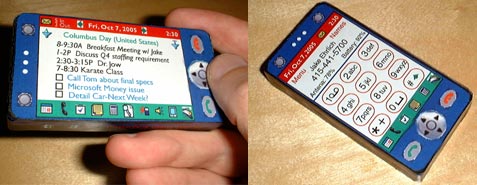
I started out with a one piece unit as seen above and then ended
up with a clamshell device as seen below. Bear in mind I made these mach ups a
year and a half before the introduction of the first Treo.
In the end, my experience with pocket PCs was awful. I ended up
replacing it with a Treo 180 and if you want to read more on my switch from the
PPC to the Treo 180 in March of 2002 you can
read it here.
Next Page: Bullet Train for the Treo 600 >>





