A year and a half ago, just after I purchased my
first Treo 180 in March of 2002, I posted and idea I had on Treomb.com about
features I would like to see on the next Treo to make it much more powerful.
Essentially my idea was "having a feature that would allow you to add additional
functionality by holding down keys for an extended period of time." You
can view the original text from that post
here.
Prior to having my first detailed preview of the
Treo 600 from Handspring, I had a week to wait. I wanted to see if I could come
up with an idea that would improve the Treo 600. I kept thinking about my idea
to be able to launch certain applications by simply holding down a key for a
long second. (By the way this feature supposedly made it into the original Treo
600.) That is where I came up with BulletTrain for the Treo 600 as seen below.

BulletTrain takes the Treo 600 User
Interface to the NEXT LEVEL by turning it into a fast Mind Reader!
The BulletTrain User Interface is intriguing
simple, highly intuitive, very fast and like nothing the UI world has ever
seen! It follows a rule which has endured since the earliest days of known
design:
The better the technology, the simpler it
appears, the easier it is to use, and the faster it works.
 The BulletTrain User Interface is ultra-fast and easy as pie. I am
an avid Treo user and I came up with this highly intuitive User Interface that
takes ease of operation to the next level. With BulletTrain the Treo 600
literally reads your mind. Things could not be easier or more
user-friendly.
The BulletTrain User Interface is ultra-fast and easy as pie. I am
an avid Treo user and I came up with this highly intuitive User Interface that
takes ease of operation to the next level. With BulletTrain the Treo 600
literally reads your mind. Things could not be easier or more
user-friendly.
Instead of making people learn and remember esoteric
navigation techniques or where things are hidden they only need to remember what
is important to them. BulletTrain quickly gets the user to what they are looking
for or what they want to do... in the most intuitive way possible... by NAME!
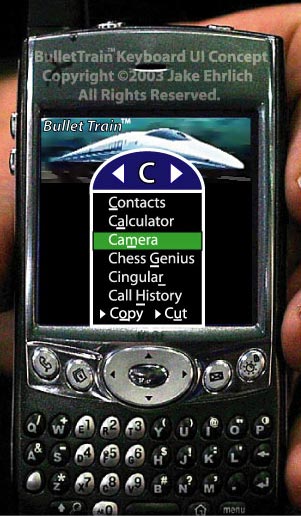
Simply hold down any letter on the thumboard for one second,
and the menu pops up. (As seen on the left illustration) Each program or option
has one letter underlined. Tap that key on the thumboard and viola!
For
instance, if you want to use the calculator all you have to do is remember that
the Treo has a calculator!?! It's that easy. All you do is tap and hold the "C"
key. After the menu pops up you tap the "A" key! It's that simple! With
BulletTrain, you are NEVER more than a second away from what is important to
you!
If you want to finish up a telephone conversation with an associate
that you called yesterday but you can't remember their name or where to find the
Call History. No Problem! Just hold down the "C" key for a second then hit the
"H" key and you are in the Call History.
No more wasting time hunting
for what you need! All you have to remember is the name of what you want to do
or where you want to go!
And if you prefer to use the five way navigation
button, you can navigate and select what you want using it. Also, the last
application you used always rises to the top and has its first letter
underlined. So for instance, if you navigated to the camera and then an
incoming call changed the screen. No problem, just tap and hold the "C" key for
a second and after the menu pops up click "C" again.
BulletTrain is the
missing link that takes the Treo 600 to the next level. BulletTrain not only
turns the Treo 600 into a mind-reading machine but into the ultimate numonic
device!
Context Sensitive Menus. Auto
Scaling Text. BulletTrain reads your mind.
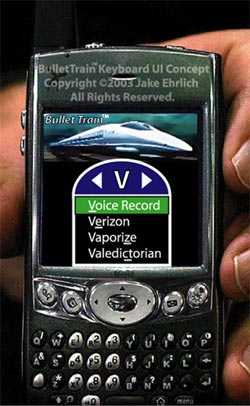
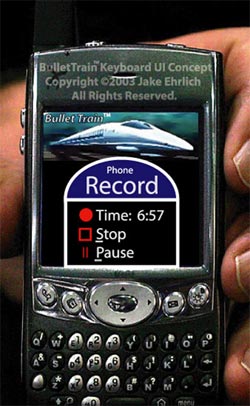
With BulletTrain if you select Voice Record while you are on the
phone it will automatically record your conversation in MP3. If you are not on
the phone it will record your voice. No more hitting the record button by
mistake. Things could not be easier:
Next Page: Part 2: Phantom V Design Reference >>





