Step Two: Managing your memory
Spb Plus
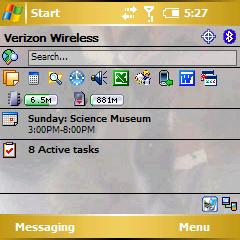
Based on some basic searching and researching I decided to try out a couple of options for managing memory. The first was Spb Pocket Plus (Buy at TreoCentral Software Store). Tim Hillebrand already mentioned this software here, where he wrote:
The desktop organizer I selected for my Treo 700W is SPB Softwarehouses Pocket Plus because it has programmable tabs for organizing applications into your choice of categories, and you can organize every aspect so easily. For instance, drag and drop icons within a tab or between tabs. Or, add or delete multiple files, folders, and items in one operation.
In addition to letting you put program icons on your Today screen, Spb Plus also has some neat features that, for me anyway, have been essential for memory management. The first is that, in addition to programs, you can put a little memory meter on your today screen that shows you how much program memory you have left. When I see it dropping down below 6mb or so I know it's time to go and close some programs (Yes, that's my cat on my Today screen. Do with that what you will).
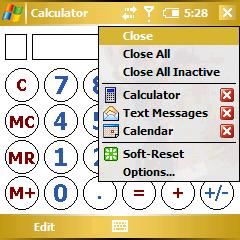
But Spb Plus' killer feature, the one that got me to register a copy after just a day of usage, is the way it allows you to change the "ok" button. Typically, as I wrote earlier, holding down the "ok" button brings up the Task Manager. With Spb Plus, however, you can change that to a customizable drop-down menu that lets you do all sorts of things. I've set up mine with the following:
- Close the current program (for real, not just the window!)
- Close all programs
- Close all inactive programs (i.e. everything but what you're currently using)
- Switch between active programs
- Soft reset
- Get to Spb Plus options
This little drop-down menu covers everything that the Task Manager does and more. It also manages to do it with an interface that's so much easier to use - it's always available, navigable via the 5-way, and snappy. I love it.
MemMaid
While Spb Plus covers most of my memory management needs, I decided to keep going and see if I couldn't improve even more. Again, Tim's article pointed me to a good program to try, MemMaid.
MemMaid is aimed managing at both storage memory and program memory. For storage memory, it allows you to delete caches, temp files, etc. That's all well and good for storage memory, but I was interested in saving program memory. MemMaid provides a few utilities for that.
The first is a bit of a hack, it lets you store certain processes, like some .dlls or your browser cache, on an SD card. Basically it allows processes that would normally be taking up program memory to instead just reside elsewhere. The program even handily color-codes certain files to make it easier to tell which are safe to move and which you shouldn't touch. In my testing, however, it hurt stability way to much.
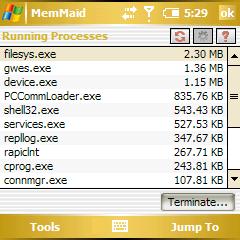
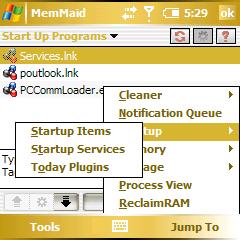
MemMaid has a raft of features, though. There are several screens that let you dig into the behind-the-scenes memory hogs. "Running Processes" shows you all of the processes running on your 700w. You can scroll through and look for anything that's grabbing an unusually large amount of your program memory and kill it (if you're bold) or use that information to troubleshoot the issue (if you're like me). The other behind-the-scenes screen that I love is the "Startup Items" view. It seemed that Voice Command was taking up too much program memory so I disabled it, only to find that it was still getting loaded during startup anyway. As Strong Bad would say, BALEETED!
Next Page: Is it all worth it? >>





