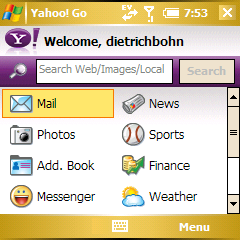
Yahoo! Go (henceforth Y!Go) is an application for many mobile phones - most recently Windows Mobile - which integrates many of Yahoo's various web services into your phone. It sports a single interface that's somewhere between a web portal and the Today screen. What's innovative about Y!Go is how well it works with the default applications of the Treo 700w|wx.
If you use many of Yahoo's services and you have a Windows Mobile device, you owe it to yourself to at least give Y!Go a try. I'm very impressed with it.
Installation
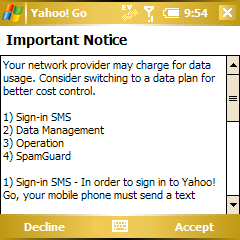
You can download Y!Go as either an installation file or as a directly installable .cab file. After the program is installed, you will be walked though a fairly simple setup process. Y!Go goes out of its way to warn you of a few things:
- During the initial setup, Y!Go will send an SMS to Yahoo's servers to verify your phone
- Y!Go uses a lot of data, so you'll want an unlimited plan
- Y!Go will start every time you turn on your phone, in other words, it'll be on in the background all the time
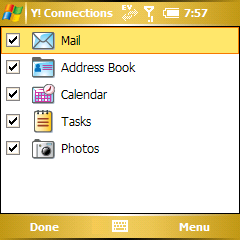
Once you accept all that (and accept one of those annoying Terms of Service screens), Y!Go will sign in and then present you with a screen from which you can choose which services to synchronize via checkboxes. I chose them all, but you don't necessarily have to. Finally Y!Go will let you know it's started synchronizing in the background.
Also of note is that the second time you use Y!Go it'll ask if you'd like SMS messages about Yahoo's services sent to you. I took one for the team and said "Yes, Yahoo, spam away." So far, though, they haven't sent anything in two weeks.
One last note: I tried Y!Go on both a 700wx and a 700w. It's not a gigantic memory hog, but it's no lightweight. 700w users will likely find themselves reducing the amount of multitasking they do (but they're probably used to that :p ).
How Y!Go works
Y!Go consists of a few bundled applications - though only the main one, Yahoo! Go, appears in your program list. That takes you to Y!Go's main screen, which presents you with a search field and and 13 different Yahoo services.
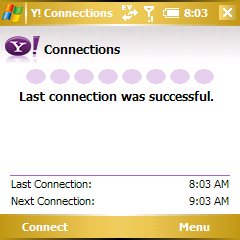
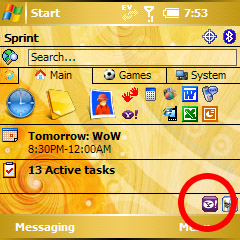
It's all run by Y!Connections, which is the application that keeps your data synchronized with Yahoo's servers. You can set it manually or automatically synchronize. It's actually pretty slick with just one caveat: there's no setting to hide the icon in the "system tray" of your Today screen. As Doug Morse noted in his Treo 750v review, Today screen real estate is precious on the WM Treos. The bar at the bottom is incredibly annoying.
Y!Connections also loads at start up and runs in the background all the time. If you don't want it to start up with your Treo, you'll have to manually navigate to "My Device/Windows/StartUp/" and delete it. I'd recommend against doing that, as it adds some instability to Y!Go. Otherwise Y!Go seems pretty solid to me, it hasn't caused any crashes.
Back to the Y!Go main screen. If you select any of the options here one of two things will happen: Y!Go will open up a default app (such as Outlook Mobile, Contacts, or Pocket Internet Explorer) with some sort of Yahoo-related Information or it will open the third application in the Y!Go Suite: Y!Photos. Let's start with the default app integration.
Email
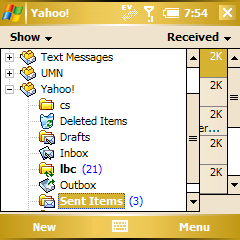
During installation, what Y!Go doesn't tell you is that it has done something very cool during this setup process - added an email account to Outlook Mobile for you. You can get to the Yahoo email account either by clicking on the "email" option in Y!Go or by just going to Outlook Mobile directly.
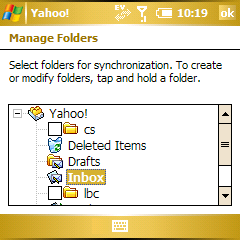
Y!Go automatically sets up all the server settings necessary to download and send email via your Yahoo Mail account. In fact, you can't edit (or even view!) these settings. What you can do is "Manage Folders." Y!Go will then synchronize any subfolders your choose from your Yahoo Mail account. It's basically IMAP!
For those of you unfamiliar with Yahoo's mail service, let me tell you that the above functions being automatically built-into Outlook Mobile is a Big Deal. Why? Because if you want to use Yahoo Mail on a desktop client you have to:
I'm addicted to IMAP myself, so I actually find myself in a pretty tough spot when it comes to Y!Go's mail features. I am a big fan of Y!Go's mail feature and I love how it was absolutely no work at all to set it up. On the other hand, if I can't have a decent (read: synchronized) experience with my email on my desktop email client, it's a bit of a pain.
Other quibbles with Y!Go's mail: It isn't "push" email - you have to wait until the next time Y!Go syncs to receive your email (unless you manually initiate a sync). Also, if you have filters set up in Yahoo Mail to automatically move certain emails, you won't get notified when those arrive as they're shuttled out of the inbox before Y!Go sees them. Notifications for items that arrive to your inbox work fine, but Y!Go just tells you you have a new message, it doesn't actually show you a preview of the email. Finally, since you can't change the server settings, there's no way to set the "reply-to" to another email address if Yahoo isn't your main email.
Even will all those caveats, Y!Go gives me half a mind to give up on using a desktop email client altogether for my personal mail so I can get the full Yahoo Mail experience. But a little voice in the back of my head is telling me "That's what Yahoo wants you to do." Grr.
Next Page: More Services >>





