Home | Stories | Reviews | TreoCast | Treo Store | Accessories | Software | Discussion | Mobile | About | Search
 
treocentral.com >> Stories >> Guides
Treo's unknown features

Mon Jun 3, 2002 - 11:44 AM EDT - By Marcus Adolfsson


Handspring's Treo contains a bunch of hidden features and Easter Eggs. While the hidden features are truly useful, most Easter Eggs have no functionality and the programming team just added them for the fun of it.

Here are a couple of them:
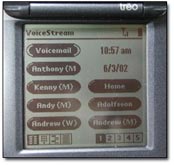
Speed Dial Time and Date

When programming your Speed Dial buttons, you can enter two special codes in the Name field that will transform that button into either a display of the date or time - &date and &time. You can still program these buttons to dial a number.

Because the Treo doesn't tell you either of these data when you open the screen, it's a great trick to know (submitted by TC member george_vc).

GRPS Upgrade 1.0 added the ability to use @time and @date. If you use @ instead of & the button can't be used to dial a number, but on the otherside it can't be selected with the jog dial either.

Battery Status
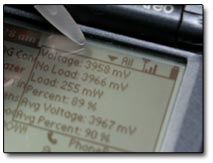
Yearning to know more about your Treo's battery status?

Go the launcher. While pressing the up button, use your stylus to press down on the screen to the right of the time in the upper right corner.

A battery status window pop-ups, informing you of values for Voltage, No Load, Load, Percent, Avg Voltage, and Avg Percent.

A similar feature is available on the Visor Prism/Platinum (but you click on the battery icon instead).

Connection Speed

When you are connecting to your ISP and it says "dialing ..." hit the scroll down button and you can see the number it's dialing and the baud rate that it connects at. So far,I always connect at 9600 (submitted by AbortRetryFail?).

Flip it, Flip!

Go to the launcher screen, and press the Up key while clicking on the time displayed in the upper left corner. Handspring's corporate mascot Flip will start dancing around on the screen.

If you press the Down key while the animation is displayed, a date will be displayed in the top right corner. Could be the ROM date - mine reads Feb 5 2002 18:34:29.

An actual Easter Egg (and a bonus for 180g owners)

Open up the preferences page, and switch to the General Category. In the bottom right hand corner of the screen (above the calculator icon on the 180g), draw a tiny clockwise circle. A tiny little Easter Egg will pop up on the screen! If it doesn't show up, keep trying. It can be hard to get.

180g owners can now switch to the Memo Pad, and hold down the PageDown key while drawing a line from the middle of the graffiti area to the left edge of the case. A steam boat will appear!

 
References
Actions
» Print this page
» Digg!


Cases

Chargers

Bluetooth

Headsets

Keyboards

Memory
Protectors Cradles
Styli


More Treo Accessories

Pen Stylus  (3-Pack)
Palm Pen Stylus (3-Pack) for Treo 755p, 750, 680
Extra Styli!
Just $14.95 BUY

More Styli
Screen Protectors  (3-Pack)
Smartphone Experts Screen Protectors (3-Pack) for Centro
Protect and enhance your screen
Just $14.95 BUY

More Screen Protectors
Holster II
Helix Holster II for Treo 755p, 750, 680
Sheer-Strength Technology
Just $19.95 BUY

More Holsters
Treo Screen Protectors  (3-Pack)
Screen Protectors for Treo
Protect your screen!
Just $15.95 BUY

More Screen Protectors
C250
Jabra C250 for Centro, Treo
Lightweight headset with style
Just $4.95 BUY

More Wired Headsets
Supertooth 3 Bluetooth Speakerphone
Blueant Supertooth 3 Bluetooth Speakerphone for Centro, Treo
Keeps your hands on the wheel and your eyes on the road!
Just $129.95 BUY

More Speakerphones
SBH700 Bluetooth Stereo Headset
Samsung SBH700 Bluetooth Stereo Headset for Centro, Treo
Behind the neck headband wearing style
Just $99.95 BUY

More Stereo Headphones
Emergency Charger
Cellet Emergency Charger for Centro, Treo
Low on power? No outlet around?
Just $12.95 BUY

More Solar & Emergency Chargers
M1 Bluetooth Stereo Speakers
Blueant M1 Bluetooth Stereo Speakers for Treo 750, 700w|wx
Powerful portable Bluetooth speakers!
Just $199.95 BUY

More Speaker Systems
Microfiber Cleaning Cloth
Smartphone Experts Microfiber Cleaning Cloth
Safely and easily remove scratches and fingerprints
Just $4.95 BUY

More Screen Protectors
H680 Frost Bluetooth Headset
Motorola H680 Frost Bluetooth Headset
Big talk time!
Just $59.95 BUY

More Wireless Headsets
Bluetooth Headset
New Jawbone Bluetooth Headset
Best in class for noise elimination!
Just $129.95 BUY

More Wireless Headsets
Max 4x Bluetooth Headset
Motor Trend Max 4x Bluetooth Headset
Extreme noise cancelling technology
Just $99.95 BUY

More Wireless Headsets


Copyright 1999-2008 TreoCentral. All rights reserved : Terms of Use : Privacy Policy

TREO and TreoCentral are trademarks or registered trademarks of palm, Inc. in the United States and other countries;
the TreoCentral mark and domain name are used under license from palm, Inc.
The views expressed on this website are solely those of the proprietor, or
contributors to the site, and do not necessarily reflect the views of palm, Inc.

Explore more: Phone different | WM Experts | Crackberry | CentroSpot | Android Central
Smartphone Accessories: Windows Mobile Accessories | iPhone Accessories | Blackberry Accessories
Centro Accessories | Motorola Q Accessories | Mogul Accessories | Tilt Accessories | Nokia n95 Accessories
Pantech Duo Accessories | Verizon XV Accessories | iPod Nano Accessories | Dash Accessories | T-Mobile Shadow Accessories
Blackjack Accessories | Xperia Accessories | HTC Accessories | Touch Accessories | Instinct Accessories




