Features
The personal profiling feature tells you exactly how many calories you need every day to lose, gain or maintain your ideal body weight. In addition to a numeric report, you can see a line graph that shows your totals for a week or four weeks, or for a quarter, six months or a year of weekly averages.
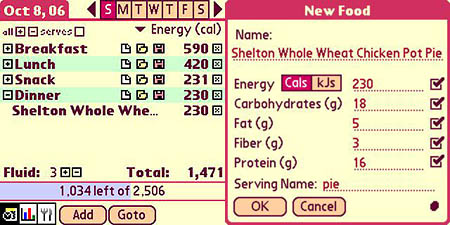
It wont take long to notice that everything on the planet isnt in the database, extensive though it is. For example, a friend brought me a whole-wheat-crusted, free-range chicken pot pie from the health food store where she works. It wasnt in the database, so I used the programs My Foods option to create the entry. Its simple to use. You just enter the fat, carbs, calories, protein, and fiber information from the products Nutrition Facts panel. Save it with a name you can remember, and when you need it again you can load it in one click.
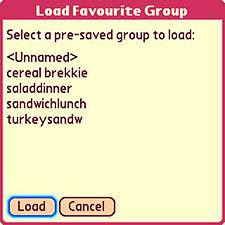
You can also customize entries for things you assemble yourself, like sandwiches, from a variety of component foods that are in the database. Indeed, if you often have the same courses in a meal or snack, you can save a custom entry for the entire meal. I saved a basic sandwich entry for which I chose two slices of bread and some mustard. When needed, I can call it up and add the cold cuts du jour, or delete one of the slices of bread if Im having only half a sandwich for a diabetics-special snack.
The Handheld Diet Diary includes a CKSync feature, which exports food and exercise data from the handheld to CalorieKing.com, where users can benefit from an extensive food library, recipe database, meal plans, live dietician meetings, and a community of fellow dieters. You know what they say about misery and company.
Problems
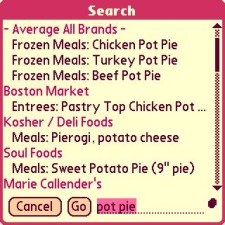
The Diary isnt without minor annoyances. The search, for example, is quite fast at locating foods to add to your meals its quicker, in fact, than simply browsing for them by name but it wont find anything you cant spell. To test, I put in bananna (double ns at the end, a common misspelling) and it came up blank.
Otherwise, the programs search is thorough and friendly. It honors partial words (without wild card characters), like bana, which locates literally anything with banana in the name - like banana nut bread (yum!), even Subway sandwiches with banana peppers as a condiment, no kidding.
Simple browsing isnt so simple. The arrangement of foods in the database isnt alphabetical by the foods name, but according to what food group the item is in, with multifarious subgroups for different types of the food. Take bananas, again. You find them in fruits, fresh, Banana, edible portion, not simply bananas.
Even so, you arent likely to need many fresh fruits and vegetables that arent in the huge database. It includes a mind-boggling variety, like Cherimoya, a California specialty that Ive never heard of or seen one of that I remember, and fresh
Fiddlehead ferns, a New England delicacy that I found online for fifty bucks a pound. The standard recipe required five pounds of the things, so I opted out on that one.
Overall, the Diarys user interface isnt bad, but it could use some improvement. The biggest annoyance is its text and numeric entry fields. They arent hot when you go to, or return to, a screen that expects user input. For example, search for a food by typing banana (or whatever) into the text field.
When you return to the search screen after adding the banana to your breakfast (or whatever), the search field is still highlighted, but its not hot. You have to tap it to make it editable, and of course tapping it removes the highlight so, to replace or erase it you have to highlight it again. This problem also applies to entries for number of servings (or grams, ounces, etc.) of a particular food.
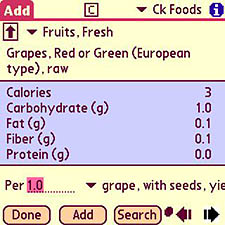
To select quantities for a food, the program offers a useful range of choices, including standardized servings, sizes (large or small bananas, for example), and often single units (like grapes), or weights in either grams or ounces.
You can fine-tune these amounts by applying a multiplier with one decimal place like 0.5, or 1.3. If you leave half of the green beans on the plate, you can claim half a serving by entering 0.5 as the number of servings, or 2.6 ounces, or 73.7 grams choose grams instead of servings from the dropdown menu for the latter option. You must enter the initial zero. Simply keying point five will not work. It should.
These customization features apply to exercises as well as foods. You can define a complete workout in several variations and reload them as needed. Or simply choose from the standard ones the program offers. The database of exercise isnt nearly as extensive as the one for food. Maybe that says something about obesity. You decide.
Next Page: Conclusion >>





