WordPop! is a great game made by Smart Box Design, the same company that made Word Watch, another word game which I've also reviewed and enjoy playing. I first played WordPop! a few years back on an iPaq 1940 my sister gave to me as a gift. Man, I loved this game! I spent many a late night hour playing WordPop!, searching for words - I worked a late shift, split 2nd/3rd and was too riled up to just lay down and sleep. I've played many word games on many, many mobile devices in my time, but I would have to say WordPop! is my all-time favorite word game!
WordPop! is a simple game, with simple (although beautiful) graphics and a straight-forward game in which you try to spell words from lettered tiles. Let's look at the game so I can explain a lil bit about why I like this game so much!
Setup
Setting up WordPop! on my Centro was as easy as downloading the PRC file from the TreoCentral store and installing it via a hot sync. Once installed, you can play the demo version which lets you play 25 rounds. Once you've played the 25 rounds, you must register to continue play the game. But, trust me, you WILL want to register! Grin
Design
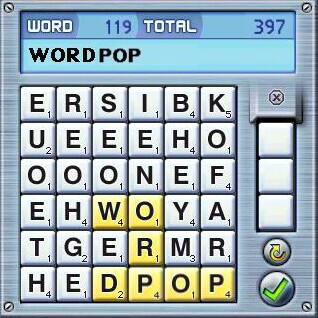
The game board consists of 36 lettered tiles arranged in a 6 by 6 grid - with available bonus tiles in a drop-down column to the right. The background consists of varying shades of blue which complement the white tiles with black letters quite nicely. The tiles also have a point value assigned to them, which appears in the bottom right corner - similar to the tiles used in the game of Scrabble.
In addition to the tiles and bonus tile column, there are the 'Word' and 'Total' columns at the top which designate the point value of words you create (in real time) and the total score of the game so far. The only other items represented are the check mark and the rotational arrow, which I'll talk about in a bit.
Gameplay
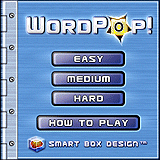
When you start WordPop! you choose from 3 levels of difficulty: Easy, Medium and Hard.
Start an easy game and your goal is to spell words from the available letters, which disappear once a valid word is made. As you click on each letter, using your stylus, you are presented with a nice 'ding' sound. You can work in any direction - up, down or diagonal. When the letters you've chosen form a valid word, you'll hear a higher pitched ding and the check mark turns green. At the top, as you form a word, the Word column changes to indicate what the current word is worth. You can continue forming the word or click on the check mark to accept the word and receive the point value the word was worth, which adds to the Total value at the top right.
When you complete a word, the tiles used will disappear. Your goal is to clear 36 tiles and advance to the next round. To aid you at any time during a round, there are up to 3 bonus tiles in the column on the right. The bonus tiles can either be an already lettered tile, or a blank tile - which can be substituted as ANY letter you wish! These tiles become vital when you're down to just a few letters from which you can't form a valid word - so use them wisely!
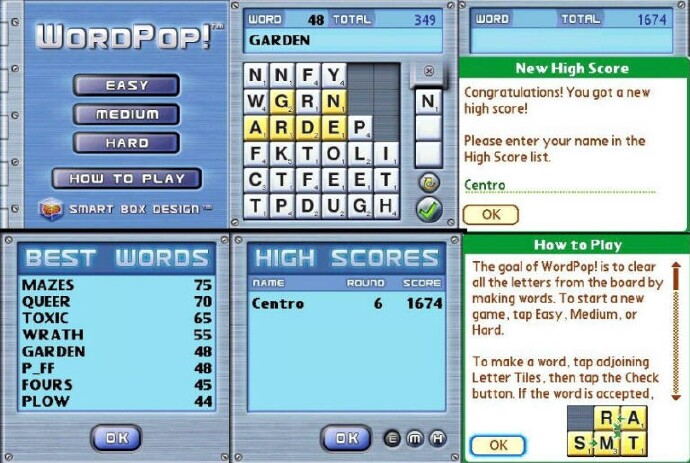
Depending on what level of difficulty you choose, you earn additional bonus tiles as you spell qualifying words (words of a set point value). These tiles are lettered tiles, but can come in VERY handy, as you can place the bonus tiles in ANY blank position on the board. During an Easy game, for instance, you earn an additional tile for spelling a word which scores 40 points or higher. Spelling an 80 point word earns you 2 bonus tiles and so forth. In the Medium mode, you earn a bonus tile for spelling a 50 point or higher word and you'll need a 60 point or higher word to qualify for a bonus tile in the Hard mode. Also, you are given a blank bonus tile after each round you complete - in all levels.
It's important to note, also, that you're initially given 3 blank bonus tiles in Easy mode, 2 blank bonus tiles in Medium and NO bonus tiles in Hard mode - you have to EARN every bonus tile in Hard mode!
Stuck and can't create a word no matter what direction you move in? Simply click the rotational arrow to the right and the playing field is rotated to the right, with the top row (for example) being moved to the right and forming the right column in a decending row. If there are blank spaces, it can rearrange the letters - to a degree. There are just so many predetermined ways the tiles can fall, after which you'll simply repeat a former pattern - so the letter combinations are limited to a degree.
When you manage to use all the letters and clear the board, you're given the blank bonus tile and a new grid of 36 tiles drops down and the action continues - at least until you're unable to clear the board! When you're down to 1, 2 or however many unused tiles you have left, and can't spell a word, you can start a new game. If you've qualified, you can enter your name into the High Scores list! There are lists for each level of difficulty.
Conclusion
WordPop! doesn't have a lot of bells and whistles, which I prefer when playing a word game. The background colors are appealing while easy on the eye at the same time. The simple sound effects are sufficient to indicate qualifying words, without being too distracting. What the game does have, though, is an ability to draw me in and keep me playing for hours at a time. I mean it, I lose track of time when playing this game, hehe.
I'll be honest, I love this game! WordPop! isn't a new game so to speak.. in fact, it's been around for several years - what you might call a 'classic' in a video games sense. But, the replay value of the game makes it a keeper and a game I'm sure you'll grow to love and play for years to come!
I say buy WordPop! today!
|
|
| Pros |
Solid game play
Great replay potential
80,000 word base
High Score list to brag about
Great Help section
|
|
| Cons |
| Only thing I can think of is the lack of the ability to export your scores to compare against other players |
|





